
Reaction - Email Opened - Timeout | Community
Skip to main content
Michael_Soprano
Level 10
July 6, 2025
Solved

Reaction - Email Opened - Timeout

  • July 6, 2025
  • 2 replies
  • 559 views

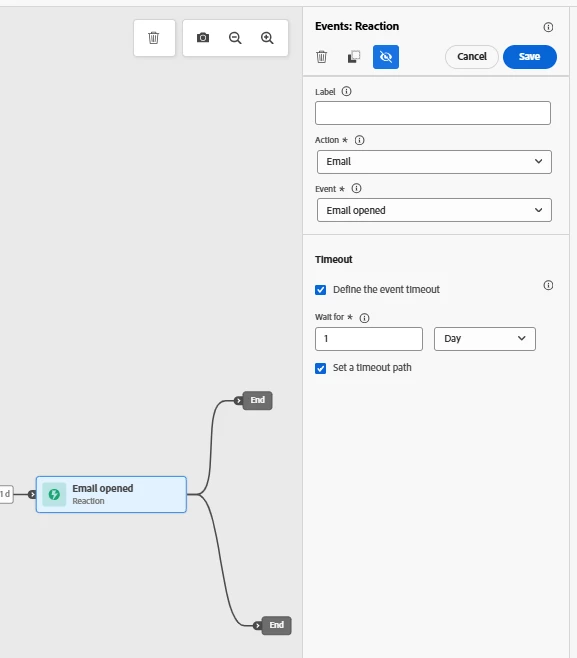
Does timeout in that case mean that the user did not open the email?
 

Best answer by ReenaJohn

hi @michael_soprano ,


This is an incoming event timeout. This creates a second path for individuals who did not react within the defined duration. You can define an event timeout path between 40 seconds and 90 days.


Warm Regards,

Reena John

2 replies

July 6, 2025

In Adobe Journey Optimizer (AJO), a "timeout" in the context of email channel actions usually refers to a situation where the user neither opened nor interacted with the email within a given time window, not just "did not open".

ReenaJohn
Community Advisor
ReenaJohnCommunity AdvisorAccepted solution
Community Advisor
July 7, 2025

hi @michael_soprano ,


This is an incoming event timeout. This creates a second path for individuals who did not react within the defined duration. You can define an event timeout path between 40 seconds and 90 days.


Warm Regards,

Reena John

Michael_Soprano
Level 10
July 14, 2025

So the be 100% sure - if the user would not open/click then would go timeout pathway?

ReenaJohn
Community Advisor
Community Advisor
July 15, 2025

@michael_soprano  Yes, to rephrase that - If the user has opened the mail it would satisfy the email opened condition and it would go to the end path, if not then it would wait for the duration you have set to see if the reaction has happened in that duration, if no reaction on the email in the duration you have set then the profile would go to the timeout path and exit the journey as per the screenshot you shared.