How do you trigger an email or journey that is 'stuck'? | Community
Skip to main content
Level 4
September 18, 2023
Solved

How do you trigger an email or journey that is 'stuck'?

  • September 18, 2023
  • 1 reply
  • 1123 views

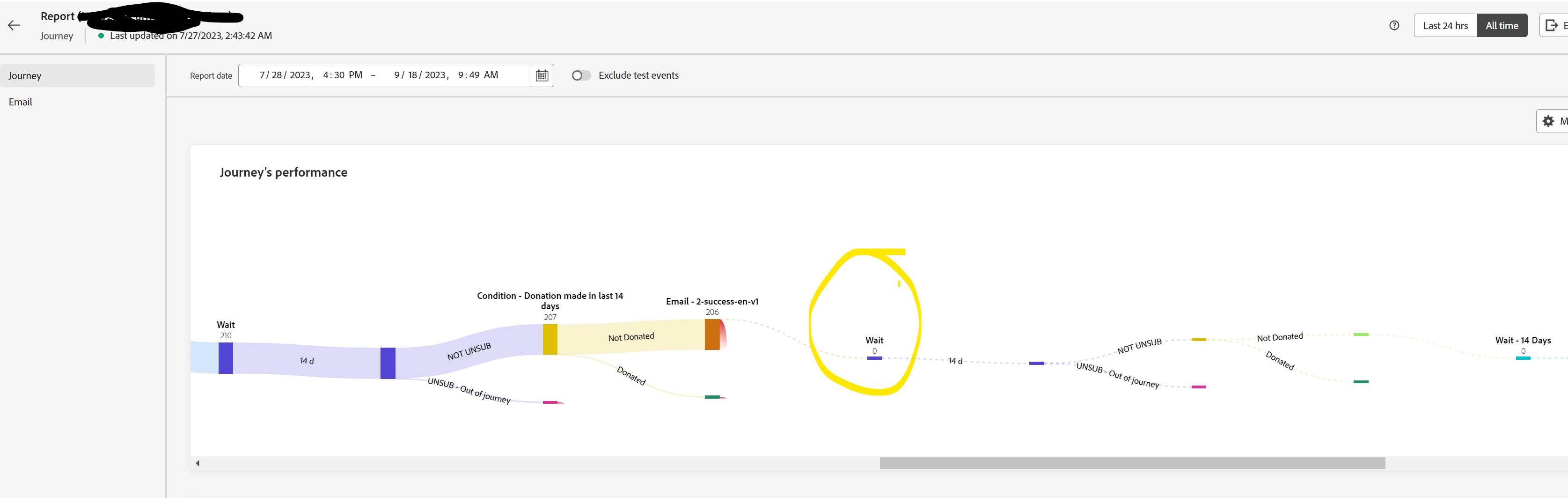
We have a 4 email journey.   Day 1, Day 4 (3 days) , Day 18 (14 days) and then every 14 days for another 2 emails.


We can see that the audience received the 3rd  email but then everyone stopped moving in the journey - they did not unsubscribe and they did not move to the next wait condition?  Anyone have this type of issue?  It raises concerns of multi touchpoint journeys.    Is there a cap on the number of days a journey can last?   Has anyone had success with Adobe helpdesk getting these types of messages unstuck or do we need to abandon the journey? 


This post is no longer active and is closed to new replies. Need help? Start a new post to ask your question.
Best answer by Anuhya-Y

@caveman77 

Check out Global journey timeout https://experienceleague.adobe.com/docs/journey-optimizer/using/orchestrate-journeys/create-journey/journey-gs.html?lang=en#global_timeout. This timeout will stop the progress of individuals in the journey 30 days after they enter.

1 reply

Anuhya-Y
Community Advisor
Anuhya-YCommunity AdvisorAccepted solution
Community Advisor
September 18, 2023

@caveman77 

Check out Global journey timeout https://experienceleague.adobe.com/docs/journey-optimizer/using/orchestrate-journeys/create-journey/journey-gs.html?lang=en#global_timeout. This timeout will stop the progress of individuals in the journey 30 days after they enter.

Caveman77Author
Level 4
September 18, 2023

Thanks for this reminder.   I did not know this was still a limitation.  It would be create to have a journey duration counter in the UI that would flag if the total wait time pushes customers outside a 30 day cap and warn before publishing.


The only warning in the UI is not exceeding 30 days for a single wait period.  However you can add multiple wait in a journey.


Level 2
September 19, 2023

Yah the maximum duration that can be configured in waot activity is 30 days, but you need to understand that global journey timeout is 30 days, meaning that a profile will always drop out of the journey maximum 30 days after he/she entered it.


So if there are long waits in journey i.e. more then 30 days break journey in multiple journeys .


Thanks,

Saurabh