
Email specific click reaction | Community
Skip to main content
PietroAm1
Level 2
August 25, 2025
Solved

Email specific click reaction

  • August 25, 2025
  • 2 replies
  • 1879 views

Hi, I'm trying to follow up a specific click in email template. I use a reaction node followed by condition node, but in this last, no way to resolve the specific click

 

using this formule "The label of the collection timeSeriesEvents at position 0 is equal to 'Voglio essere ricontattato'"


can you help me?
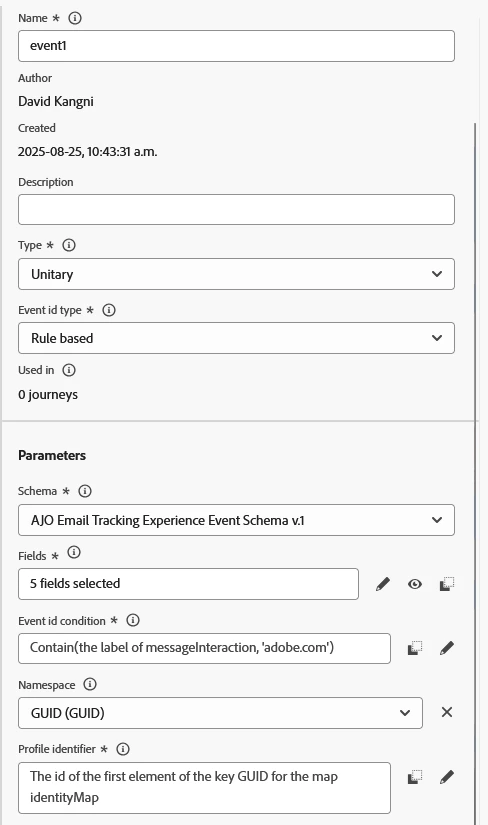
Best answer by DavidKangni

Hi @pietroam1 


reaction will track any clicks in you email and will not pass the details of the click. Instead, you can create an unitary event from configurations section and use this event as listener in your journey.

Thanks,

David


2 replies

DavidKangni
Community Advisor
DavidKangniCommunity AdvisorAccepted solution
Community Advisor
August 25, 2025

Hi @pietroam1 


reaction will track any clicks in you email and will not pass the details of the click. Instead, you can create an unitary event from configurations section and use this event as listener in your journey.

Thanks,

David


David Kangni
PietroAm1
PietroAm1Author
Level 2
August 26, 2025

Ok thanks, it's a little bit complicate (first because we do not have write permission, read only), second cause we have to do a lot of similar case s x week (even 15 x week). It's pretty strange that in a  Mk automation software in 2025   isn't easy to follow up a specific click inside the flowchart.

Mayank_Gandhi
Adobe Employee
Adobe Employee
August 27, 2025

@pietroam1 
To follow up a specific click in an Adobe Journey Optimizer (AJO) email journey, you generally need to track the unique "label" or "URL" of the link clicked by the recipient. Your approach is logical: a Reaction node captures the click, and a Condition node evaluates specifics about the click event. However, there are important limitations and a few constraints:

All Links Are Tracked by Default: If tracking is enabled for the email, every link can be monitored. Each link's label (the visible text or the tracking label you assign) is reported back and appears in the event payload 

Accessing Clicked Link Data:

  • When a recipient clicks a link, the tracked label (or URL, depending on your setup) is recorded in the event payload (under timeSeriesEvents).
  • Your journey condition should reference this collection and the correct field—for example:
    The label of the collection timeSeriesEvents at position 0 is equal to 'Voglio essere ricontattato'

Do not put logic or personalization expressions directly in the link URLs

Use Journey's "Dry run" and reporting to see the event payload and diagnose which key ("label", "url", or other) is actually populated with your clickable's display text 


https://experienceleague.adobe.com/en/docs/journey-optimizer/using/channels/email/design-email/add-content/message-tracking

now adding to what @davidkangni  highlighted, if you need granular level details use custom event.

  1. Create a Custom (Unitary) Event in Configurations

    • In AJO, navigate to Configurations > Events.
    • Create a new event of type Unitary.
    • Configure its fields to capture specific click data—such as the label, URL, or any custom identifier for your email links (see guide).
  2. Update Your Email/Tracking to Emit This Unitary Event

    • Ensure your email links (or the environment handling clicks) sends the custom event to Journey Optimizer, including the important fields (label, URL, etc.).
    • This could be accomplished via a webhook, API call, or Adobe Web SDK embedded in a landing page 
    • Example event payload:
      {
        "eventType": "email.linkClick",
        "linkLabel": "Voglio essere ricontattato",
        "linkUrl": "https://example.com/callback"
      }
      
  3. Use Your Custom Event as Journey Listener

    • In the journey, set the trigger/listener node to watch for this unitary event.
    • In subsequent condition nodes, you can reference the event's fields (like linkLabel) and make precise splits or trigger actions.
PietroAm1
PietroAm1Author
Level 2
August 27, 2025

Thank you, I'll test it.


question: how about 

position 0

and is it necessary? how can I determine the correct position?

Sukrity_Wadhwa
Community Manager
Community Manager
September 8, 2025

Hi @mayank_gandhi,
Can you please help @pietroam1 further with their query?
Thanks!

Sukrity Wadhwa