Duplicating/ Reusing Content Template | Community
Skip to main content
March 29, 2023
Solved

Duplicating/ Reusing Content Template

  • March 29, 2023
  • 3 replies
  • 2724 views

Hi 

Is there an option to Re-use/ Duplicate an existing Content template in AJO ? I can't seem to find an option for it. 

Thanks 

This post is no longer active and is closed to new replies. Need help? Start a new post to ask your question.
Best answer by Anuhya-Y

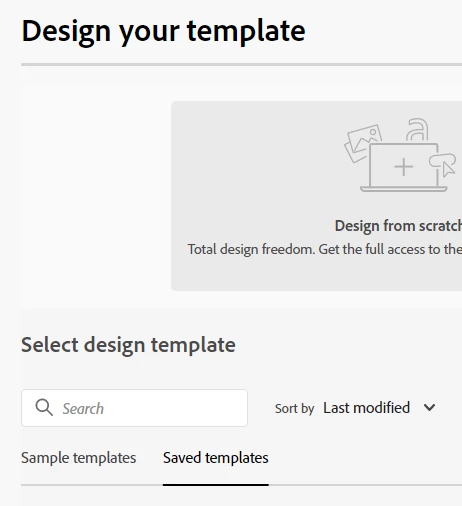
@mdona  There is no direct way (button/option) of duplicating content template. Here is a work around , hope this helps.

create template and select the template from saved templates and save. This way you can re-use/duplicate existing content template.


3 replies

Anuhya-Y
Community Advisor
Anuhya-YCommunity AdvisorAccepted solution
Community Advisor
March 29, 2023

@mdona  There is no direct way (button/option) of duplicating content template. Here is a work around , hope this helps.

create template and select the template from saved templates and save. This way you can re-use/duplicate existing content template.


mdonaAuthor
April 5, 2023

Thank you for your response. I have managed to create a template using saved templates as mentioned above. 

March 29, 2023

Hi, it is possible to copy an email from one journey to another, using ctrl+c - ctrl+v, https://experienceleague.adobe.com/docs/journey-optimizer/using/orchestrate-journeys/create-journey/using-the-journey-designer.html?lang=en#copy-paste , it might be an option for your use case 🤔 🤔 🙂

mdonaAuthor
April 5, 2023

Thank you

Sukrity_Wadhwa
Community Manager
Community Manager
April 3, 2023

Hi @mdona,

Were you able to resolve this query with the help of the given solutions or do you still need more help here? Do let us know. In case the given solutions were helpful, then kindly choose the one that helped you the most as the 'Correct Reply'.
Thanks!

Sukrity Wadhwa
July 23, 2024

Hi,

Just noticed this thread! We are facing a similar issue where there is no direct option to duplicate a template with 'Content Type' Also, content type templates do not appear in the 'Saved templates' list. So we had to download the HTML and then 'Import HTML' in the new template to duplicate the work.

Just wondering if there is any easy solution or option to see the content type templates in the Saved Templates list? I can see all the HTML type appears but not 'Content Type' It is a weird behaviour but curious to know the reasoning behind this.


Kind regards,

Vidhi

Anuhya-Y
Community Advisor
Community Advisor
July 23, 2024

@vidhikh1   "Save as content template" option helps to create duplicate content template. "Apply content template" helps to choose the content template from the list of content templates.