Compare two different fields in Adobe Journey Optimizer | Community
Skip to main content
Level 3
May 21, 2025
Solved

Compare two different fields in Adobe Journey Optimizer

  • May 21, 2025
  • 1 reply
  • 890 views

Hi,

I am trying to add some rule in Adobe Experience Platform that in a Query looks like:

SELECT count(*)        
FROM profile_snapshot_export_xxx where
<path>.LastChequeRedeemedDate <= dateadd(day,30, <path>.Most_Recent_Drop_Date_DM) -- 477


I set a rule like this in the audience:
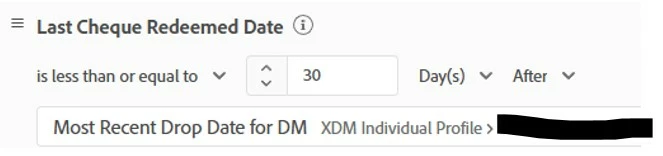
However, the Query count and Audience count are completely different (query gives me 477 and audience only 211)

How should the rule be set in the audience, so it matches the count from the Query?


Thanks.


Best answer by GabrielaNa1

Hi @gabrielana1,

Were you able to resolve this query with the help of Adobe support or do you still need help here? Do let us know.

Thanks!


We finally managed to figure it out, mostly on our own. In the end we had somebody from Adobe sitting down with us and confirmed our findings. What cracked it was actually using "View Code" and reading out loud the code. Seems that I am joking, but no - this was actually what did it for us. Enough to say, for something that in the query might seem a simple <= or >=, the Segmentation UI might require two or even three criteria to do the same thing. I was promised by Adobe SME we discussed this issue with that he will open a ticket so that some of these things are better explained in Adobe documentation.

1 reply

SatheeskannaK
Community Advisor
Community Advisor
May 21, 2025

@gabrielana1 Audience count 211 after the audience evaluation or estimated profiles? Also, can you paste the code view from the audience?

Thanks, Sathees
Level 3
May 21, 2025

Hi, This is estimated profiles.


Here is the code view: 


There are other criteria, but I ran all those criteria in parallel with the audience and everything matches until I apply that last one:

SatheeskannaK
Community Advisor
Community Advisor
May 21, 2025

@gabrielana1 I recommend holding off until we see the numbers after the audience evaluation. Since the audience estimate is merely an approximation based on the profile store, we should wait for the audience evaluation to finish. The high counts in the query service are due to it retrieving data from the data lake before any merges.

Thanks, Sathees