AJO Email not Parsing productListItems | Community
Skip to main content
MktgCloudUser
Level 4
October 23, 2023
Solved

AJO Email not Parsing productListItems

  • October 23, 2023
  • 1 reply
  • 1073 views

Hello,


I'm trying to generate a Order Confirmation email and not getting the data from the productListItems - even in Test mode.  My basic setup is the same as outlined in Adobe's help file.  


{{#each context.journey.events.event_ID.productListItems as |product|}} <table> <tbody> <tr> <td><b>{{context.journey.events.event_ID.productListItems.name}}</b></td> <td><b>{{context.journey.events.event_ID.productListItems.quantity}}</b></td> <td><b>${{context.journey.events.event_ID.productListItems.priceTotal}}</b></td> </tr> </tbody> </table> {{/each}}


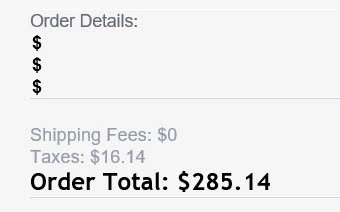
When the visitor goes through the flow, I get all other commerce related items but nothing in the productList.  You can see from the image below, the "$" string literal proves the /each statement is looping through the 3 products in the list (so they are there) but there's no no data.


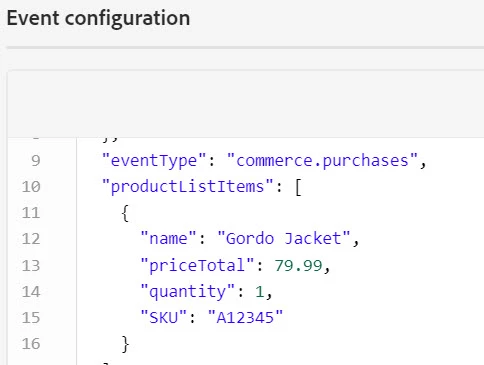
When I put the Journey is Test mode and Trigger the Event with the productList information (see below), I get the same thing - purchase data but nothing from the productsList.


What am I missing here?  Can't figure out what's wrong.

This post is no longer active and is closed to new replies. Need help? Start a new post to ask your question.
Best answer by SatheeskannaK

Hi @mktgclouduser, You should be using a variable (product) when looping for each product.


{{#each context.journey.events.event_ID.productListItems as |product|}} <table> <tbody> <tr> <td><b>{{product.name}}</b></td> <td><b>{{product.quantity}}</b></td> <td><b>${{product.priceTotal}}</b></td> </tr> </tbody> </table> {{/each}}


1 reply

SatheeskannaK
Community Advisor
SatheeskannaKCommunity AdvisorAccepted solution
Community Advisor
October 23, 2023

Hi @mktgclouduser, You should be using a variable (product) when looping for each product.


{{#each context.journey.events.event_ID.productListItems as |product|}} <table> <tbody> <tr> <td><b>{{product.name}}</b></td> <td><b>{{product.quantity}}</b></td> <td><b>${{product.priceTotal}}</b></td> </tr> </tbody> </table> {{/each}}


Thanks, Sathees
MktgCloudUser
Level 4
October 24, 2023

Ah yes, that makes total sense - we are assigning the productsList as a variable called "products".  This was my fault for following Adobe's help file too explicitly.  Thank you - that worked.


BTW - Adobe's online documentation is incorrect here - https://experienceleague.adobe.com/docs/journey-optimizer/using/content-management/personalization/personalization-use-cases/personalization-use-case-helper-functions.html as it had exactly what I originally posted.  You may want to let the Adobe team know as anyone following that page exactly will have the same issues I was having.


Thanks again.