

AJO Universal Link Integration Guide for iOS
Authors - Shiladitya Bose, Somesh Jaiswal, Ashu Malik
What is Universal Link ?
Universal Links are a feature in iOS (introduced in iOS 9) that allows developers to create a seamless connection between a website and a corresponding app. They enable a single URL to open a specific location within an app if it's installed or direct the user to the website if the app is not installed. This provides a smoother user experience compared to traditional deep linking methods.
Customer hosted AASA file snippet
The following is the AASA configuration which will be required to support the integration. Let us suppose we are supporting this integration for www.mybusiness.com & customer has delegated email.mybusiness.com subdomain in AJO. AASA file hosted at
https://www.mybusiness.com/.well-known/apple-app-site-association
will define the URLs which their app(s) support.
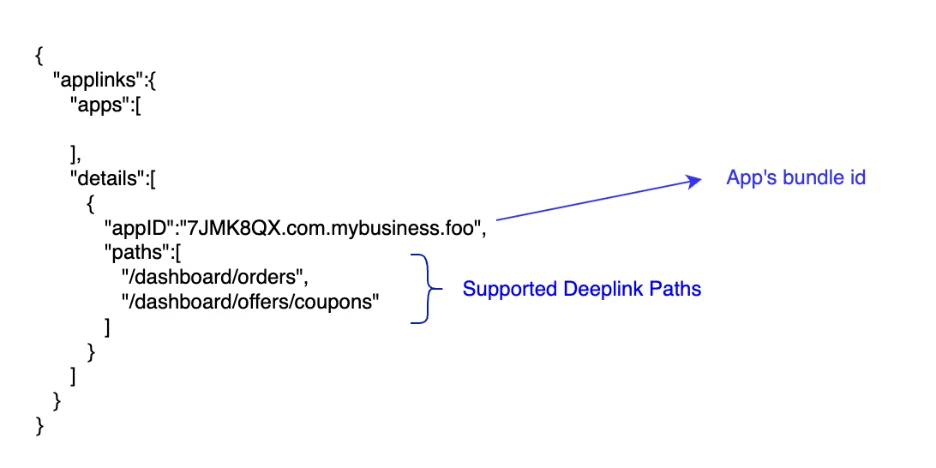
Universal Link with Tracking
Let us consider the following universal link (illustrative) that MyBusiness wants to launch in the App –
https://www.mybusiness.com/dashboard/offers/coupons- Based on customer’s AASA file configuration (Customer Hosted AASA File Snippet), AJO will detect that the given url is one of the supported deep link URL is customer’s app. In this case, the tracked URL that will be generated by AJO will be the following.
https://data.email.mybusiness.com/ee/v1/mclick?tuid=<trackerUniqueId>&pid=<pid>¶ms=<params>- The key aspect to note here is the keyword mclick that is present in the AJO generated tracked links marked to be launched in the mobile app.
On device flow of MyBusiness’s mobile app with mobile app rendered URLs
- MyBusiness mobile app is installed on user’s device with the domain
data.email.mybusiness.com - User clicks the following link in iOS device for the content delivered via AJO channels (email)
https://data.email.mybusiness.com/ee/v1/mclick?tuid=<trackerUniqueId>&pid=<pid>¶ms=<params>- iOS makes a call to fetch AASA file from a static URL
https://data.email.mybusiness.com/.well-known/apple-app-site-association- Once iOS downloads the AASA file it verifies the path. The AASA file should contain path /ee/v1/mclick allowlisted for the mobile app. The AASA file hosted on
https://data.email.mybusiness.com/.well-known/apple-app-site-associationshould look like this:
Adobe Hosted AASA
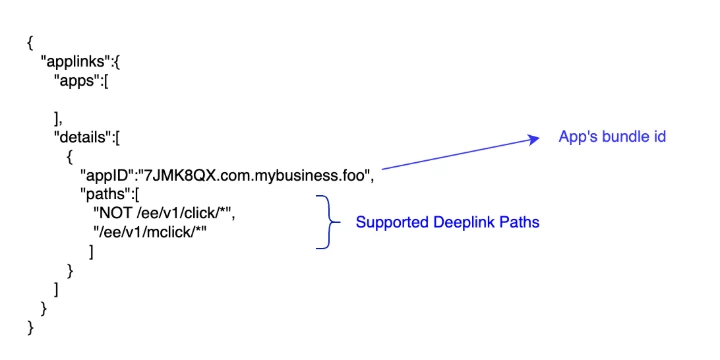
- App needs to make a GET request on the following URL
https://data.email.mybusiness.com/ee/v1/mclick?tuid=<trackerUniqueId>&pid=<pid>¶ms=<params> - and read `Location` header in the response which will look like the following and render in the app. This call will also log a tracking interaction.
www.mybusiness.com/dashboard/offers/coupons - Note: If mobile app is not installed on the device, then the URL will be rendered in the browser as fallback. Tracking will work as expected.
Changes Needed
Adobe
- Host local AASA file (Adobe Hosted above) in customer’s domain delegated to Adobe
- Enable support for click and mclick based tracked URL basis directives in customer’s main AASA file
Customer
- Build the support for the universal links in the app, host appropriate AASA file
- Share the link of the main AASA file with Adobe
- Ensure that the delegated domain hosts AASA file as shown in Adobe Hosted
- Use a supported link in AJO journey
- Validate the case for mclick & click
- If expectation is to open the link in app, AJO generated tracked link should look like
https://data.email.mybusiness.com/ee/v1/mclick?tuid=<trackerUniqueId>&pid=<pid>¶ms=<params> - If expectation is to open the link in the browser, AJO generated tracked link should look like
https://data.email.mybusiness.com/ee/v1/click?tuid=<trackerUniqueId>&pid=<pid>¶ms=<params> - If the deep link behavior is as expected, launch the journey