tracking servers for multiple domains | Community
Skip to main content
Level 4
June 28, 2018
Solved

tracking servers for multiple domains

  • June 28, 2018
  • 5 replies
  • 4138 views

Hi all,

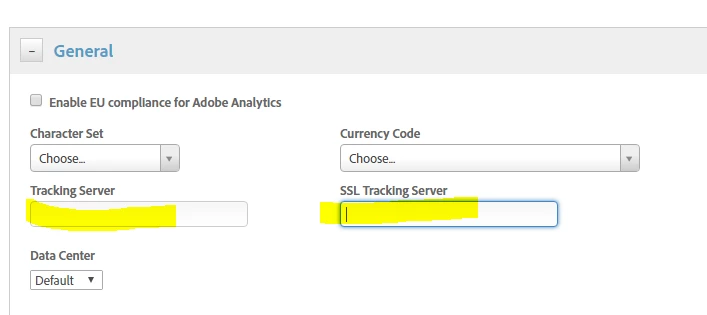
I have one web property that has 3 domains. Each domain has there own first party cookie tracking server (secured and unsecured). I assume I can write an if statement in the custom code area of the adobe analytics tool so that the tracking server will change based on the domain. Does that mean I should leave the tracking server fields under general tab blank? Also, is there another maybe easier way, to get the same result?
This post is no longer active and is closed to new replies. Need help? Start a new post to ask your question.
Best answer by jantzen_b

You'll need to write custom code to also populate these variables in the visitorAPI.js file. The Analytics tool only populates the values in the AppMeasurement.js file. The Experience Cloud ID Service tool populates the values in the visitorAPi.js file. I believe I've seen some customers use data elements for this purpose but I can't point you to a particular example.

5 replies

Level 4
June 28, 2018

ok, I figured it out. I leave the fields blank in the general tab and specify using the below code for each secured and unsecured tracking server wiithin my if statement.

    s.trackingServer="tag.somethinghere.com";

    s.trackingServerSecure="securedtag.somethinghere.com";

works perfect.

Level 4
June 28, 2018

another question.

Do I also keep the tracking server fields in the experience cloud ID service tool blank as well? I assume the tracking servers I created in the adobe analytics tool will be used and pertain to ID service as well?

jantzen_b
Adobe Employee
jantzen_bAdobe EmployeeAccepted solution
Adobe Employee
June 29, 2018

You'll need to write custom code to also populate these variables in the visitorAPI.js file. The Analytics tool only populates the values in the AppMeasurement.js file. The Experience Cloud ID Service tool populates the values in the visitorAPi.js file. I believe I've seen some customers use data elements for this purpose but I can't point you to a particular example.

Level 4
July 2, 2018

So if I use the visitorAPI.js file then I will have to remove the experience cloud ID tool correct?

jantzen_b
Adobe Employee
Adobe Employee
July 9, 2018

Yes, if you were to put the VisitorAPI file in the custom section of your Analytics tool, you'd want to remove the ECID tool. Like I said previously, I believe you can accomplish this with data elements and then reference the data element in the ECID tool. this would be the preferred method since it would keep the ECID tool installed.