Tracking new elements in the source code | Community
Skip to main content
Level 3
December 29, 2017
Solved

Tracking new elements in the source code

  • December 29, 2017
  • 17 replies
  • 13133 views

Hi.  We added some new elements on the source code.  See below:

var dtmAnalyticsData = {"channel":"REVIEWS","url":"\/2017\/12\/delta-one-lax-jfk-flight-review\/","pageName":"delta-one-lax-jfk-flight-review","author":"Daryl Chua","eVar20":"business class, Delta, Delta Air Lines, Flight Review, Flight Reviews","eVar21":"12252017","eVar22":0,"eVar23":1413,"eVar24":"","eVar25":"Delta, Delta SkyMiles"};

I added data elements and set up page load tracking for the items listed as evar 21, evar 22, evar 23, evar 24, evar 25.  However, I'm not seeing them in the adobe analytics reporting interface.  Please help.

-Robert

This post is no longer active and is closed to new replies. Need help? Start a new post to ask your question.
Best answer by jdonley

Okay so a couple of things I see.

First, here is what I see on the page for dtmAnalyticsData:
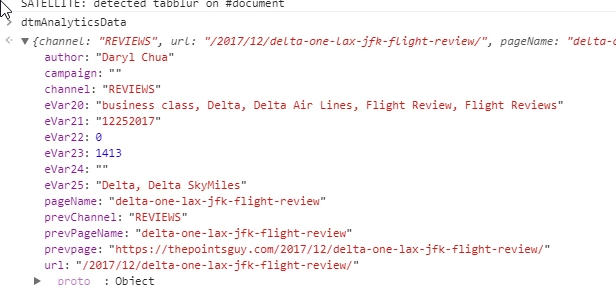
And here are the Data Elements I see:
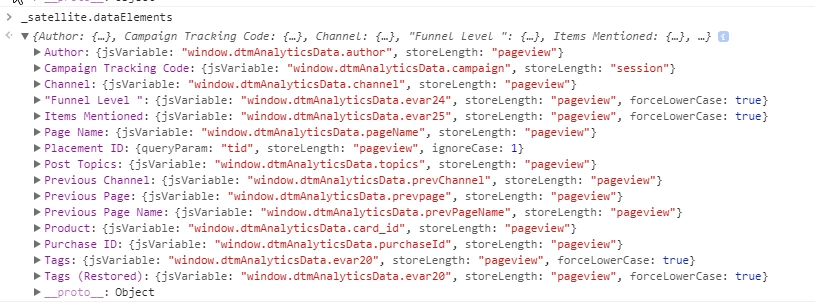
So firstly, you originally mentioned setting up DE's referencing eVar21-25, but I only see DE's for evar24 and evar25.  So it looks like you are missing DE's for eVar21-23.

Secondly, for the ones you have created (eVar24-25), you reference them as evar24 and evar25, but they are eVar24 and eVar25 (capital "V").  Javascript variables are case-sensitive.

Thirdly, the one for eVar25 you have labeled as "Funnel Level ". So it looks like you included quotes in your DE name.  Firstly,  it's not following the same convention as your other DE names, and it will make for clunkier code if trying to reference it in javascript. You'd have to do

_satellite.getVar('"Funnel Level "')

or

_satellite.getVar("\"Funnel Level \"")

I haven't tested it, but this also is likely going to cause problems in the %data_element_name% field syntax, as well.  Because I look at the output rule code and it looks like DTM strips the quotes from the reference:
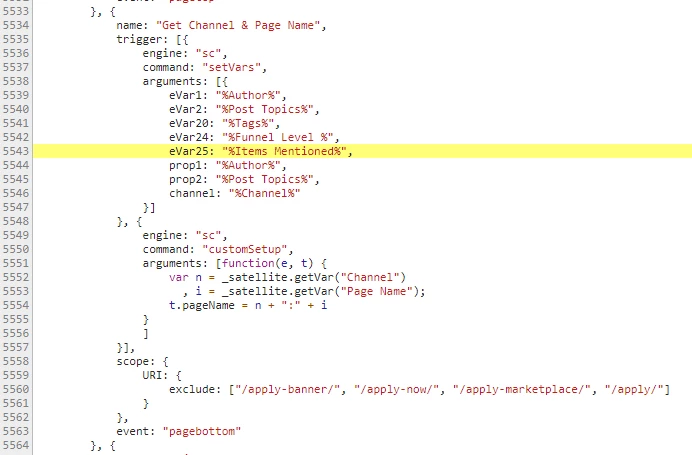
So long story short, you should probably remove the quotes (and trailing space) from your DE name.

And lastly, as mentioned before, you do not have DE's setup for eVar21-23. And I cannot see in the output DTM code that you have anything setup to pop them, either. I found no rules in the output DTM referencing eVar21-23.

You may or may not still have issues with timing, but you will need to fix the above stuff first.  So do these and then we'll go from there, if necessary.

.josh

17 replies

Level 8
January 2, 2018

do you see the data in the tracking server request?

Level 3
January 2, 2018

No

On Mon, Jan 1, 2018 at 8:23 PM joshd7227840 <forums_noreply@adobe.com>

jantzen_b
Adobe Employee
Adobe Employee
January 2, 2018

If you are not seeing the expected values in your Analytics request, they definitely won't show up in reporting. This is likely because of an implementation issue. Have you tried calling the data elements you created directly in the console to see if they contain the expected value?

You can call Data Elements directly in the console using:

_satellite.getVar("Element Name");

Level 3
January 3, 2018

Based on the feedback from adobe client care the issue stems from the data

element. I believe the proper syntax is dtmAnalyticsData=xyz but what

happens when the source code has multiple objects in the same string?

Multiple parameters are being passed separated by a comma.

Robert

On Tue, Jan 2, 2018 at 8:01 AM Jantzen.Belliston <forums_noreply@adobe.com>

aseelund
Level 3
January 5, 2018

your data elements should be referencing specific objects on your data layer, not treating the whole data layer as a string.

Assuming that dtmAnalyticsData is your data layer, does it follow any specification?

example: https://www.w3.org/2013/12/ceddl-201312.pdf

in your data elements, you can reference by `JS Object` to window.dtmAnalyticsData.{specific_key} to return a value.

Then in your rule, configure an evar, prop to use those data elements.

Level 3
January 8, 2018

HI Jantzen,

Here's the source code:

var dtmAnalyticsData =

{"channel":"REVIEWS","url":"\/2017\/12\/delta-one-lax-jfk-flight-review\/","pageName":"delta-one-lax-jfk-flight-review","author":"Daryl

Chua","eVar20":"business class, Delta, Delta Air Lines, Flight Review,

Flight

Reviews","eVar21":"12252017","eVar22":0,"eVar23":1413,"eVar24":"","eVar25":"Delta,

Delta SkyMiles"};

From here, I'm trying to create a data element for evar20, evar24, and

evar25. Initially, I created them using this format:

dtm.AnalyticsData.evar20

However, this doesn't work.

-Robert

On Fri, Jan 5, 2018 at 12:36 PM, Jantzen.Belliston <forums_noreply@adobe.com

Level 8
January 8, 2018

You have a dot in there that doesn't belong.

dtm.AnalyticsData.evar20

Should be

dtmAnalyticsData.eVar20

Level 3
January 8, 2018

Hi Josh,

I think that was a typo. The data element does not have the dot between

dtm and Analytics.

-Robert

On Mon, Jan 8, 2018 at 9:06 AM, joshd7227840 <forums_noreply@adobe.com>

Level 3
January 8, 2018

This is the current structure:

window.dtmAnalyticsData.evar20

Level 3
January 8, 2018

I believe that's what I did. Here's the data element:

window.dtmAnalyticsData.evar20

It was based on this source code:

var dtmAnalyticsData =

{"channel":"REVIEWS","url":"\/2017\/12\/delta-one-lax-jfk-flight-review\/","pageName":"delta-one-lax-jfk-flight-review","author":"Daryl

Chua","eVar20":"business class, Delta, Delta Air Lines, Flight Review,

Flight

Reviews","eVar21":"12252017","eVar22":0,"eVar23":1413,"eVar24":"","eVar25":"Delta,

Delta SkyMiles"};