
Solved
How to capture the Satellite values in DTM through scripting
Hi,
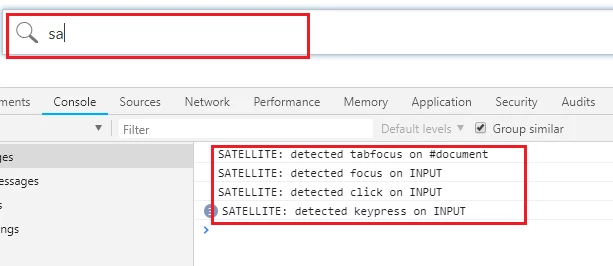
How to capture the "SATELLITE: detected focus on INPUT " values in DTM? I am trying to capture the values from search drop down section.
Thanks!
Roshan
Hi,
How to capture the "SATELLITE: detected focus on INPUT " values in DTM? I am trying to capture the values from search drop down section.
Thanks!
Roshan
Unofficially, there is a _satellite.Logger object that stores SATELLITE:[..] stuff for a given page duration. _satellite.Logger.getHistory() returns a full array of all current logged entries, which is stored in _satellite.Logger.messages array if you'd rather reference it directly.
But this is NOT a public facing DTM method marked as "safe" for us to use. As in, Adobe can change it or remove it at any time without notice, and they are not responsible for anything that happens to your code as a result of using it.
Enter your E-mail address. We'll send you an e-mail with instructions to reset your password.