Get value of URL parameter for data elements | Community
Skip to main content
floriane3493069
Level 2
March 27, 2018
Solved

Get value of URL parameter for data elements

  • March 27, 2018
  • 6 replies
  • 9733 views

Hi there,

I am using DTM and I wanted to create a data element using the  value from an url parameter.

If the url is testpages.com?id=123 I would like to geht the "123" as value for my data element.

I assume I need to apply a custom script but I do not know how to writ it. Can anybody help me with that?

Thank you very much.

Best Florian
This post is no longer active and is closed to new replies. Need help? Start a new post to ask your question.
Best answer by Muralidharan_Ve

Hi Florian,

I don't think a custom script is needed in this case.

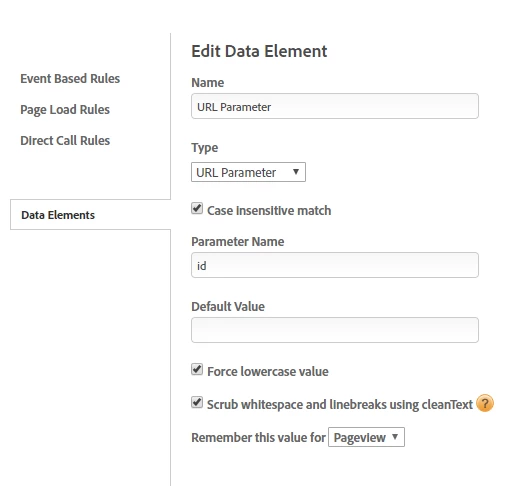
You can simply use the 'URL Parameter' data element type and mention the parameter name (id here).

Regards,

Muralidharan

6 replies

Muralidharan_Ve
Muralidharan_VeAccepted solution
Level 2
March 27, 2018

Hi Florian,

I don't think a custom script is needed in this case.

You can simply use the 'URL Parameter' data element type and mention the parameter name (id here).

Regards,

Muralidharan

jantzen_b
Adobe Employee
Adobe Employee
April 2, 2018

Florian,

Muralidharan is correct. You do not need to use custom code to accomplish this. DTM & Launch both have the ability to extract values from the query string built in. The screenshot provided is exactly how you'd extract '123' from the example URL you provided.

If this answers your question, you'd you mind marking their answer correct? If it doesn't fully answer your question, can you let us know what else we can clarify?


Thanks,
Jantzen

floriane3493069
Level 2
April 23, 2018

Hi Muralidharan,

sorry for my late reply. And thank you for your help. I used the url parameter data element just like you suggested and it worked perfectly well.

thanks a lot.

Best

Florian

Level 2
September 13, 2018

Hi Jantzen!

So we have custom script to extract the Query Strinh parameter in DTM.

I tried the suggested approach above to get the value of 1 element (I.e “utm_source”) vs the full string but it doesn’t work for us.

We have to do this for now since the website is using both cmpid AND utm tags.

What I’ve been trying to set up are separate data elements for

utm_source

utm_campaign

utm_medium

and have each one appended to an eVat to populate AA data  in it’s respective areas...any suggestions aside from custom script?

Many thanks

ericbrownaustin
February 12, 2019

Any updates on the question from


I'm not sure if the underscore causes an trouble as I am seeing the same issue. 

April 4, 2019

@paulinab55518612 I've been able to use the Data Element Assistant to create a Concatenate data element which concat's my utm parameters and cmpid together. If you are still looking into this I would tell you to give this a try.

The issue I am still having is populating that data element when some or all of my utm parameters/cmpid is in the url and NOT populating it when none are set.

I'm Looking for any guidance on how to cleanly do this now that I cannot use_satellite.getQueryParam. I've been looking into creating different page rules based on if there is a utm parameter, but that seems to be an ugly solution.

Thanks

Eric