
Target client-side logging - No analyticToken is returned. | Community
Skip to main content
Stewart_Schilling
Community Advisor
Community Advisor
August 5, 2022
Solved

Target client-side logging - No analyticToken is returned.

  • August 5, 2022
  • 3 replies
  • 1448 views

I am following the instructions for Target client-side logging as described here https://experienceleague.adobe.com/docs/experience-platform/edge/personalization/adobe-target/a4t/client-side.html?lang=en


After executing the alloy sendEvent, I get a response that has `characteristics.eventToken` but no `characteristics.analyticsToken`.
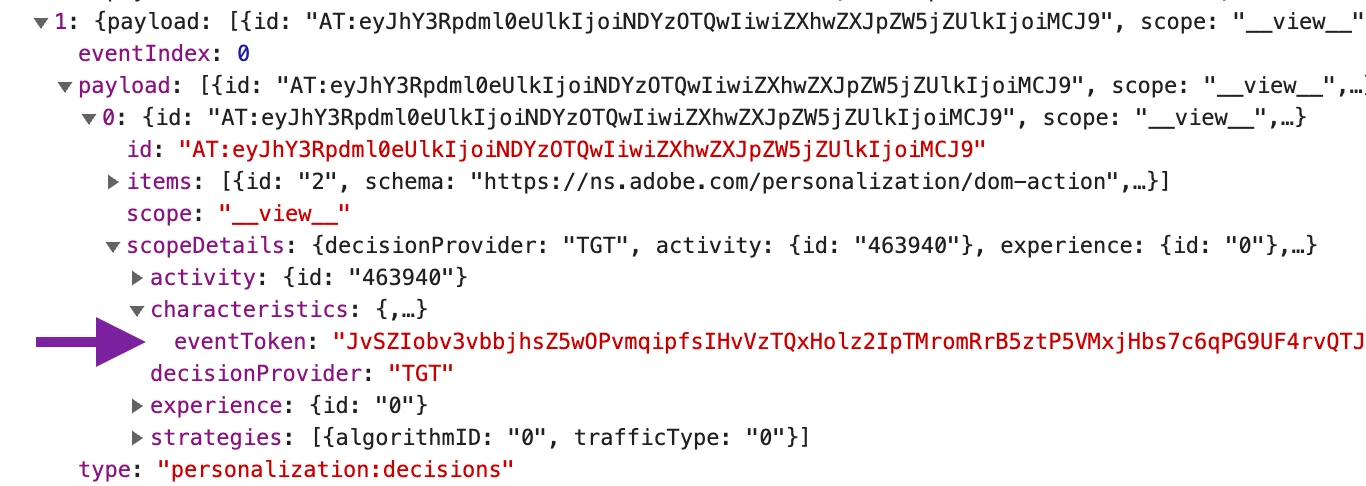
Is this documentation still valid?

This post is no longer active and is closed to new replies. Need help? Start a new post to ask your question.
Best answer by Stewart_Schilling

I found the issue.  My Target activity was set up with Reporting Source === Adobe Target rather than Adobe Analytics.  I created a new activity with a reporting source of Adobe Analytics and scopeDetails.characteristics.analyticsToken was returned. 

3 replies

Stewart_Schilling
Community Advisor
Community Advisor
August 5, 2022

@gaurav_singh_02  - Do you have any ideas about this?

Level 2
August 8, 2022

Hi @stewart_schilling 

Yes the documentation is the latest for webSDK. 

Have you applied the code as mentioned in the document here , for Analytics token?


Stewart_Schilling
Community Advisor
Community Advisor
August 8, 2022

I did not because the analyticsToken field does not exist in the returned data. 

Stewart_Schilling
Community Advisor
Community Advisor
August 8, 2022

I added a log of the request and the response in case it helps. (my instance is named 'amalgam'). The experience is being returned and rendered as expected.  It's just missing scopeDetails.characteristics.analyticsToken in the response.


Also, below is my Datastream config.  Per the docs, I have disabled Adobe Analytics. (FYI, I have tried Datastream configs for no Adobe Analytics, with Disabled AA with report suite and Disabled AA without report suite).  None of these configurations are returning the analyticsToken.


Stewart_Schilling
Community Advisor
Stewart_SchillingCommunity AdvisorAuthorAccepted solution
Community Advisor
August 15, 2022

I found the issue.  My Target activity was set up with Reporting Source === Adobe Target rather than Adobe Analytics.  I created a new activity with a reporting source of Adobe Analytics and scopeDetails.characteristics.analyticsToken was returned.