Target cannot retrieve mbox parameter value that I am passing to qualify for Audience | Community
Skip to main content
Level 2
April 22, 2020
Solved

Target cannot retrieve mbox parameter value that I am passing to qualify for Audience

  • April 22, 2020
  • 4 replies
  • 6946 views

I want users to be able to experience an activity on the follow conditions:

- If this is not their first session on the site

- If they have items in their cart


To check if they have items in their cart, I've wrote a trackEvent code that will fire once the quantity element is present on the page. 

function paramQuantityLoop(){
        var bagQuantityLooper = setInterval(function(){
             if(document.querySelector('.total-quantity') && document.querySelector('.total-quantity').innerText != ""){
                     adobe.target.trackEvent({
                           "mbox": "customTestMbox",
                           "params": {
                                 "itemsInBag": parseInt(document.querySelector('.total-quantity').innerText),
                            } });
                  clearInterval(bagQuantityLooper);
                }
         },1000);
}
paramQuantityLoop();


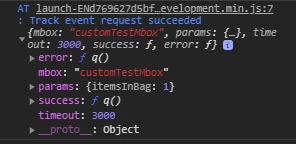
The parameter is successfully passed when i use the debugger tool in the console:


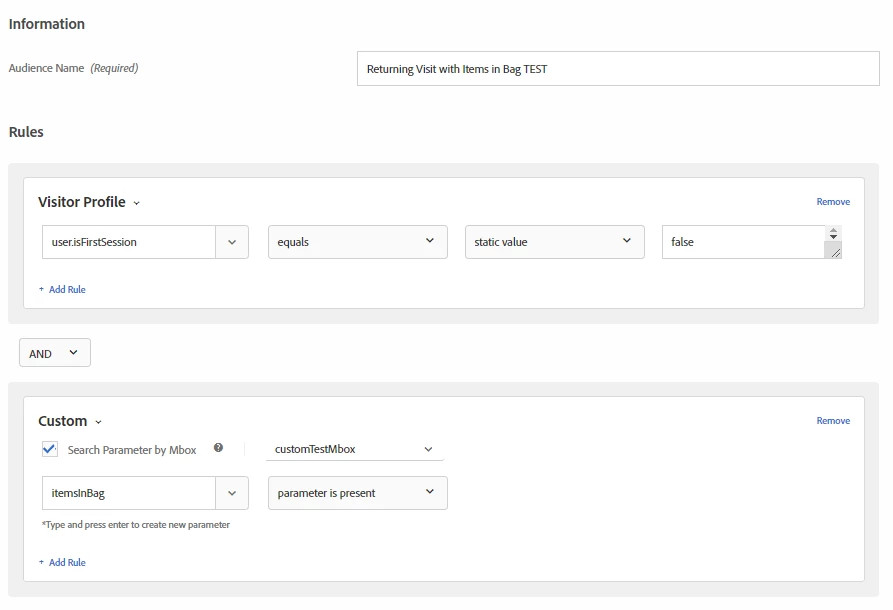
In my audience configuration, the mbox parameter is available to use as a condition to qualify for the audience.
 

However, I haven't been able to successfully qualify for my audience yet. At one point I event wrote a simple profile script in an attempt to retrieve the mbox parameter.
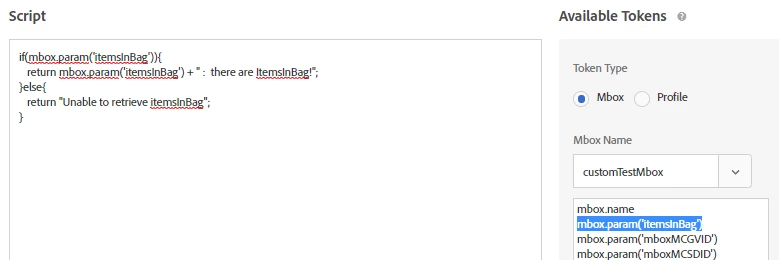

However, a quick glance at the response tokens reveals that even my profile script is having issues retrieving the mbox parameter.


I've been stuck on this for the past day. I've validated that the isFirstSession profile script is functioning properly, so currently the biggest obstacle is trying to properly pass the itemsInBag parameter. Any ideas or advice?

This post is no longer active and is closed to new replies. Need help? Start a new post to ask your question.
Best answer by Amelia_Waliany

Just closing the loop on this great thread! 


REPLY from Comments, by @ambikatewari_atci:


"Hey @Christmann , I have few queries to ask : 
1. On which page are you firing this mbox param ? Is it view cart page ?
2. Which page are you using to target the audience ? If it is not view cart page then do not expect the audience qualification here.

Through this piece of code you are firing a mbox param that will not persist for a session and this will be available for targeting on that page only where it is generated
"mbox": "customTestMbox",
"params": {
"itemsInBag": parseInt(document.querySelector('.total-quantity').innerText),}

If you want to use this param value on some other page for targeting then try using mbox profile param like this :

"mbox": "customTestMbox",
"params": {
"profile.itemsInBag": parseInt(document.querySelector('.total-quantity').innerText),}

now this would be available under Audience ---> Visitor Profile ---> itemsInBag . You can use this audience for targeting on any page post user has added an itme to cart.

Hope that helps you! Happy to discuss this in more details if this doesn't fix the issue."

4 replies

ambikaTewari_ATCI
Community Advisor
Community Advisor
April 23, 2020

Hey @Christmann , I have few queries to ask : 
1. On which page are you firing this mbox param ? Is it view cart page ?
2. Which page are you using to target the audience ? If it is not view cart page then do not expect the audience qualification here.

Through this piece of code you are firing a mbox param that will not persist for a session and this will be available for targeting on that page only where it is generated
"mbox": "customTestMbox",
"params": {
"itemsInBag": parseInt(document.querySelector('.total-quantity').innerText),
}

If you want to use this param value on some other page for targeting then try using mbox profile param like this :

"mbox": "customTestMbox",
"params": {
"profile.itemsInBag": parseInt(document.querySelector('.total-quantity').innerText),
}

now this would be available under Audience ---> Visitor Profile ---> itemsInBag . You can use this audience for targeting on any page post user has added an itme to cart.


Hope that helps you! Happy to discuss this in more details if this doesn't fix the issue.

Level 2
April 23, 2020
@ambikatewari_atci, you are my hero! It worked as you expected!
Amelia_Waliany
Adobe Employee
Adobe Employee
January 27, 2021

@ambikatewari_atci amazing effort and skill in helping your peer Target Community members! 👏👏👏 Would you be able to copy/ paste your answer from being a Comment to instead being a "Reply" so that @christammm (or I) can mark it as Correct? Thanks so much and hope you have a wonderful day!

Amelia_Waliany
Adobe Employee
Amelia_WalianyAdobe EmployeeAccepted solution
Adobe Employee
February 2, 2021

Just closing the loop on this great thread! 


REPLY from Comments, by @ambikatewari_atci:


"Hey @Christmann , I have few queries to ask : 
1. On which page are you firing this mbox param ? Is it view cart page ?
2. Which page are you using to target the audience ? If it is not view cart page then do not expect the audience qualification here.

Through this piece of code you are firing a mbox param that will not persist for a session and this will be available for targeting on that page only where it is generated
"mbox": "customTestMbox",
"params": {
"itemsInBag": parseInt(document.querySelector('.total-quantity').innerText),}

If you want to use this param value on some other page for targeting then try using mbox profile param like this :

"mbox": "customTestMbox",
"params": {
"profile.itemsInBag": parseInt(document.querySelector('.total-quantity').innerText),}

now this would be available under Audience ---> Visitor Profile ---> itemsInBag . You can use this audience for targeting on any page post user has added an itme to cart.

Hope that helps you! Happy to discuss this in more details if this doesn't fix the issue."