sending Target at_property with mbox | Community
Skip to main content
Michael_Soprano
Level 10
April 7, 2025
Question

sending Target at_property with mbox

  • April 7, 2025
  • 1 reply
  • 602 views

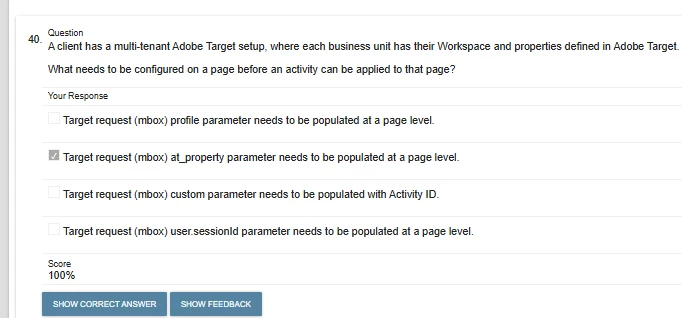
I have seen such an exam question:


ChatGPT advise something like that:


<script>
window.targetGlobalSettings = {
property: "your-property-token-here"
};
</script>


However I do not see that property in window.targetGlobalSettings():

https://experienceleague.adobe.com/en/docs/target-dev/developer/client-side/at-js-implementation/functions-overview/targetglobalsettings

This post is no longer active and is closed to new replies. Need help? Start a new post to ask your question.

1 reply

GigiCotruta
Level 4
April 7, 2025

It refers to this code:


Michael_Soprano
Level 10
April 10, 2025

Is it also compliant with at.js?

So if I would like to have Dev and Prod then I set up two properties and then put that snippet above at.js code?


<script>
function targetPageParams() {
return {
"at_property": "property_for_dev"
};
}
</script>

// at.js for dev

<script src='at.js'>

</script>


Unfortunately its not explained here: https://experienceleague.adobe.com/en/docs/target-dev/developer/client-side/at-js-implementation/functions-overview/targetpageparams


Michael_Soprano
Level 10
April 15, 2025

If you have your connection via WEB SDK, aka, datastream integration, I wouldn't encourage you using at.js. It's either one or the other. I am recommending Web SDK, it is a little bit more confusing, indeed, but it is faster and better integrated with your CDP. 


If you want to have dev and prod, link those separated environments using your datastream integration. In your prod mbox, use the prod environment from Tagret, for the DEV sandbox, use the dev environment from Target. 

You basically don't need any snippet code with web SDK as long as you already have your Tag script in place. 

If you have this script in your head section of the web page you are trying to use target on, using the datastream connection it will connect without any problems. 


Thanks very much!

So what is from your perspective art-of-state Target implementation with Data Collection in 2025? 😄

What I did:

1. Create two properties in Target (Dev and Prod):

2. Created two Datastreams in Data Collection. 

Dev Datastream mapped to dev property and dev Target environment

Prod Datastream mapped to prod propery and Target  prod environment

3. I create one Tag. In the Web SDK Extension I put:

Prod Datastream for Prod Tag ENV

Dev Datastream for Dev Tag ENV

4. Tag Environements. I have got three different scripts. I put one script from Production into Production WWW and then Development into Dev Environment like that:

5. What do you think about that? Should I use that? It would be then included in Target reporting?