Regarding Local Storage in Adobe Target and Launch | Community
Skip to main content
February 26, 2024
Solved

Regarding Local Storage in Adobe Target and Launch

  • February 26, 2024
  • 1 reply
  • 1709 views

Urgent Help Needed

Hi Guys,


We need to access the data from local storage for creating audiences.

We have tried using custom code as well using local storage option in Data element so that we can access and create the audience in Adobe Target, but we're not able to achieve.

Please find screenshot and code for your reference.

 

// Example code to extract audiences from the JSON
try {
var jsonData = JSON.parse(localStorage.getItem('tealium_va')); // Replace 'yourLocalStorageKey' with the actual key used to store the JSON in local storage
if (jsonData && jsonData.audiences) {
jsonData.audiences; // This is the correct way to use the value in Adobe Launch data element code
} else {
console.log('Audiences data not found');
}
} catch (error) {
console.error('Error extracting audiences:', error);
}


Audience creation in Adobe Target:
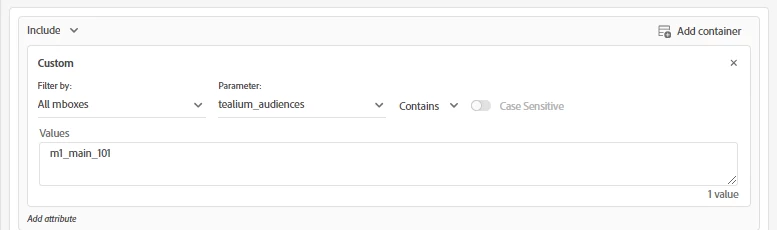
Please help me out.


This post is no longer active and is closed to new replies. Need help? Start a new post to ask your question.
Best answer by NicholasDrzewiecki

There are a few different ways you could do this. Hard to say without knowing your full implementation.
https://experienceleague.adobe.com/docs/target-dev/developer/implementation/methods/methods-to-get-data-into-target.html?lang=en

One option that I'm personally familiar with is the Adobe Target v2 extension.


You can create 2 separate rule actions to Add Params to Page Load Request followed by Fire Page Load Request.

https://experienceleague.adobe.com/docs/experience-platform/tags/extensions/client/target-v2/overview.html?lang=en#add-params-to-page-load-request

https://experienceleague.adobe.com/docs/experience-platform/tags/extensions/client/target-v2/overview.html?lang=en#adobe-target-basic-deployment


In the Add Params to Page Load Request action you can add a parameter which references a data element to fetch the data from localStorage.

You should then be able to reference that parameter in an Adobe Target audience under Custom.


For the parameter dropdown you'd select the name of the parameter that you chose in the Add Params to Page Load Request action.


I don't have any experience with the other methods so hopefully somebody more experienced can chime in.

Best of luck!

1 reply

NicholasDrzewieckiAccepted solution
Level 2
February 27, 2024

There are a few different ways you could do this. Hard to say without knowing your full implementation.
https://experienceleague.adobe.com/docs/target-dev/developer/implementation/methods/methods-to-get-data-into-target.html?lang=en

One option that I'm personally familiar with is the Adobe Target v2 extension.


You can create 2 separate rule actions to Add Params to Page Load Request followed by Fire Page Load Request.

https://experienceleague.adobe.com/docs/experience-platform/tags/extensions/client/target-v2/overview.html?lang=en#add-params-to-page-load-request

https://experienceleague.adobe.com/docs/experience-platform/tags/extensions/client/target-v2/overview.html?lang=en#adobe-target-basic-deployment


In the Add Params to Page Load Request action you can add a parameter which references a data element to fetch the data from localStorage.

You should then be able to reference that parameter in an Adobe Target audience under Custom.


For the parameter dropdown you'd select the name of the parameter that you chose in the Add Params to Page Load Request action.


I don't have any experience with the other methods so hopefully somebody more experienced can chime in.

Best of luck!

Level 2
February 27, 2024

I'm guessing that if you were to use the following:

https://experienceleague.adobe.com/docs/target-dev/developer/client-side/at-js-implementation/functions-overview/targetpageparams.html?lang=en


That it's probably what the Adobe Target v2 extension is doing under the hood.