Recommendations of Most popular criteria | Community
Skip to main content
November 28, 2022
Solved

Recommendations of Most popular criteria

  • November 28, 2022
  • 1 reply
  • 964 views

Hi all!

I have implemented Recommendations of certain tourist places that recommends most popular tourist places for the new user using Most popular criteria in Adobe Target. I have got certain changes on my website, but is there any way I can validate that these places are actually popular across the site? How can we make sure that the entities recommendation is showing me the correct order? If I can use Adobe workspace, how can I do that?

Please do let me know incase of any info.

Thanks
This post is no longer active and is closed to new replies. Need help? Start a new post to ask your question.
Best answer by JacobTo1

Hi @analyticsenthusiast 

If you wanted to sanity check the recommendation results from a "popularity" based Criteria I would suggest 

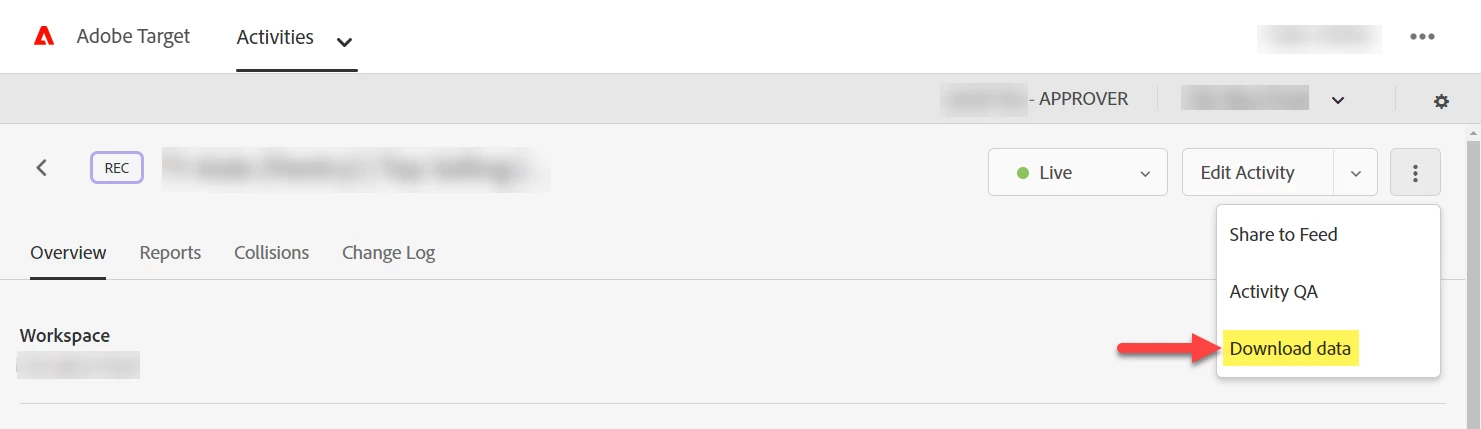
  1. "Download data" from the Recommendations Activity - this will download a .csv with the back end data from your Criteria.
  2. In Analytics Workspace, create a Freeform Table with the equivalent Dimension and Metric to your Recommendations Entity (e.g. an evar) & Popularity based Algorithm (e.g. views, purchases or other analytics metric).
  3. Compare the data sets.


You can also see more detail about how the Target algorithms generate outputs here:
https://experienceleague.adobe.com/docs/target/using/recommendations/criteria/recommendations-algorithms.html?lang=en 

1 reply

JacobTo1Accepted solution
Level 4
November 30, 2022

Hi @analyticsenthusiast 

If you wanted to sanity check the recommendation results from a "popularity" based Criteria I would suggest 

  1. "Download data" from the Recommendations Activity - this will download a .csv with the back end data from your Criteria.
  2. In Analytics Workspace, create a Freeform Table with the equivalent Dimension and Metric to your Recommendations Entity (e.g. an evar) & Popularity based Algorithm (e.g. views, purchases or other analytics metric).
  3. Compare the data sets.


You can also see more detail about how the Target algorithms generate outputs here:
https://experienceleague.adobe.com/docs/target/using/recommendations/criteria/recommendations-algorithms.html?lang=en