Recommendations JSON | Community
Skip to main content
neilh83114327
November 28, 2017
Solved

Recommendations JSON

  • November 28, 2017
  • 13 replies
  • 17057 views

On the Design Overview page of the Recommendations documentation it says "Target can also return recommendations as a JSON object."  It gives an example output of the JSON that can be generated. However, the topic of generating JSON is not discussed anywhere in that section. I imagine this is either accomplished in a design or an mbox parameter, but I cannot find any further discussion of the topic.  How is this accomplished?

A related question: the documentation says that Designs use Apache "Velocity Version 1.5 with no additional tools or libraries" (such as EscapeTool, which would be very useful!!). However, I swear I recall seeing an article somewhere on how to escape quotes for JavaScript in the Velocity used in Recommendations-- but I can't find it again!  Is this possible? I'd like to escape single quotes so that valid JavaScript/JSON can be created when they appear in recommendations content.

Thanks for any assistance you can offer!

This post is no longer active and is closed to new replies. Need help? Start a new post to ask your question.
Best answer by JonTehero

Hi Neil,

Good call-out about our documentation. I will work on getting some JSON Recommendations samples in our help. Let me also provide a quick example in the mean time. JSON responses can be returned when configuring an activity via the form-based editor. Here's how you can test it out:

Setting up a Recommendations Activity that Returns a JSON response

  1. Create a design from within Design Library or within the form-based workflow. If you attempt to do this inside the visual workflow it will not allow you to create anything other than an HTML design (which is wrapped in a <div> for click tracking purposes.
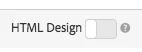
  2. Make sure the "HTML Design" option is turned off as shown below:
  3. See an example below of what you could paste into your design

    #*

    *  "Return a simple list of recommended entity ids"

    *#

    {

      "notes":{

      "purpose": "Return a simple list of recommended entity ids",

      "use-case": "Use this approach if you prefer to do a real-time lookup of entity attribute details (such as inventory, price, rating) from another system (such as a CMS, PIM or ecommerce platform)",

      "version": "01"

      },

      "recommendedItems": {

        "key": "$key.id",

        "slot-01": "$entity1.id",

        "slot-02": "$entity2.id",

        "slot-03": "$entity3.id",

        "slot-04": "$entity4.id",

        "slot-05": "$entity5.id",

        "slot-06": "$entity6.id",

        "slot-07": "$entity7.id",

        "slot-08": "$entity8.id",

        "slot-09": "$entity9.id",

        "slot-10": "$entity10.id"

      }

    }

  4. Now setup a form-based Recommendations activity that uses this design.
    1. Navigate to the "Activities Page"
    2. Click "Create Activity"
    3. Select "Recommendations"
    4. Under "Choose Experience Composer" select "Form"
    5. Under location, enter the text: "Sample_Recs_Response"
    6. Under "Default Content" click the down arrow and "Add Reccomendation"
    7. Choose a Page Type (this just determines the initial filtering of the next screen)
    8. Select a Criteria card. Click "Next"
    9. Select the Design you created in the step above. Click "Save"
    10. Finish the setup process
    11. Click the right arrow next to "Inactive." Select "Activate"
  5. After your activity is setup and activitate, you can setup a sample request to get back the clean JSON response. Note: from the time that you save your activity, Target will need to build a model to support the Criteria configuration selected. Depending on a number of factors, this could take some time. Results will appear once the model has build.
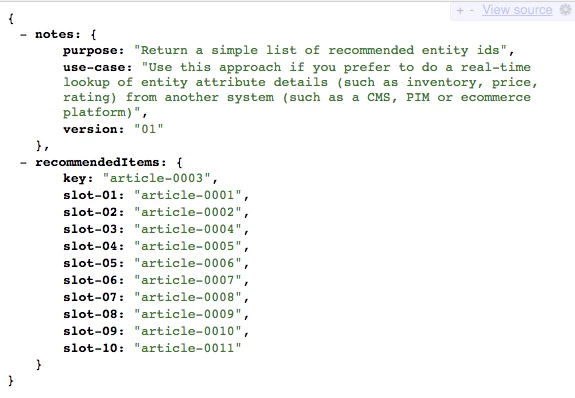
  6. After your algorithm has run, and you have results, your response should look something like this:

I hope that helps you get started!

Some additional tips and tricks:

You can also just send back a simple comma delimmited list of items by setting up a design with this sytax:

entity1.id, $entity2.id, $entity3.id, $entity4.id, $entity5.id,

Alternatively, there is a lot of additional information that you can send back in the response as well. Below is a much more complex example that returns much more than the entity ids with their associated slots (order). The Design example below also returns Activity details, Target Profile details (as applicable), and other entity.attributes associated with the items returned.

{

"adobeRecommendations": {

  "notes": {

   "purpose": "Return a list of entity ids with their associated entity.attributes",

   "use-case": "Use this approach to avoid looking up attribute details after receiving a response from Target",

   "version": "01"

  },

  "recommendedItems": {

   "slot-01": "$entity1.id",

   "slot-02": "$entity2.id",

   "slot-03": "$entity3.id",

   "slot-04": "$entity4.id",

   "slot-05": "$entity5.id",

   "slot-06": "$entity6.id",

   "slot-07": "$entity7.id",

   "slot-08": "$entity8.id",

   "slot-09": "$entity9.id",

   "slot-10": "$entity10.id"

  },

  "activityDetails": {

   "mbox.name": "email-mbox",

   "campaign.name": "\${campaign.name}",

   "campaign.id": "\${campaign.id}",

   "campaign.recipe.name": "\${campaign.recipe.name}",

   "campaign.recipe.id": "\${campaign.recipe.id}",

   "offer.name": "\${offer.name}",

   "offer.id": "\${offer.id}",

   "criteria.title": "$criteria.title",

   "algorithm.name": "$algorithm.name",

   "algorithm.dayCount": "$algorithm.dayCount"

  },

  "visitorProfile": {

   "profile.favorite-category": "\${profile.favorite-category}",

   "profile.test": "\${profile.test}",

   "user.endpoint.lastPurchasedEntity": "\${user.endpoint.lastPurchasedEntity}",

   "user.endpoint.lastViewedEntity": "\${user.endpoint.lastViewedEntity}",

   "user.endpoint.mostViewedEntity": "\${user.endpoint.mostViewedEntity}",

   "user.endpoint.categoryAffinity": "\${user.endpoint.categoryAffinity}",

   "profile.geolocation.city": "\${profile.geolocation.city}",

   "profile.geolocation.dma": "\${profile.geolocation.dma}",

   "profile.geolocation.state": "\${profile.geolocation.state}",

   "profile.geolocation.country": "\${profile.geolocation.country}",

   "profile.sessionCount": "\${profile.sessionCount}",

   "profile.averageDaysBetweenVisits": "\${profile.averageDaysBetweenVisits}",

   "profile.browserTime": "\${profile.browserTime}",

   "user.activeActivities": "\${user.activeActivities}",

   "user.pcId": "\${user.pcId}",

   "user.isFirstSession": "\${user.isFirstSession}",

   "user.isNewSession": "\${user.isNewSession}",

   "user.header": "\${user.header}",

   "user.parameter": "\${user.parameter}"

  },

  "recKey": {

   "recKeyDetails": {

    "id": "$key.id",

    "name": "$key.name",

    "category": "$key.category",

    "pageUrl": "$key.pageUrl",

    "thumbnailUrl": "$key.thumbnailUrl"

   }

  },

  "recDetailedResults": {

   "recEntity1Details": {

    "id": "$entity1.id",

    "name": "$entity1.name",

    "category": "$entity1.category",

    "pageUrl": "$entity1.pageUrl",

    "thumbnailUrl": "$entity1.thumbnailUrl"

   },

   "recEntity2Details": {

    "id": "$entity2.id",

    "name": "$entity2.name",

    "category": "$entity2.category",

    "pageUrl": "$entity2.pageUrl",

    "thumbnailUrl": "$entity2.thumbnailUrl"

   },

   "recEntity3Details": {

    "id": "$entity3.id",

    "name": "$entity3.name",

    "category": "$entity3.category",

    "pageUrl": "$entity3.pageUrl",

    "thumbnailUrl": "$entity3.thumbnailUrl"

   },

   "recEntity4Details": {

    "id": "$entity4.id",

    "name": "$entity4.name",

    "category": "$entity4.category",

    "pageUrl": "$entity4.pageUrl",

    "thumbnailUrl": "$entity4.thumbnailUrl"

   },

   "recEntity5Details": {

    "id": "$entity5.id",

    "name": "$entity5.name",

    "category": "$entity5.category",

    "pageUrl": "$entity5.pageUrl",

    "thumbnailUrl": "$entity5.thumbnailUrl"

   },

   "recEntity6Details": {

    "id": "$entity6.id",

    "name": "$entity6.name",

    "category": "$entity6.category",

    "pageUrl": "$entity6.pageUrl",

    "thumbnailUrl": "$entity6.thumbnailUrl"

   },

   "recEntity7Details": {

    "id": "$entity7.id",

    "name": "$entity7.name",

    "category": "$entity7.category",

    "pageUrl": "$entity7.pageUrl",

    "thumbnailUrl": "$entity7.thumbnailUrl"

   },

   "recEntity8Details": {

    "id": "$entity8.id",

    "name": "$entity8.name",

    "category": "$entity8.category",

    "pageUrl": "$entity8.pageUrl",

    "thumbnailUrl": "$entity8.thumbnailUrl"

   },

   "recEntity9Details": {

    "id": "$entity9.id",

    "name": "$entity9.name",

    "category": "$entity9.category",

    "pageUrl": "$entity9.pageUrl",

    "thumbnailUrl": "$entity9.thumbnailUrl"

   },

   "recEntity10Details": {

    "id": "$entity10.id",

    "name": "$entity10.name",

    "category": "$entity10.category",

    "pageUrl": "$entity10.pageUrl",

    "thumbnailUrl": "$entity10.thumbnailUrl"

   }

  }

}

}


Thanks!

Jon Tehero 

13 replies

Amelia_Waliany
Adobe Employee
Adobe Employee
November 28, 2017

Hi there and thanks for your question! I believe this page of Adobe Target's Documentation on Passing Parameters to a Global Mbox might be helpful to you - hope so! Feel free to reach out here if you have any other follow up questions

August 3, 2021
is this still using a from to do this? How can I explicitly pass in parameters to my mBox, if I do not know what the resulting JSON will look like?
neilh83114327
November 28, 2017

I don't think that addresses it.  Your linked doc discussed how to pass JSON as a parameter INTO an MBOX request.

The doc I linked to says that it is possible to get JSON containing recommendations results/contents OUT of Target... in the result of a mbox call.  The purpose is to take the JSON content and format it into results into HTML/etc on the client side rather than having the Recommendations Design do it on the server side.

Thanks for the reply & your follow up!

JonTeheroAdobe EmployeeAccepted solution
Adobe Employee
November 29, 2017

Hi Neil,

Good call-out about our documentation. I will work on getting some JSON Recommendations samples in our help. Let me also provide a quick example in the mean time. JSON responses can be returned when configuring an activity via the form-based editor. Here's how you can test it out:

Setting up a Recommendations Activity that Returns a JSON response

  1. Create a design from within Design Library or within the form-based workflow. If you attempt to do this inside the visual workflow it will not allow you to create anything other than an HTML design (which is wrapped in a <div> for click tracking purposes.
  2. Make sure the "HTML Design" option is turned off as shown below:
  3. See an example below of what you could paste into your design

    #*

    *  "Return a simple list of recommended entity ids"

    *#

    {

      "notes":{

      "purpose": "Return a simple list of recommended entity ids",

      "use-case": "Use this approach if you prefer to do a real-time lookup of entity attribute details (such as inventory, price, rating) from another system (such as a CMS, PIM or ecommerce platform)",

      "version": "01"

      },

      "recommendedItems": {

        "key": "$key.id",

        "slot-01": "$entity1.id",

        "slot-02": "$entity2.id",

        "slot-03": "$entity3.id",

        "slot-04": "$entity4.id",

        "slot-05": "$entity5.id",

        "slot-06": "$entity6.id",

        "slot-07": "$entity7.id",

        "slot-08": "$entity8.id",

        "slot-09": "$entity9.id",

        "slot-10": "$entity10.id"

      }

    }

  4. Now setup a form-based Recommendations activity that uses this design.
    1. Navigate to the "Activities Page"
    2. Click "Create Activity"
    3. Select "Recommendations"
    4. Under "Choose Experience Composer" select "Form"
    5. Under location, enter the text: "Sample_Recs_Response"
    6. Under "Default Content" click the down arrow and "Add Reccomendation"
    7. Choose a Page Type (this just determines the initial filtering of the next screen)
    8. Select a Criteria card. Click "Next"
    9. Select the Design you created in the step above. Click "Save"
    10. Finish the setup process
    11. Click the right arrow next to "Inactive." Select "Activate"
  5. After your activity is setup and activitate, you can setup a sample request to get back the clean JSON response. Note: from the time that you save your activity, Target will need to build a model to support the Criteria configuration selected. Depending on a number of factors, this could take some time. Results will appear once the model has build.
  6. After your algorithm has run, and you have results, your response should look something like this:

I hope that helps you get started!

Some additional tips and tricks:

You can also just send back a simple comma delimmited list of items by setting up a design with this sytax:

entity1.id, $entity2.id, $entity3.id, $entity4.id, $entity5.id,

Alternatively, there is a lot of additional information that you can send back in the response as well. Below is a much more complex example that returns much more than the entity ids with their associated slots (order). The Design example below also returns Activity details, Target Profile details (as applicable), and other entity.attributes associated with the items returned.

{

"adobeRecommendations": {

  "notes": {

   "purpose": "Return a list of entity ids with their associated entity.attributes",

   "use-case": "Use this approach to avoid looking up attribute details after receiving a response from Target",

   "version": "01"

  },

  "recommendedItems": {

   "slot-01": "$entity1.id",

   "slot-02": "$entity2.id",

   "slot-03": "$entity3.id",

   "slot-04": "$entity4.id",

   "slot-05": "$entity5.id",

   "slot-06": "$entity6.id",

   "slot-07": "$entity7.id",

   "slot-08": "$entity8.id",

   "slot-09": "$entity9.id",

   "slot-10": "$entity10.id"

  },

  "activityDetails": {

   "mbox.name": "email-mbox",

   "campaign.name": "\${campaign.name}",

   "campaign.id": "\${campaign.id}",

   "campaign.recipe.name": "\${campaign.recipe.name}",

   "campaign.recipe.id": "\${campaign.recipe.id}",

   "offer.name": "\${offer.name}",

   "offer.id": "\${offer.id}",

   "criteria.title": "$criteria.title",

   "algorithm.name": "$algorithm.name",

   "algorithm.dayCount": "$algorithm.dayCount"

  },

  "visitorProfile": {

   "profile.favorite-category": "\${profile.favorite-category}",

   "profile.test": "\${profile.test}",

   "user.endpoint.lastPurchasedEntity": "\${user.endpoint.lastPurchasedEntity}",

   "user.endpoint.lastViewedEntity": "\${user.endpoint.lastViewedEntity}",

   "user.endpoint.mostViewedEntity": "\${user.endpoint.mostViewedEntity}",

   "user.endpoint.categoryAffinity": "\${user.endpoint.categoryAffinity}",

   "profile.geolocation.city": "\${profile.geolocation.city}",

   "profile.geolocation.dma": "\${profile.geolocation.dma}",

   "profile.geolocation.state": "\${profile.geolocation.state}",

   "profile.geolocation.country": "\${profile.geolocation.country}",

   "profile.sessionCount": "\${profile.sessionCount}",

   "profile.averageDaysBetweenVisits": "\${profile.averageDaysBetweenVisits}",

   "profile.browserTime": "\${profile.browserTime}",

   "user.activeActivities": "\${user.activeActivities}",

   "user.pcId": "\${user.pcId}",

   "user.isFirstSession": "\${user.isFirstSession}",

   "user.isNewSession": "\${user.isNewSession}",

   "user.header": "\${user.header}",

   "user.parameter": "\${user.parameter}"

  },

  "recKey": {

   "recKeyDetails": {

    "id": "$key.id",

    "name": "$key.name",

    "category": "$key.category",

    "pageUrl": "$key.pageUrl",

    "thumbnailUrl": "$key.thumbnailUrl"

   }

  },

  "recDetailedResults": {

   "recEntity1Details": {

    "id": "$entity1.id",

    "name": "$entity1.name",

    "category": "$entity1.category",

    "pageUrl": "$entity1.pageUrl",

    "thumbnailUrl": "$entity1.thumbnailUrl"

   },

   "recEntity2Details": {

    "id": "$entity2.id",

    "name": "$entity2.name",

    "category": "$entity2.category",

    "pageUrl": "$entity2.pageUrl",

    "thumbnailUrl": "$entity2.thumbnailUrl"

   },

   "recEntity3Details": {

    "id": "$entity3.id",

    "name": "$entity3.name",

    "category": "$entity3.category",

    "pageUrl": "$entity3.pageUrl",

    "thumbnailUrl": "$entity3.thumbnailUrl"

   },

   "recEntity4Details": {

    "id": "$entity4.id",

    "name": "$entity4.name",

    "category": "$entity4.category",

    "pageUrl": "$entity4.pageUrl",

    "thumbnailUrl": "$entity4.thumbnailUrl"

   },

   "recEntity5Details": {

    "id": "$entity5.id",

    "name": "$entity5.name",

    "category": "$entity5.category",

    "pageUrl": "$entity5.pageUrl",

    "thumbnailUrl": "$entity5.thumbnailUrl"

   },

   "recEntity6Details": {

    "id": "$entity6.id",

    "name": "$entity6.name",

    "category": "$entity6.category",

    "pageUrl": "$entity6.pageUrl",

    "thumbnailUrl": "$entity6.thumbnailUrl"

   },

   "recEntity7Details": {

    "id": "$entity7.id",

    "name": "$entity7.name",

    "category": "$entity7.category",

    "pageUrl": "$entity7.pageUrl",

    "thumbnailUrl": "$entity7.thumbnailUrl"

   },

   "recEntity8Details": {

    "id": "$entity8.id",

    "name": "$entity8.name",

    "category": "$entity8.category",

    "pageUrl": "$entity8.pageUrl",

    "thumbnailUrl": "$entity8.thumbnailUrl"

   },

   "recEntity9Details": {

    "id": "$entity9.id",

    "name": "$entity9.name",

    "category": "$entity9.category",

    "pageUrl": "$entity9.pageUrl",

    "thumbnailUrl": "$entity9.thumbnailUrl"

   },

   "recEntity10Details": {

    "id": "$entity10.id",

    "name": "$entity10.name",

    "category": "$entity10.category",

    "pageUrl": "$entity10.pageUrl",

    "thumbnailUrl": "$entity10.thumbnailUrl"

   }

  }

}

}


Thanks!

Jon Tehero 
ambikaTewari_ATCI
Community Advisor
Community Advisor
January 27, 2023

Hi @jontehero @ryanr7  I am using the velocity js in the design  to show the recommendations by a form based activity. Our purpose is to skip the duplicate value and show the next one .

I have written below code in the design:


#foreach( $ent in $entities )

#if( $velocityCount > 10 && !$entities.contains( $ent.offerId ))

#break

#end

"slot-$velocityCount": "$ent.offerId",

#end

}


But I'm getting duplicate values in the response. Please refer 1355589

 RESPONSE:

"content""\n\n    \n    \"slot-1\": \"OFF-66800\",\n\n\n    \n    \"slot-2\": \"OFF-66088\",\n\n\n    \n    \"slot-3\": \"OFF-68007\",\n\n\n    \n    \"slot-4\": \"1355589\",\n\n\n    \n    \"slot-5\": \"OFF-31971\",\n\n\n    \n    \"slot-6\": \"OFF-39431\",\n\n\n    \n    \"slot-7\": \"1355589\",\n\n\n    \n    \"slot-8\": \"OFF-66829\",\n\n\n    \n    \"slot-9\": \"OFF-59035\",\n\n\n    \n    \"slot-10\": \"OFF-53959\",\n\n\n    \n        \n  } \n\n",
 
Could you suggest how could I skip duplicate value through the design?
 
Any suggestion in this regard will be really helpfull.
 
neilh83114327
November 29, 2017

Jon, that is a fantastic response, thank you so much. I'm still going through it. A bunch of great info.

What isn't clear to me is the second issue of my original message: how do I keep entity values with single and double quotes from breaking JSON syntax?  Our product names have measurements & possessives in them, so these are not uncommon.  Given that, what would keep this line in your code from breaking?

    "name": "$entity1.name", 

when it becomes something like:

    "name": "Samsung's 32" Television & Stand, <10lbs, Black", 

We certainly need to handle that case for this all to be practical. Thanks again for your assistance!

January 4, 2018

Jon,

Thanks for the explanation, though wanted to confirm is there a typo in the  mentioned URL.

When I try to use this URL after replacing parameter values I get a File not found error, and if I replace ubox with mbox in the URL I am getting

mboxEnv.disable(10 * 60) // got 500 from node

(Code removed by Moderator)

Adobe Employee
January 4, 2018

Yes, you are correct. Thanks for bringing this to our attention!

I've made corrections to the text below.

5. After your activity is setup and activitate, you can setup a sample request to get back the clean JSON response. Note: from the time that you save your activity, Target will need to build a model to support the Criteria configuration selected. Depending on a number of factors, this could take some time. Results will appear once the model has build.

August 3, 2021
everytime I try to examine the link, it always takes me to the adobe forums, so I am not sure I am creating the url correctly.
neilh83114327
January 6, 2018

Jon, it's great to have you here! I see that you updated the JSON documentation, which is great! I've been working with various Velocity commands & discovered that the following works (adapted from your example above):

#*

*  "Return a simple list of recommended entity ids"

*#

{

  "notes":{

  "purpose": "Return a simple list of recommended entity ids",

  "use-case": "Use this approach if you prefer to do a real-time lookup of entity attribute details (such as inventory, price, rating) from another system (such as a CMS, PIM or ecommerce platform)",

  "version": "01"

  },

  "recommendedItems": {

    "key": "$key.id",

#foreach( $ent in $entities )

    #if( $velocityCount > 10 )

        #break

    #end

    "slot-$velocityCount": "$ent.id",

#end

  }

}

...and the results are pretty darn close to the example:

{

  "notes": {

      "purpose": "Return a simple list of recommended entity ids",

      "use-case": "Use this approach if you prefer to do a real-time lookup of entity attribute details (such as inventory, price, rating) from another system (such as a CMS, PIM or ecommerce platform)",

      "version": "01"

  },

  "recommendedItems": {

      "key": "$key.id",

      "slot-1": "343123",

      "slot-2": "226471",

      "slot-3": "395930",

      "slot-4": "58766",

      "slot-5": "301385",

      "slot-6": "69689",

      "slot-7": "384594",

      "slot-8": "383904",

      "slot-9": "350986",

      "slot-10": "357621",

  }

}

Is there any disadvantage to generating JSON or HTML recommendations results this way rather than expanding them out manually with $entity1, $entity2, etc?  The only impact I could think of might be related to "Partial Design Rendering" depending on how it determines the number of entities a design uses.  Are there any other considerations? This will make designs so much easier to maintain. If I leave out the "#if( $velocityCount > 10 )" it gives me the full list of recommendations, which is awesome!

The Adobe Recommendations documentation suggests that the version of Velocity is 1.5, but the support of #break suggests it is at least 1.6.  Would you verify what version of Velocity Recommendations uses?

Many thanks for being in this forum!

January 8, 2018

Thanks for the help Jon, I am able to get the JSON response now.

June 28, 2018

Hi Jon,

I am also trying to use Recommendations the same way as Neil; but I am still having issues after following the directions above.  My company has a Target Premium license, but adding the at_property parameter with the token returns "File not found"; yet when I omit this parameter I get a text response of "success" instead of a JSON string. I also don't see any parameters in the URL that would indicate passing the activity ID and I don't see any documentation on the mboxPC and mboxSession parameters.

Please help.

May 7, 2019

Yes we are stuck with the same problem , how to tweak the JSON response instead of just returning "Success" or "File Not Found" as plain text while using Adobe Recommendations API , any help would be great