"Viewed an mbox" in Goal Advanced Setting | Adobe Higher Education
Skip to main content
rickyffff
Level 2
November 9, 2018
Respondido

"Viewed an mbox" in Goal Advanced Setting

  • November 9, 2018
  • 3 respostas
  • 4109 Visualizações

In an activity, regarding the setting on goal metrics, there is a option to set "viewed an mbox" then show an unseen experience.

Is it possible to set "viewed an mbox" N time then show an unseen experience?

Regards,

Ricky

Este tópico foi fechado para respostas.
Melhor resposta por MihneaD

rickyffff​,

This is a great question. There is no OOTB way to do this currently. However I can imagine that you might be able to accomplish this by doing the following:

1. Create some custom code that keeps track of how many times the mbox was viewed by the visitor.

2. Store this number value in as an mbox parameter.

3. Build a custom audience based on that custom mbox parameter.

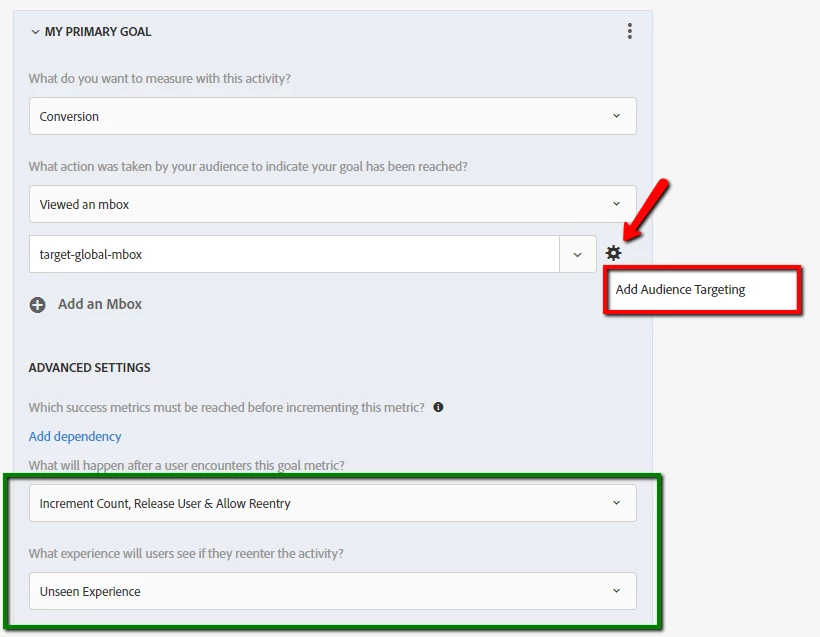
4. Add the audience as an additional Audience Targeting rule to the mbox in the conversion metric. See screen-shot below.

Keep in mind this will also make it so that the conversion will only increment after the mbox is viewed N times.

Hope this helps!

Viewed mbox N times:
Mihnea Docea  | Technical Support Rep, Customer Care | Customer & Employee Experience | Adobe | (:: 1 (800) 497-0335

3 Respostas

MihneaD
Adobe Employee
MihneaDAdobe EmployeeResposta
Adobe Employee
November 9, 2018

rickyffff​,

This is a great question. There is no OOTB way to do this currently. However I can imagine that you might be able to accomplish this by doing the following:

1. Create some custom code that keeps track of how many times the mbox was viewed by the visitor.

2. Store this number value in as an mbox parameter.

3. Build a custom audience based on that custom mbox parameter.

4. Add the audience as an additional Audience Targeting rule to the mbox in the conversion metric. See screen-shot below.

Keep in mind this will also make it so that the conversion will only increment after the mbox is viewed N times.

Hope this helps!

Viewed mbox N times:

Mihnea Docea  | Technical Support Rep, Customer Care | Customer & Employee Experience | Adobe | (:: 1 (800) 497-0335

rickyffff
Level 2
November 12, 2018

Hi Mihnea,

Thanks for the reply.

May i know if there is any step by step guide or documents on how to do step 1-3?

Regards,

Ricky

MihneaD
Adobe Employee
Adobe Employee
November 12, 2018

rickyffff​,

No unfortunately since that would require custom code there are no step by step directions on how to do that. Your web developer will probably be able to wip up some code for you to accomplish that.

Mihnea Docea  | Technical Support Rep, Customer Care | Customer & Employee Experience | Adobe | (:: 1 (800) 497-0335