Profile attributes not showing up in Audience builder in Target | Community
Skip to main content
Level 2
May 14, 2020
Solved

Profile attributes not showing up in Audience builder in Target

  • May 14, 2020
  • 5 replies
  • 12064 views

Hi,


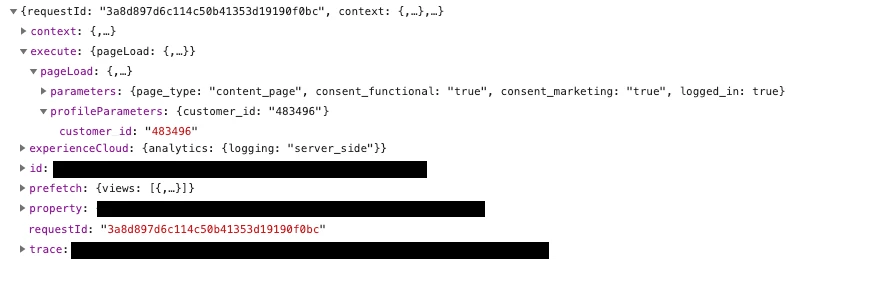
I am building a small POC to try out some ways to capture data using at.js (version 2.3.0) directly on the page instead of Launch. I attached some profile specific attributes when sending the pageload request, they get stored within the profile in Target, but I am unable to use these parameters when I try to build an Audience in Target using the 'Visitor Profile' selector. 


The request
The response with tracing
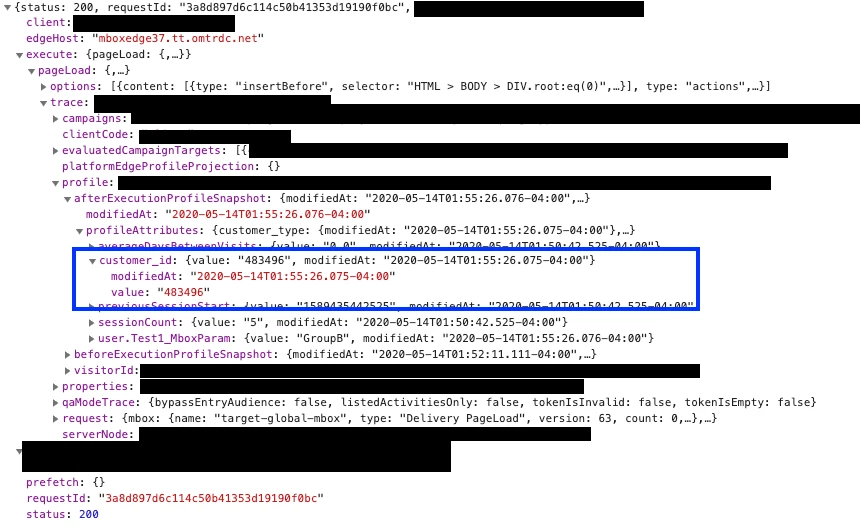
 

What step am I missing? 


Thanks, Thomas

This post is no longer active and is closed to new replies. Need help? Start a new post to ask your question.
Best answer by sadsadsad

The solution:

There was something going wrong on the edge server that I was routed too. The sync between the Edge and the Target DB was not happening which resulted in the properties not showing up in the audience builder. 

--> I needed help from an Adobe Engineer to figure this one out. 

5 replies

Community Advisor
May 18, 2020

It might just take some time for it to show up. You could also set up an API call to get the list.


http://developers.adobetarget.com/api/#list-profile-parameters

sadsadsadAuthor
Level 2
May 18, 2020
Timing should not be an issue since more than a day passed by. I did the api calls to check what they said, just to be sure that the parameters were indeed saved to the Target Database, and they also show that the parameters are set correctly on the profile.
Tanvi_Agarwal_
Adobe Employee
Adobe Employee
May 20, 2020

Hello @sadsadsad 


If you are creating any profile attribute through "Profile Scripts" Then it will be available in "Visitor profile" while creating the audience.

Profile scripts > https://docs.adobe.com/content/help/en/target/using/audiences/visitor-profiles/profile-parameters.html


However I believe the customer_ID is not being passed through 'profile scripts'. Please correct me if there is any difference in understanding.

sadsadsadAuthor
Level 2
May 20, 2020
That's right. That parameter is not set through profile script but through a custom profile parameter within the mbox call. This should, according to the documentation, also appear within the Visitor Profile attributes within the Audience Builder (https://docs.adobe.com/content/help/en/target/using/audiences/create-audiences/categories-audiences/visitor-profile.html point 4, the last sentences).
Adobe Employee
May 20, 2020

@sadsadsad  


Greetings !


You can trying passing the profile parameter as 'profile.customer_id' instead of just 'customer_id'. 

Then you should be able to see the parameter while building Audience in Target using the 'Visitor Profile' selector. 


Note : Make sure you fire multiple Target calls containing the parameter so that it can be received by Target server and thus be able to recognize the parameter when creating audience.


Also after firing the target call, check in a fresh session i.e. in an incognito window so that latest changes can be seen in target UI.

Adobe Employee
May 20, 2020

@sadsadsad Can you please ensure that you are meeting the below specifications for the profile parameters:

Maximum count = 50
Name not blank
Name length <= 128
Value length <= 256
Name should not start with "profile."
 
 
Regards,
Karan
sadsadsadAuthor
Level 2
May 20, 2020
Hi Karen, Indeed the parameters validate these requirements. They get saved within the target database. It just seems that the Target UI does not want to fetch them.
sadsadsadAuthorAccepted solution
Level 2
June 27, 2020

The solution:

There was something going wrong on the edge server that I was routed too. The sync between the Edge and the Target DB was not happening which resulted in the properties not showing up in the audience builder. 

--> I needed help from an Adobe Engineer to figure this one out.