Problem with Target Audiences and Profile Scripts | Community
Skip to main content
Level 2
February 11, 2025
Solved

Problem with Target Audiences and Profile Scripts

  • February 11, 2025
  • 2 replies
  • 1997 views

Hi everyone,

I'm trying to create audiences in Adobe Target using profile scripts. This is my first time attempting this, so I followed this guide to send the data I need for the profile scripts from Data Collection:
https://experienceleague.adobe.com/en/docs/platform-learn/implement-web-sdk/applications-setup/setup-target#send-parameters-to-target

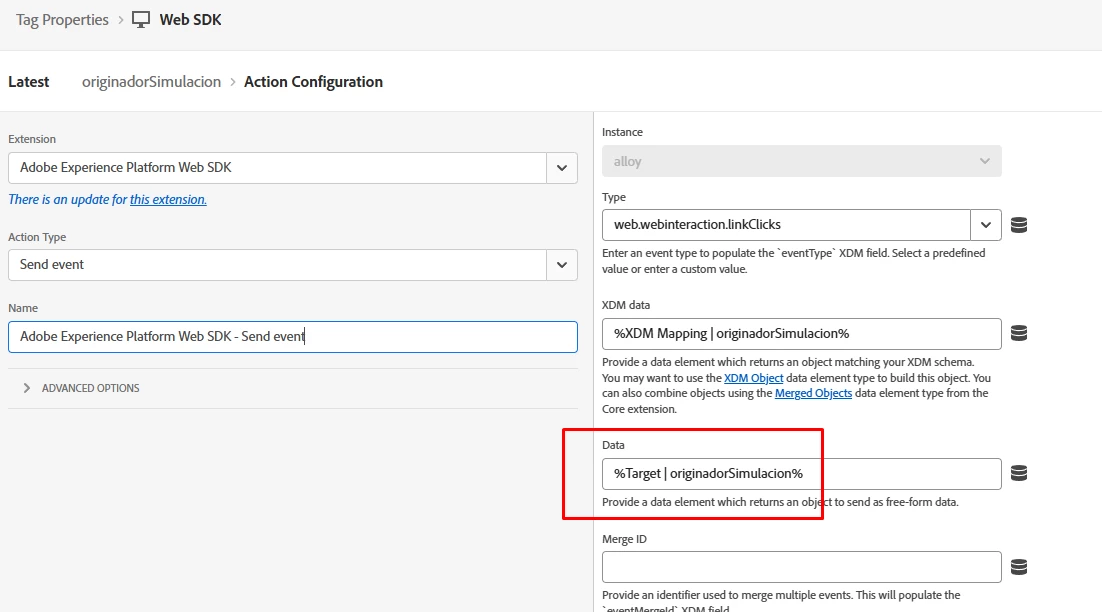
This is how we map the data to be send. In a data element:


var data = { __adobe: { target: { "profile.comprobarIngresosSimulador": _satellite.getVar("originadorSimulacion | comprobarIngresosSimulador"), "profile.montoPrestamoSimulado": _satellite.getVar("originadorSimulacion | montoPrestamoSimulado"), "profile.pagoFijo": _satellite.getVar("originadorSimulacion | pagoFijo"), "profile.plazoSimulado": _satellite.getVar("originadorSimulacion | plazoSimulado"), "profile.producto": _satellite.getVar("originadorSimulacion | producto"), "profile.tasaInteres": _satellite.getVar("originadorSimulacion | tasaInteres"), } } } return data;


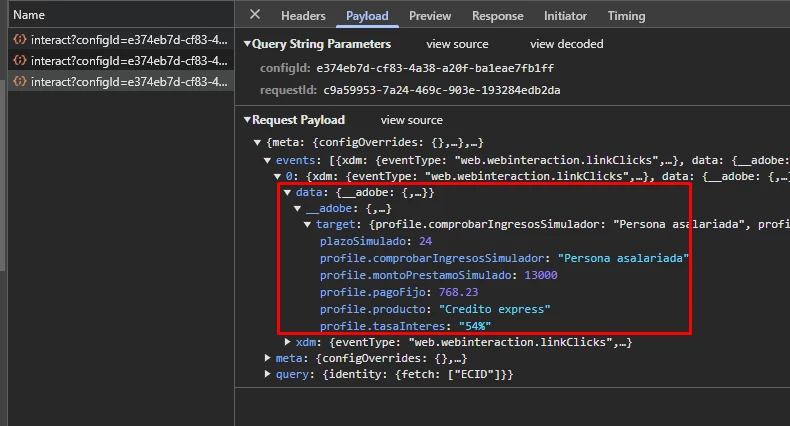
To verify that the data is being sent to Target, I checked the request payload and confirmed that the object with the necessary data is included, as shown in the attached image.
 

In Target, I created a profile script (named originadorSimulacion_producto) that uses one of these fields:


return user.get('plazoSimulado') || 0;


I also created an audience with the following condition:


Visitor Profile: user.originadorSimulacion_producto Contains (case insensitive) 48


However, when I try to qualify for the audience following the necessary steps, it doesn't work. Additionally, based on the response tokens I enabled for debugging, I noticed that the profile script is returning the default value instead of the value sent.

My goal is to create simple audiences based on user interactions and use them to deliver personalized experiences. I know this can be achieved with RT-CDP, but we don't have the license for this project. We have Analytics but audiences shared from there to Target take up to 8 hours to qualify.

Is it possible to achieve this using profile scripts? Am I missing something in the configuration? I appreciate any help!

Thanks in advance!
Best answer by GigiCotruta

Hello, @shamir_duran,


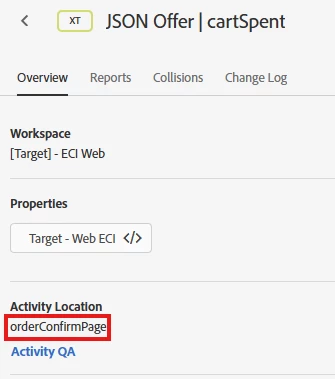
I think that your problem is in the scope. What scope are you using when you are sending this event? The "global mbox scope" is "__view__". Try to send it alongside data. Other way to do it is to use the same scope (location) in the JSON Offer as the one you are sending the data object to. 


An example of the event you have to send:

await aepalloy("sendEvent", { "renderDecisions": true, "personalization": { "sendDisplayEvent": false }, "xdm": {}, "decisionScopes": ["__view__"], // you can add an additional scope in here "data": { __adobe: { target: { "profile.comprobarIngresosSimulador": _satellite.getVar("originadorSimulacion | comprobarIngresosSimulador"), "profile.montoPrestamoSimulado": _satellite.getVar("originadorSimulacion | montoPrestamoSimulado"), "profile.pagoFijo": _satellite.getVar("originadorSimulacion | pagoFijo"), "profile.plazoSimulado": _satellite.getVar("originadorSimulacion | plazoSimulado"), "profile.producto": _satellite.getVar("originadorSimulacion | producto"), "profile.tasaInteres": _satellite.getVar("originadorSimulacion | tasaInteres"), } } } });


And here is an example of the scope mentioned above:


2 replies

GigiCotruta
GigiCotrutaAccepted solution
Level 4
February 13, 2025

Hello, @shamir_duran,


I think that your problem is in the scope. What scope are you using when you are sending this event? The "global mbox scope" is "__view__". Try to send it alongside data. Other way to do it is to use the same scope (location) in the JSON Offer as the one you are sending the data object to. 


An example of the event you have to send:

await aepalloy("sendEvent", { "renderDecisions": true, "personalization": { "sendDisplayEvent": false }, "xdm": {}, "decisionScopes": ["__view__"], // you can add an additional scope in here "data": { __adobe: { target: { "profile.comprobarIngresosSimulador": _satellite.getVar("originadorSimulacion | comprobarIngresosSimulador"), "profile.montoPrestamoSimulado": _satellite.getVar("originadorSimulacion | montoPrestamoSimulado"), "profile.pagoFijo": _satellite.getVar("originadorSimulacion | pagoFijo"), "profile.plazoSimulado": _satellite.getVar("originadorSimulacion | plazoSimulado"), "profile.producto": _satellite.getVar("originadorSimulacion | producto"), "profile.tasaInteres": _satellite.getVar("originadorSimulacion | tasaInteres"), } } } });


And here is an example of the scope mentioned above:


Level 2
February 13, 2025

Thank you for your response.


I am using the view scope. I also tried adding an additional scope as you suggested, but the issue persists. What I would really like to understand is why I am unable to use the sent data inside the profile script—it seems as if the data is not reaching it.


By the way, I am not using Alloy to send events. Instead, I am using adobeDataLayer.push. From a rule that triggers when a push with a specific event name is received, then I send the data to both Adobe Analytics and Adobe Target.


GigiCotruta
Level 4
February 13, 2025

Did you enabled the profile.plazoFijo, profile.plazoSimulado etc. In response tokens? You have that in administration tab. 

Vaibhav_Mathur
Community Advisor
Community Advisor
February 13, 2025

Hi @shamir_duran , 

I can suggest you an alternate approach which works correctly for me. 

Instead of using adobeDataLayer.push, you can trigger an Alloy function to send event along with your required parameters. 


For example : 

window.alloy("sendEvent", { "renderDecisions": false, decisionScopes: ["__view__"], "xdm": { "web": { "webPageDetails": { "plazoSimulado": "test" } } } })


After you send the above alloy function, you can create a profile script to read your parameter as given below : 

return mbox.param("web.webPageDetails.plazoSimulado");


Hope you find it useful.

Best Regards, 
Vaibhav Mathur

Level 2
February 14, 2025

Hi @vaibhav_mathur 

It worked using Alloy instead of dataLayer.


To make the data persistent, I simply added this to the profile script:

user.setLocal("plazoSimulado", mbox.param("web.webPageDetails.plazoSimulado"))

and then retrieved it using

user.getLocal("plazoSimulado")


Thanks for your suggestion!