Network Request Failed | Community
Skip to main content
Level 2
April 26, 2021
Solved

Network Request Failed

  • April 26, 2021
  • 3 replies
  • 4403 views

We are noticing that a lot of our users seem to hit a "network request failed" when bringing the at.js file into a React web application:
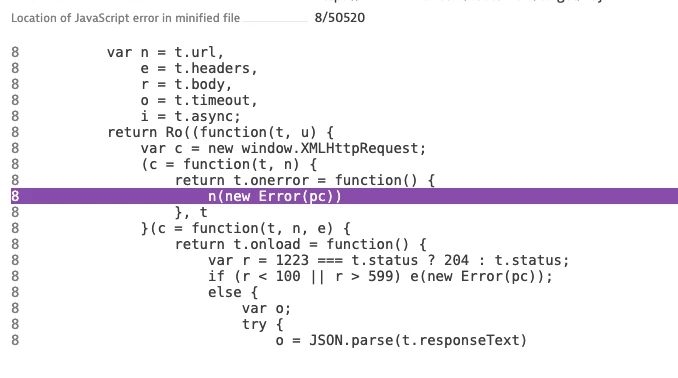
 

This is a screenshot of the error we are detecting.  What is the typical cause of this?  Can it be security settings on the browser?  Is there a workaround?


This post is no longer active and is closed to new replies. Need help? Start a new post to ask your question.
Best answer by Pawan-Gupta

Hello,


at.js can be accessed from any application or website until unless it has supported environment setup and has authorized setting related to account.

now, can you plz share more details...

1. can you share network log or console error

2. where is your at.js file located and how you are referring at.js in react app??

3. who is your user, is it internal users (inside vpn) or your end user?


thanks!!

3 replies

ambikaTewari_ATCI
Community Advisor
Community Advisor
April 26, 2021

Hi @jchabot86  are you connected with some proxy ?

can you try checking this with some open network ?

jchabot86Author
Level 2
April 26, 2021
It's not me personally...its our users that we see hitting this issue. Are you thinking they may be using some sort of VPN or proxy?
Pawan-Gupta
Pawan-GuptaAccepted solution
Level 8
April 26, 2021

Hello,


at.js can be accessed from any application or website until unless it has supported environment setup and has authorized setting related to account.

now, can you plz share more details...

1. can you share network log or console error

2. where is your at.js file located and how you are referring at.js in react app??

3. who is your user, is it internal users (inside vpn) or your end user?


thanks!!

jchabot86Author
Level 2
April 27, 2021

Personally, I do not get the error, but a lot of our end users do seem to get the error.  Unfortunately, I am unable to get their actual console logs. 

A realtime user monitoring tool we use is detecting that this error is occurring for multiple users.


2. where is your at.js file located and how you are referring at.js in react app??

Loading of script (from public folder)/targetpageParams:


Function to execute getOffer()


3. who is your user, is it internal users (inside vpn) or your end user?

End user - we don't have direct contact with our end users unfortunately.


If the above code looks good - then I'm looking for tips/advice as to what is the probable cause of this issue.

jchabot86Author
Level 2
April 27, 2021

Personally, I do not get the error, but a lot of our end users do seem to get the error.  Unfortunately, I am unable to get their actual console logs.  A realtime user monitoring tool we use is detecting that this error is occurring for multiple users.


2. where is your at.js file located and how you are referring at.js in react app??

Loading of script (from public folder)/targetpageParams:


Function to execute getOffer()


3. who is your user, is it internal users (inside vpn) or your end user?

End user - we don't have direct contact with our end users unfortunately.


If the above code looks good - then I'm looking for tips/advice as to what is the probable cause of this issue.

Amelia_Waliany
Adobe Employee
Adobe Employee
February 22, 2022

Hi @pawan-gupta and @ambikatewari_atci! Thank you both for reaching out here with some clarifying questions! Do you have any further thoughts on @jchabot86 's additional context? 


Warmly,

Amelia, your Adobe Target Community Manager