Network - Domain Name rule for ip based | Community
Skip to main content
Prarthana_Sharm
Level 2
November 2, 2017
Solved

Network - Domain Name rule for ip based

  • November 2, 2017
  • 4 replies
  • 4360 views

I am creating a rule based on network details i.e

  1. Audiences > Create Audience >Add Rule > Network > Domain Name

and I am within my in network connection but I am not seeing the experience. I see it for some(including me) but not for others, also network wifi.

Please let me know how i can achieve this.

This post is no longer active and is closed to new replies. Need help? Start a new post to ask your question.
Best answer by ryanr7

Hey Prarthana,

I'd use the mboxTrace debugging tool to see what is returned for your IPs for domainName and then adjust your audience accordingly. Here's the help doc on using the mboxTrace tool: Troubleshooting Content Delivery​. You'll also need to get the auth token (described in the doc). You can find it in Target > Setup > Implemenation > Generate Authorization Token.

Then load the page where Target is implemented and open the developer tools > network tab to view the mbox request response. In Chrome it will look like this:
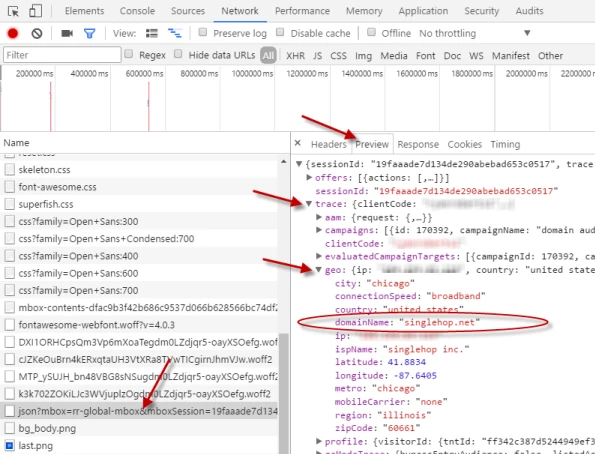
Also, if you know other specific IP addresses that you want to include you can use the "&mboxOverride.browserIp=X.X.X.X" debugging parameter to spoof Target into thinking you are coming from a different IP and thereby see what it's domainName is too. Just add that parameter to your page URL (use a "?" instead of the "&" if there is no "?" in your page URL). Hope that helps.

4 replies

ryanr7Adobe EmployeeAccepted solution
Adobe Employee
November 6, 2017

Hey Prarthana,

I'd use the mboxTrace debugging tool to see what is returned for your IPs for domainName and then adjust your audience accordingly. Here's the help doc on using the mboxTrace tool: Troubleshooting Content Delivery​. You'll also need to get the auth token (described in the doc). You can find it in Target > Setup > Implemenation > Generate Authorization Token.

Then load the page where Target is implemented and open the developer tools > network tab to view the mbox request response. In Chrome it will look like this:

Also, if you know other specific IP addresses that you want to include you can use the "&mboxOverride.browserIp=X.X.X.X" debugging parameter to spoof Target into thinking you are coming from a different IP and thereby see what it's domainName is too. Just add that parameter to your page URL (use a "?" instead of the "&" if there is no "?" in your page URL). Hope that helps.

Prarthana_Sharm
Level 2
November 16, 2017

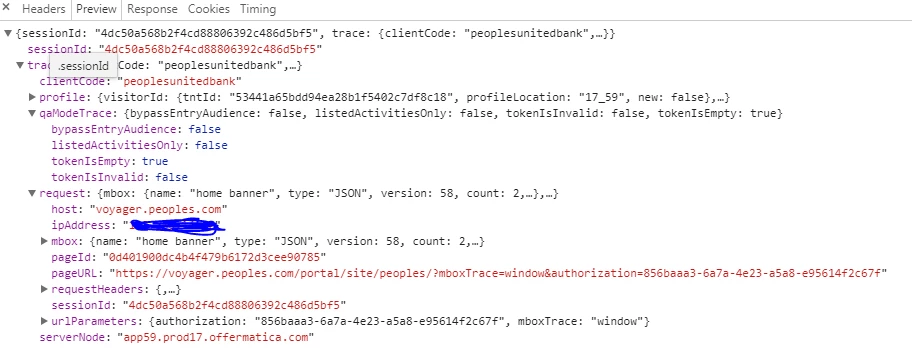
Hi Ryan, I do not see Domain name in my preview:

And do i still try -

  1. Audiences > Create Audience >Add Rule > Network > Domain Name

or use profile script?

Prarthana_Sharm
Level 2
November 20, 2017

Please help. Waiting to hear back.

Adobe Employee
November 21, 2017

Hi Parthana,

It looks like you have to include the mboxOverride.browserIp parameter to get the GEO data to show in your trace. I hadn't realized that before. You can use your own IP in the mboxOverride.browserIp too.