Multiple Audiences in an A/B Test | Community
Skip to main content
September 21, 2018
Solved

Multiple Audiences in an A/B Test

  • September 21, 2018
  • 2 replies
  • 2837 views

Hello Testers,

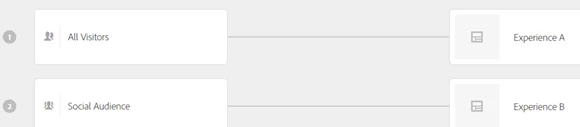
How would you setup an A/B which separates an experience based off of 2 audiences?  I have a combined audience rule at the front door of the test and then once inside it I would like to display the Control to audience no.1 and the Experience B to audience no.2.  I have added Experience Audiences to the A/B configuration and while validating this it seems like I have 4 experiences in total.

Control - audience no. 1

Control - audience no. 2

Experience B - audience no. 1

Experience B - audience no. 2

Ideally I would like there to be only

Control - audience no. 1

Experience B - audience no. 2

I have followed the steps here Multiple Experience Versions in an A/B Test  and there is only 1 page being tested in this test.

Thanks, Matt
This post is no longer active and is closed to new replies. Need help? Start a new post to ask your question.
Best answer by Joshua_Eisikovi

Hi Matt,

Would an Experience Targetting test be best suited for this particular use case?

You would have two Experiences based on two audiences on the same activity location (page).

Help Doc

Let me know your thoughts?

Thanks,

Joshua

2 replies

Joshua_Eisikovi
Adobe Employee
Joshua_EisikoviAdobe EmployeeAccepted solution
Adobe Employee
September 25, 2018

Hi Matt,

Would an Experience Targetting test be best suited for this particular use case?

You would have two Experiences based on two audiences on the same activity location (page).

Help Doc

Let me know your thoughts?

Thanks,

Joshua

September 25, 2018

I am going with XT.


Thanks Joshua