Is this possible - Linking > Google Analytics (Segments) and Adobe Target (A/B Testing)? | Community
Skip to main content
Level 2
November 25, 2021
Solved

Is this possible - Linking > Google Analytics (Segments) and Adobe Target (A/B Testing)?

  • November 25, 2021
  • 1 reply
  • 5147 views

Hello,


We use Google Analytics to track the traffic and are exploring tools for doing A/B Testing.


Can we link Google Analytics and Adobe Target?


Scenario : We want to use Google Analytics Segments for Targeting (using Adobe Target). Is this possible?
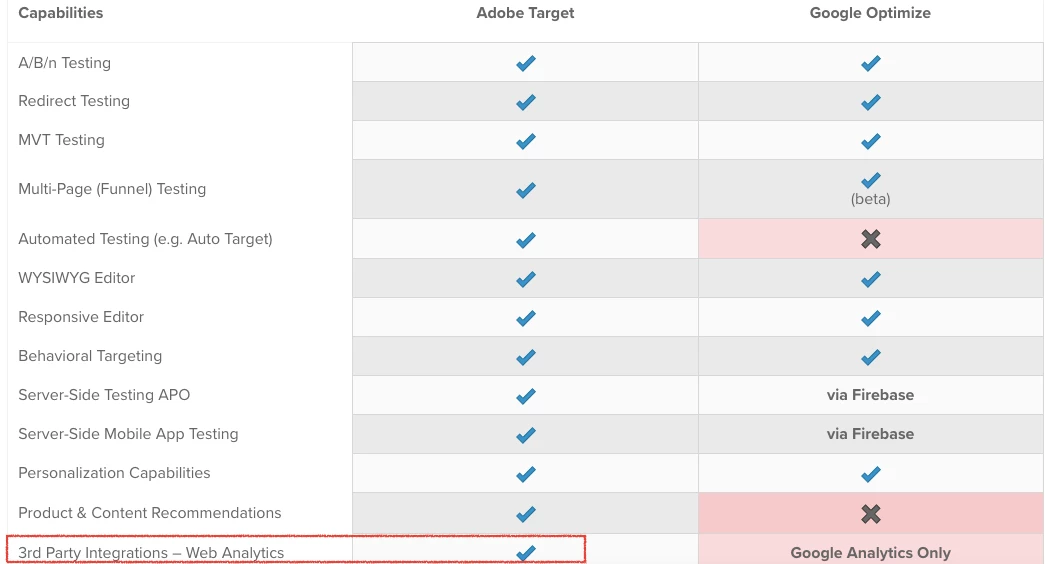
 

Reference Link : https://www.blastanalytics.com/blog/adobe-target-vs-google-optimize-360-testing-personalization


Cheers

This post is no longer active and is closed to new replies. Need help? Start a new post to ask your question.
Best answer by zach_shearer

Thanks Zach.


It's not that easy as I though it would be (for a non-technical professional like me)


I know a bit of Tag Manager but not Data Layer in depth.


I guess I need to figure out my use cases with solution mentioned in this How to Use Google Optimize & Tag Manager for Personalization 


If any other alternate solution is there (where Coding is not involved) or with Coding with easy Step-by-step procedure (any article you might have come across), pls let me know.


Thanks once again for your help.


Cheers


I don't know of a step-by-step, but the following documentation is probably the closest that it gets as far as I know. 


https://experienceleague.adobe.com/docs/target/using/administer/response-tokens.html?lang=en#section_04AA830826D94D4EBEC741B7C4F86156

1 reply

Level 2
December 7, 2021

Hi,


You can integrate Google Analytics and Adobe Target--I'm leading project on this integration at my company


Thanks


Level 2
December 11, 2021

Thanks @rc211 for your reply 👍


Is the Integration process (Google Analytics and Adobe Target) simple or a bit complex (Coding required)?


Thanks

zach_shearer
Level 4
December 13, 2021

There really isn't an official integration between Adobe Target and Google Analytics. You can always use something like the following after you fire your global Mbox to send Adobe Target activity data to the Google Tag Manager datalayer--or modify it to send Google Analytics events directly if installed on page. 


document.addEventListener(adobe.target.event.REQUEST_SUCCEEDED, function (e) {
    var tokens = e.detail.responseTokens;

    if (isEmpty(tokens)) {
        console.log("No active Adobe Target activity.");
        return;
    } else {
        var uniqueTokens = distinct(tokens);
        uniqueTokens.forEach(function (token) {
            window.dataLayer.push({
                'event': 'adobeTargetMetaData',
                'CampaignName': token["activity.name"],
                'CampaignId': token["activity.id"],
                'RecipeName': token["experience.name"],
                'RecipeId': token["experience.id"],
                'OfferId': token["option.id"],
                'OfferName': token["option.name"],
                'MboxName': e.detail.mbox
            });
        });
    }

    function isEmpty(val) {
        return (val === undefined || val == null || val.length <= 0) ? true : false;
    }

    function key(obj) {
        return Object.keys(obj)
            .map(function (k) {
                return k + "" + obj[k];
            })
            .join("");
    }

    function distinct(arr) {
        var result = arr.reduce(function (acc, e) {
            acc[key(e)] = e;
            return acc;
        }, {});

        return Object.keys(result)
            .map(function (k) {
                return result[k];
            });
    }
})