IMS Configuration in AEM - Unhealthy configuration | Community
Skip to main content
Level 2
November 29, 2022
Solved

IMS Configuration in AEM - Unhealthy configuration

  • November 29, 2022
  • 1 reply
  • 2108 views

I am trying to integrate AEM with Adobe Target using IMS and I have done all the configurations mentioned in the below link.

https://experienceleague.adobe.com/docs/experience-manager-cloud-service/content/sites/integrations/integration-adobe-target-ims.html?lang=en#configuring-an-ims-configuration-generating-a-public-key 


After completing the IMS configuration in AEM when I try to check health I am getting below error:
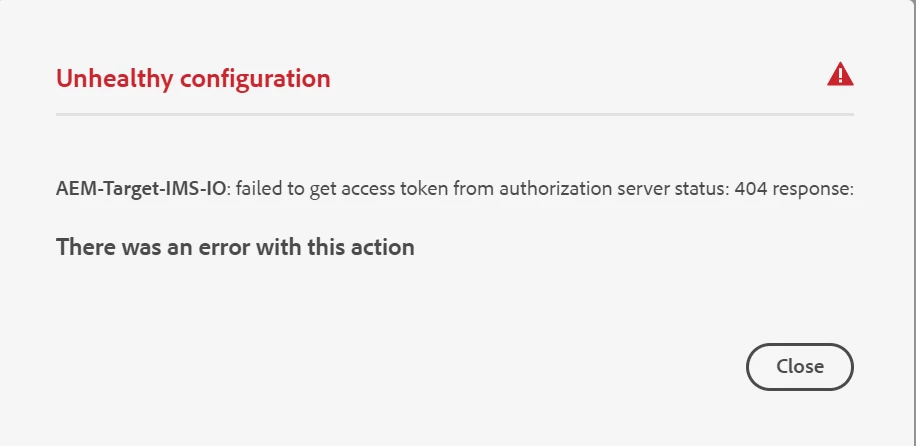
Any idea what I am missing here.


This post is no longer active and is closed to new replies. Need help? Start a new post to ask your question.
Best answer by vignesh_bhat

Hi Vignesh,

Check with your administrator, might be your are not having permission to see the API Credentials tab.


Interestingly the issue was with Authorization Server URL. In the documentation its mentioned that we need to give the complete URL with API Key but it works when we give only the domain.


Ex:

Correct config - https://ims-na1.adobelogin.com

Wrong config - https://ims-na1.adobelogin.com/c/c95###042A###########56d

1 reply

Avinash_Gupta_
Community Advisor and Adobe Champion
November 29, 2022

Hi @vignesh_bhat 


Have you done the following steps mentioned in the document? Also what's the product profiles are you using?


  1. Open the Adobe Admin Console:

  2. Navigate to Products (top toolbar), then select Adobe Target - <your-tenant-id> (from the left panel).

  3. Select Product Profiles, then your required workspace from the list presented. For example, Default Workspace.

  4. Select API Credentials, then the required integration configuration.

  5. Select Editor as the Product Role; instead of Observer.

Avinash_Gupta_
Community Advisor and Adobe Champion
December 1, 2022

Hey @vignesh_bhat : Is your issue resolved?

Try with the steps mentioned above it will solve your issue. Let me know in case you face any issue.

Level 2
December 2, 2022

Hi Avinash,

For default workspace I am not seeing API Credentials tab/option to change the privilege.

Issue still exists.