How to view multiple metrics in AA for a completed test | Community
Skip to main content
jonathanc652204
April 23, 2019
Solved

How to view multiple metrics in AA for a completed test

  • April 23, 2019
  • 2 replies
  • 1692 views

The only metric I am able to view in AA is revenue. All other metrics are grayed out.

This post is no longer active and is closed to new replies. Need help? Start a new post to ask your question.
Best answer by MihneaD

jonathanc65220441​,

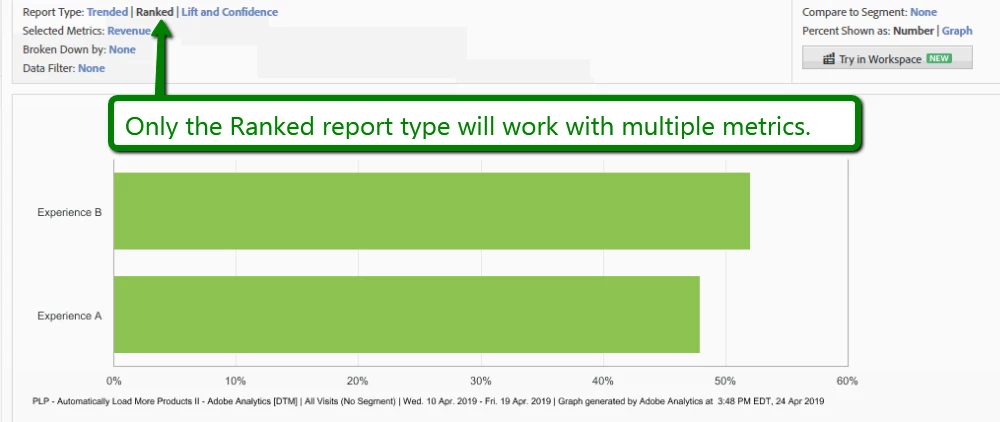
The report type you have selected is probably the culprit. In Analytics the Trended report will allow you to select multiple metrics at once the other two report times will force you to look at the data one metric at a time.

If this helps you don't forget to like, mark as helpful & mark as answer as that helps me. Hope you have a wonderful day.


Here is a screen-shot of where that is located in the UI:

Mihnea Docea
| Technical Support Consultant | Customer Experience | Adobe | (:: 1 (800) 497-0335

2 replies

MihneaD
Adobe Employee
MihneaDAdobe EmployeeAccepted solution
Adobe Employee
April 26, 2019

jonathanc65220441​,

The report type you have selected is probably the culprit. In Analytics the Trended report will allow you to select multiple metrics at once the other two report times will force you to look at the data one metric at a time.

If this helps you don't forget to like, mark as helpful & mark as answer as that helps me. Hope you have a wonderful day.


Here is a screen-shot of where that is located in the UI:


Mihnea Docea
| Technical Support Consultant | Customer Experience | Adobe | (:: 1 (800) 497-0335

jonathanc652204
April 26, 2019

Thanks, Mike

That resolved the issue.