How to use JSON offer to create an activity | Community
Skip to main content
Level 2
March 15, 2023
Solved

How to use JSON offer to create an activity

  • March 15, 2023
  • 2 replies
  • 2647 views

So I have list of JSON offers created using AEM . How can I use the JSON offers to create an activity in Target . Till now we are using HTML offers for creating activity. Is there any DEV work needed or Business authors can use the platform to create an activity.

I tried searching for any documentation but couldn't get anything from Adobe Documentation

This post is no longer active and is closed to new replies. Need help? Start a new post to ask your question.
Best answer by Matthew_Ravlich_ACG

Hi @indranilm,


You can use JSON offers in Adobe Target, but only using the form-based composer and not the Visual Experience Composer (VEC).


More JSON considerations:

  • JSON offers are currently available only for A/B Tests, Automated Personalization (AP), and Experience Targeting (XT) activities.
  • JSON offer can be retrieved directly when you are using the Server Side APIs and Mobile Node.js, Java, .NET, and Python SDKs.
  • In the browser, JSON offers can be retrieved ONLY via at.js 1.2.3 (or later) and using getOffer() by filtering actions using the setJson action.
  • JSON offers are delivered as native JSON objects rather than as strings. Consumers of these objects are no longer required to handle objects as strings and convert them to JSON objects.
  • JSON offers are not applied automatically as opposed to other offers (such as HTML offers) because JSON offers are non-visual offers. Developers must write code to get the offer using getOffer explicitly ().

1. Creating a JSON offer:
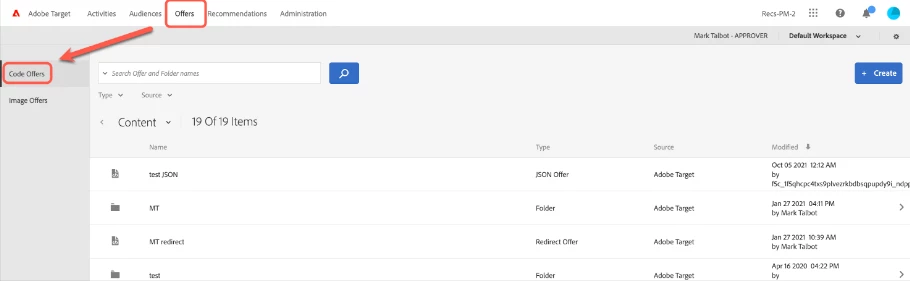
2. Click Offers > Code Offers.
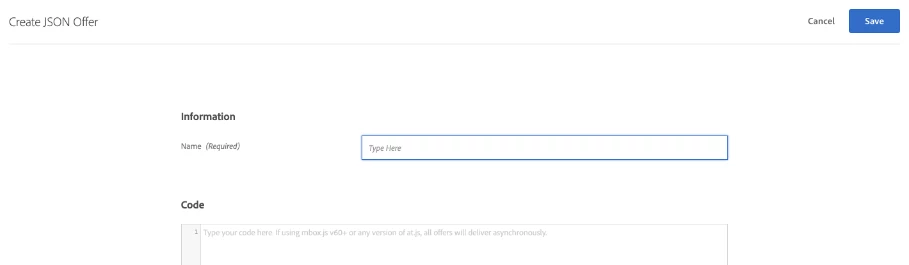
3. Type an offer name.

4. Type or paste your JSON code in the Code box.

5. Click Save.

Documentation: https://experienceleague.adobe.com/docs/target/using/experiences/offers/create-json-offer.html?lang=en


Also, there is an integration between AEM and Adobe Target which you might want to look into: https://experienceleague.adobe.com/docs/experience-manager-64/administering/integration/target.html?lang=en


I hope this helps.


Matthew Ravlich | ACG Digital | albertacg.com

2 replies

Matthew_Ravlich_ACG
Community Advisor
Matthew_Ravlich_ACGCommunity AdvisorAccepted solution
Community Advisor
March 15, 2023

Hi @indranilm,


You can use JSON offers in Adobe Target, but only using the form-based composer and not the Visual Experience Composer (VEC).


More JSON considerations:

  • JSON offers are currently available only for A/B Tests, Automated Personalization (AP), and Experience Targeting (XT) activities.
  • JSON offer can be retrieved directly when you are using the Server Side APIs and Mobile Node.js, Java, .NET, and Python SDKs.
  • In the browser, JSON offers can be retrieved ONLY via at.js 1.2.3 (or later) and using getOffer() by filtering actions using the setJson action.
  • JSON offers are delivered as native JSON objects rather than as strings. Consumers of these objects are no longer required to handle objects as strings and convert them to JSON objects.
  • JSON offers are not applied automatically as opposed to other offers (such as HTML offers) because JSON offers are non-visual offers. Developers must write code to get the offer using getOffer explicitly ().

1. Creating a JSON offer:

2. Click Offers > Code Offers.

3. Type an offer name.

4. Type or paste your JSON code in the Code box.

5. Click Save.

Documentation: https://experienceleague.adobe.com/docs/target/using/experiences/offers/create-json-offer.html?lang=en


Also, there is an integration between AEM and Adobe Target which you might want to look into: https://experienceleague.adobe.com/docs/experience-manager-64/administering/integration/target.html?lang=en


I hope this helps.


Matthew Ravlich | ACG Digital | albertacg.com

Perrin_Ennen
Community Advisor
Community Advisor
March 16, 2023

Hi @indranilm,

In case you need to insert the offers always in a same pattern in a page etc. You can also write an HTML offer that ensures that the data from the JSON (which you can get with adobe.target.getOffer) - is used to display your activity accordingly.


Hope this helps you.