How to set metrics to track journey progress to next page ? | Community
Skip to main content
Level 2
October 29, 2021
Solved

How to set metrics to track journey progress to next page ?

  • October 29, 2021
  • 1 reply
  • 809 views

Hi All,


I set a personalization on multipal page ,Ex.Page A1, Page A2,Page A3,Page A4, Page A5, Page A6 , on these pages I promoted a band,  which "Page B" is one of the destination URL.


I wanna see in Target Report,  how many visitors clicked the CTA and go to page B.


I wonder How to set metrics to track journey progress to next page ?


Thank you
This post is no longer active and is closed to new replies. Need help? Start a new post to ask your question.
Best answer by Gaureshk_Kodag

Hi @bazil_wang 


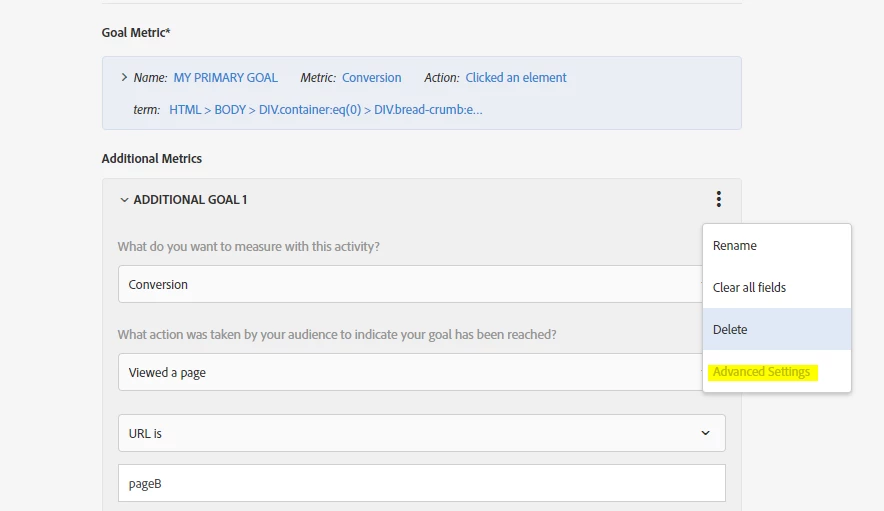
In this case you will need to select two goal metrics,

1. clicks on CTA

2. visited a pageB


Now, while selecting second metric "visited pageB", click on advanced settings.

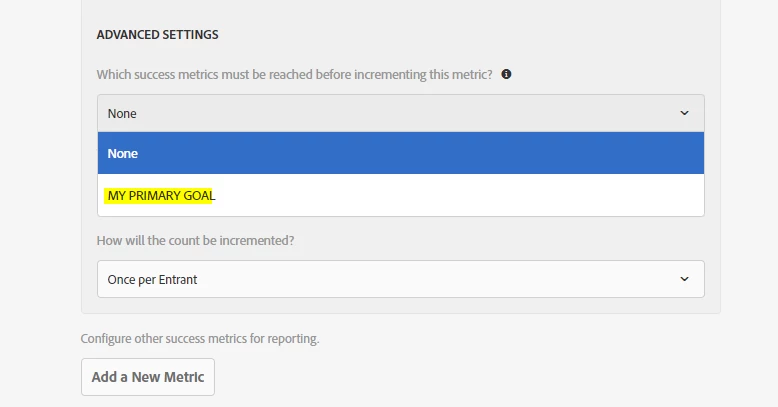
then, under "Which success metrics must be reached before incrementing this metric? " select "my primary goal".


what will happen here is, Visited a PageB will only be counted if user has clicked on CTA which is your primary goal.


Hope this helps.


1 reply

Gaureshk_Kodag
Adobe Employee
Gaureshk_KodagAdobe EmployeeAccepted solution
Adobe Employee
November 2, 2021

Hi @bazil_wang 


In this case you will need to select two goal metrics,

1. clicks on CTA

2. visited a pageB


Now, while selecting second metric "visited pageB", click on advanced settings.

then, under "Which success metrics must be reached before incrementing this metric? " select "my primary goal".


what will happen here is, Visited a PageB will only be counted if user has clicked on CTA which is your primary goal.


Hope this helps.