How to set an audience to include a number of zip codes with only the first 3 digits | Community
Skip to main content
Level 2
September 28, 2018
Solved

How to set an audience to include a number of zip codes with only the first 3 digits

  • September 28, 2018
  • 4 replies
  • 4731 views

Hello,

I would like to set up an audience to include a number of zip codes, however the list of zip codes that I have only include the first 3 digits.

Is there any way to achieve this in Target without having to find every possible zip code combination?

I know you can add a Geo rule to 'contain' a set of characters, but these wouldn't necessarily be the first 3.

Any suggestions would be appreciated.

Thanks,

Chris
This post is no longer active and is closed to new replies. Need help? Start a new post to ask your question.
Best answer by MihneaD

Chris,

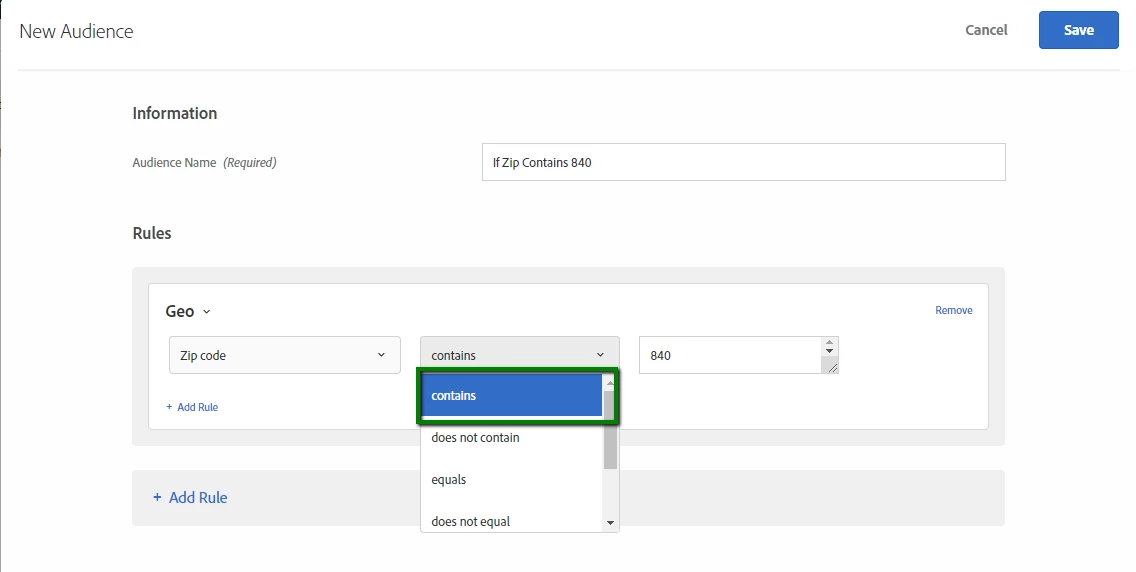
What a great idea! The closest you can get to this in the system is with a "contains" rule. See attached screen-shot below. However this rule could end up including other zip codes that end in those last three digits. So not exactly ideal However I can see the utility in having a "begins with" option in that second drop down. I've emailed product management about this internally however features are always best requested by customers from:https://forums.adobe.com/community/experience-cloud/marketing-cloud/target/ideas if you let me know in a reply here after you submit the idea I'll make sure to vote for it!


Mihnea Docea  | Technical Support Rep, Customer Care | Customer & Employee Experience | Adobe | (:: 1 (800) 497-0335

4 replies

Adobe Employee
September 28, 2018

chrisl92739620

Target Geo audiences actually use a third party license from DeviceAtlas, so this may not be possible right out of the box. However, you may be able to combine the default audience, with a custom profile script to assist suit your audience needs, to contain only a specific number of of digits.

Geo

MihneaD
Adobe Employee
MihneaDAdobe EmployeeAccepted solution
Adobe Employee
September 28, 2018

Chris,

What a great idea! The closest you can get to this in the system is with a "contains" rule. See attached screen-shot below. However this rule could end up including other zip codes that end in those last three digits. So not exactly ideal However I can see the utility in having a "begins with" option in that second drop down. I've emailed product management about this internally however features are always best requested by customers from:https://forums.adobe.com/community/experience-cloud/marketing-cloud/target/ideas if you let me know in a reply here after you submit the idea I'll make sure to vote for it!


Mihnea Docea  | Technical Support Rep, Customer Care | Customer & Employee Experience | Adobe | (:: 1 (800) 497-0335

Level 2
October 1, 2018

Thanks Mihnea,

This is what I thought, I've submitted the idea - Enhance audience rules to target zip codes that begin with a set of characters

Thanks,

Chris

Adobe Employee
October 1, 2018

Hi Chris,

This can currently be done as Ram was suggesting with a profile script. As scripts can employ regular expressions. Something like this would return true or false based on the zip STARTING with 840:

Then use the profile script response to define your audience. Visitor profile > user.SCRIPTNAME equals true.

August 2, 2023

Hi 
I have more than 10k zipcodes to be targetted , how to proceed with AEP ? 
If I try segment builder , it says you can only input 250 values , and I am stuck