How to print Activity ID or Name on the browser console for debugging? | Community
Skip to main content
Level 2
July 14, 2023
Solved

How to print Activity ID or Name on the browser console for debugging?

  • July 14, 2023
  • 1 reply
  • 3179 views

I have a react application which has Adobe Target SDK deployed on the server side and using at.js 2.x. 
How can I print the Activity ID or Activity Name on the browser console so that it's useful for debugging or checking if the correct offer is applied?
Below is my current TriggerView function: 
I would like to console log the Activity ID after the success call. 

export function triggerView(viewName, mbox) { if (typeof adobe !== 'undefined' && adobe.target && typeof adobe.target.triggerView === 'function') { adobe.target.getOffer({ "mbox": mbox, "success": function (offer) { if (offer.length) { adobe.target.applyOffer({ "mbox": mbox, "offer": offer }); } }, "error": function (status, error) { console.log('Error', status, error); }, "timeout": 3000 });
 

This post is no longer active and is closed to new replies. Need help? Start a new post to ask your question.
Best answer by Gokul_Agiwal

Hi @pravinrams1 

you can achieve this through Response tokens

RT helps you and can provide the information include details about the activity, offer, experience, user profile, geo information, and more. 

Here is the link of ttMETA plugin that you can inject directly into your HTML page or through tag manager and print all the Activity ID or Activity Name and other info on console. 

https://experienceleague.adobe.com/docs/target/using/administer/response-tokens.html?lang=en#debugging-using-the-equivalent-of-the-ttmeta-plugin 


If in case if you're using the AEP Web SDK then here is the solution

Hope this helps. 


Hi @pravinrams1 

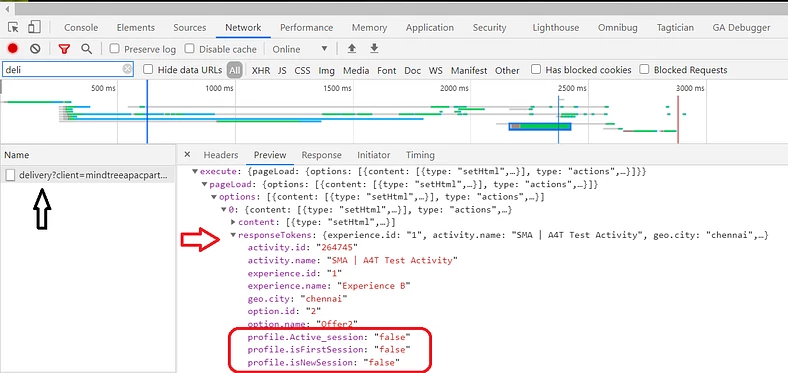
You can also look for the requested info using Browser Network tab and search for “delivery” inside the search box. Please see in the below screenshot in response Token object you can able to see activity.id, name, experience name and other info.

1 reply

Adobe Employee
July 14, 2023

@pravinrams1 Here is the syntax to fetch the Activity name and Activity ID in the custom code

1. Campaign Name: ${campaign.name}

2. Campaign ID: ${campaign.id}

Hope this helps to achieve your scenario

Level 2
July 14, 2023

@dsingh16 Sorry, I am new to Adobe Target. Where do you put this custom code?

Level 2
July 17, 2023

@pravinrams1 When you create Target activities, you will see an option as Modification Type, choose the modification type as Custom code, and add code in the head section. 

Help link: https://experienceleague.adobe.com/docs/target/using/experiences/vec/modifications/vec-code-editor.html?lang=en#section_26CB3360097D400FB02E20AE5FDBA352


Hello! It looks like it's only VEC but I am using form method, is there a similar option for "Form-based" as well?