How to change the layout using VEC in a MVT | Community
Skip to main content
Level 2
June 4, 2024
Solved

How to change the layout using VEC in a MVT

  • June 4, 2024
  • 1 reply
  • 572 views

We are trying to deliver a MVT in Target and the requirements are as below:

1) Change the layout of an opt-in element lead form
2) Change the verbiage of the same element

We are able to change the layout using VEC in a AB test(using arrange/move), but we cannot seem to do the same using the VEC in a MVT. Could anyone please let us know the best approach here?
This post is no longer active and is closed to new replies. Need help? Start a new post to ask your question.
Best answer by pradnya_balvir

Hi @vikramgk9  

MVT compares combinations of offers in elements on a page to determine which combination performs the best for a specific audience.

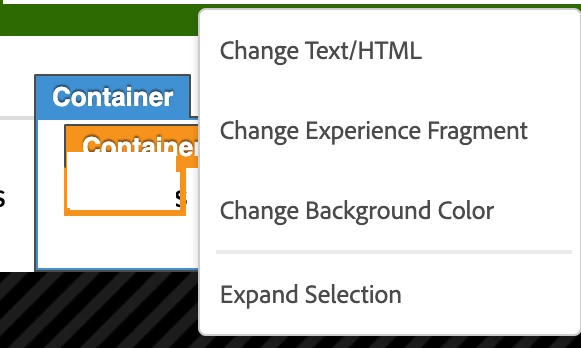
You can change the text, background colour as per the requirement. Also create an offer or experience fragment as per the requirement and change it.


I would like to suggest, if you are looking for comparing two experiences performance as per the changes then use A/B test. 


1 reply

pradnya_balvir
Community Advisor
pradnya_balvirCommunity AdvisorAccepted solution
Community Advisor
June 4, 2024

Hi @vikramgk9  

MVT compares combinations of offers in elements on a page to determine which combination performs the best for a specific audience.

You can change the text, background colour as per the requirement. Also create an offer or experience fragment as per the requirement and change it.


I would like to suggest, if you are looking for comparing two experiences performance as per the changes then use A/B test.