Hide mbox after conversion | Community
Skip to main content
New Member
February 1, 2024
Solved

Hide mbox after conversion

  • February 1, 2024
  • 1 reply
  • 866 views

Hi Guys,


Is there a profile script that can return true or false after a user has converted after engaging with an mbox.

Basically we want hide the mbox after a user has reached the confirmation page.

This post is no longer active and is closed to new replies. Need help? Start a new post to ask your question.
Best answer by alexbishop

A couple of different ways of doing this but probably the most simple is to exclude them with a more advanced Reporting Settings setup:
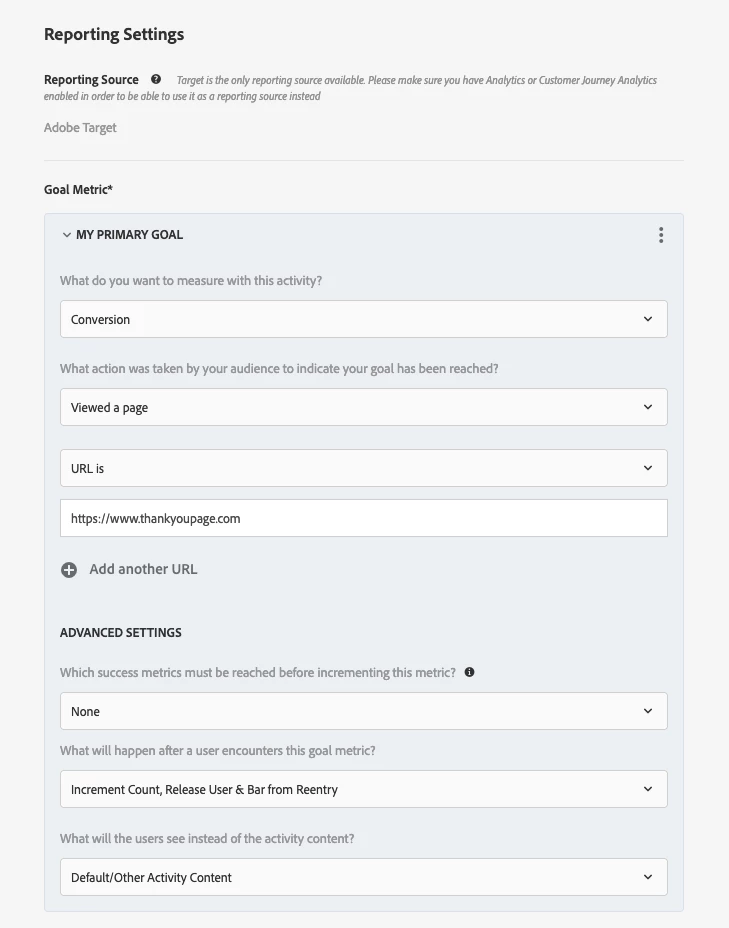
By clicking on the 3 dots you can select the Advanced Settings option, which then allows you to disqualify & bar from re-entry. This will work if you're just interested in excluding people from the activity in question; however, you might also want to push those users into a new audience that could potentially be targeted in a follow-up activity, in which case you could use a profile script instead. 

1 reply

alexbishop
Adobe Employee
Adobe Employee
February 5, 2024

Just trying to understand exactly the use case, what do you mean by "engaging with an mbox"? Do you mean that the visitor was shown a Target activity and has clicked on a call to action that was part of that activity? And then they converted so you want to stop showing them the activity?

user08466Author
New Member
February 5, 2024

Indeed. In essence, the user is presented with an activity. Upon clicking on a call-to-action (CTA), they are redirected to a thank you page. Our objective is to cease displaying the activity to the user once they have viewed the thank you page. Conversely, if they do not confirm, they will continue to encounter the same card repeatedly.

alexbishop
Adobe Employee
alexbishopAdobe EmployeeAccepted solution
Adobe Employee
February 5, 2024

A couple of different ways of doing this but probably the most simple is to exclude them with a more advanced Reporting Settings setup:

By clicking on the 3 dots you can select the Advanced Settings option, which then allows you to disqualify & bar from re-entry. This will work if you're just interested in excluding people from the activity in question; however, you might also want to push those users into a new audience that could potentially be targeted in a follow-up activity, in which case you could use a profile script instead.