Exclude OS From Test | Community
Skip to main content
This post is no longer active and is closed to new replies. Need help? Start a new post to ask your question.
Best answer by MihneaD

Brion,

If you ever need to exclude something from an existing audience there is a way to do this. Lets say you have a United States audience but you want to exclude all visitors who are on Linux OS. You could accomplish that like this:

1. Create an audience that looks for the specific os you want to exclude save it to the audience library.

2. Edit the activity in question.

3. Click ont he audience and use the "Combine Multiple Audiences" feature to combine the "United States" audience with the "OS = Linux" audience.

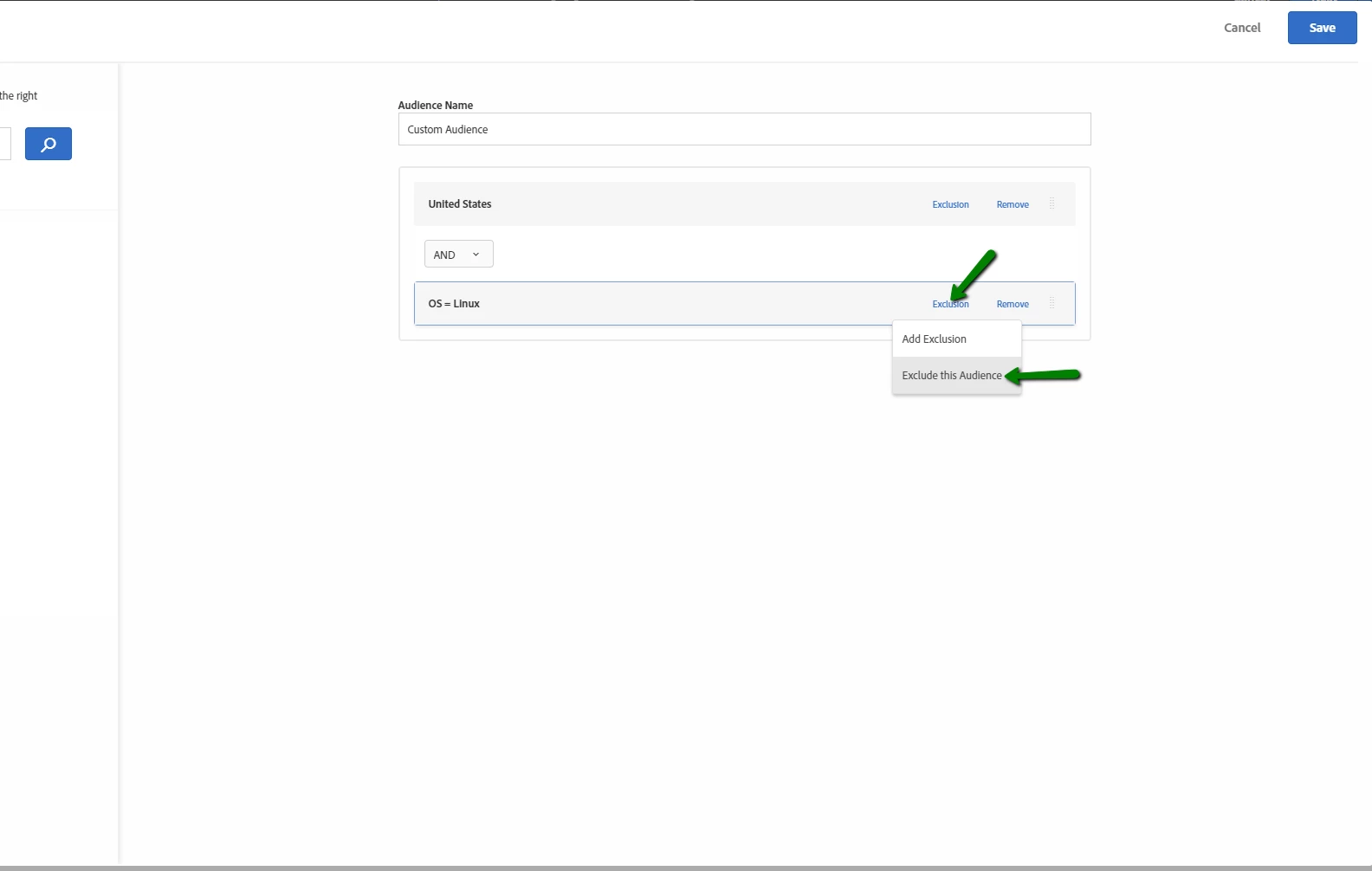
4. For the "OS = Linux" audience click on Exclusion > Exclude this audience


Combine audiences:

Exclude audiences:
Hope you like this in depth explanation and that it's answered your question. If not let me know.
3 replies

Adobe Employee
August 20, 2018

In the Audience Configuration for OS, you don't get to choose anything beyond the OS itself and you only have 3 options: Windows, Linux, Mac.  If you wanted to exclude one, simply add a rule to include one and then another rule separated by the boolean OR to include the other and the third OS would then be excluded.

MihneaD
Adobe Employee
MihneaDAdobe EmployeeAccepted solution
Adobe Employee
August 20, 2018

Brion,

If you ever need to exclude something from an existing audience there is a way to do this. Lets say you have a United States audience but you want to exclude all visitors who are on Linux OS. You could accomplish that like this:

1. Create an audience that looks for the specific os you want to exclude save it to the audience library.

2. Edit the activity in question.

3. Click ont he audience and use the "Combine Multiple Audiences" feature to combine the "United States" audience with the "OS = Linux" audience.

4. For the "OS = Linux" audience click on Exclusion > Exclude this audience


Combine audiences:

Exclude audiences:

Hope you like this in depth explanation and that it's answered your question. If not let me know.

bkmills1
bkmills1Author
August 21, 2018

@Mihnea - Thank you for the in depth explanation!!  I haven't needed to combine audiences in a while and actually forgot that you can do this.

Works like a charm!!!

- Brion