Editing/rearranging the audience waterfall in new UI | Community
Skip to main content
Level 2
June 6, 2025
Solved

Editing/rearranging the audience waterfall in new UI

  • June 6, 2025
  • 1 reply
  • 519 views

Does anyone know how to edit and rearrange the order of the audience/experience waterfall within an activity in the new UI?? Previously you could hold and drag them into a new order on the 'edit targeting' tab within the activity edit screen.
Best answer by NarenKotipalli

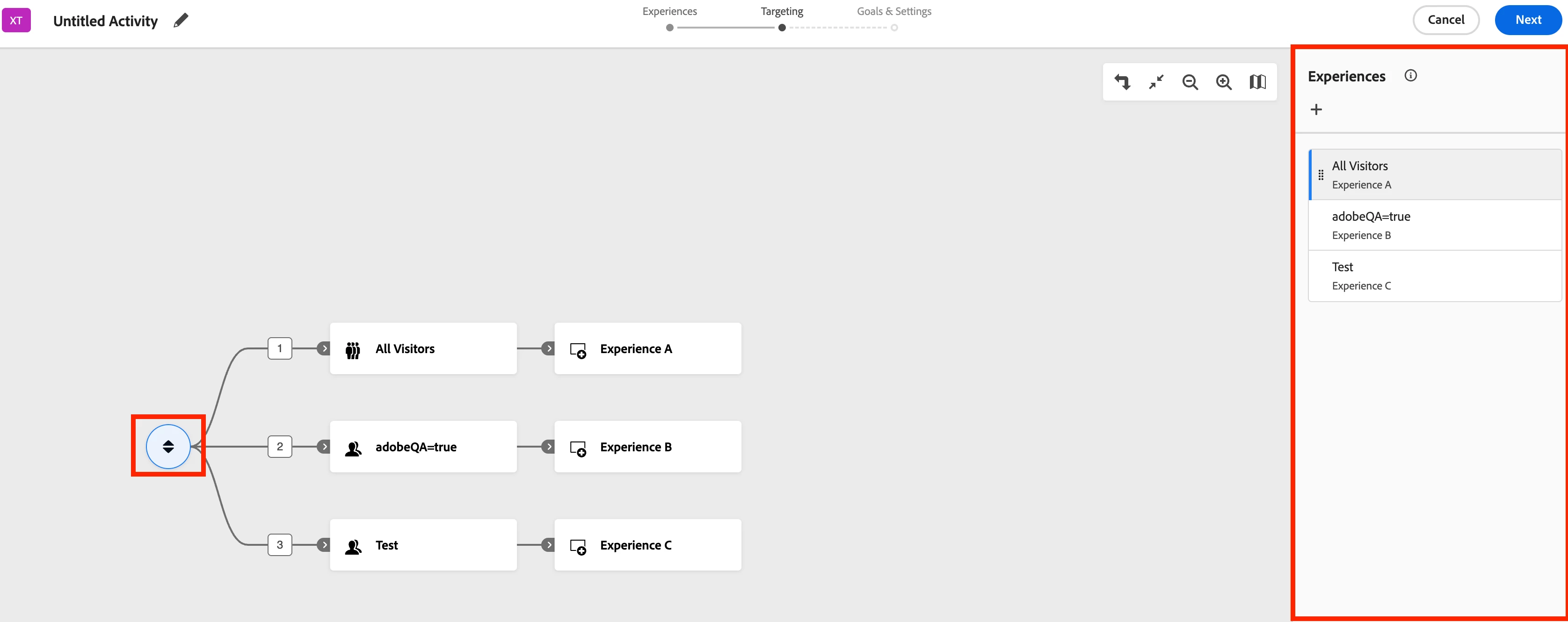
@jonathanhi5 In the Targeting section, click on the Rearrange icon (highlighted below). This will open a panel on the right, where you can drag and drop the experiences in your preferred order. I hope this resolves your query.


1 reply

NarenKotipalli
NarenKotipalliAccepted solution
Level 3
June 9, 2025

@jonathanhi5 In the Targeting section, click on the Rearrange icon (highlighted below). This will open a panel on the right, where you can drag and drop the experiences in your preferred order. I hope this resolves your query.


Level 2
June 9, 2025

Thank you!!