
Customer Attribute Not Appearing in Customer Profile | Community
Skip to main content
Eli-Kirkley
July 10, 2024
Solved

Customer Attribute Not Appearing in Customer Profile

  • July 10, 2024
  • 1 reply
  • 921 views

I have created a new customer attribute, have uploaded data, and can see it in Target under Visitor Profile when creating an audience. But when I create an activity with the audience and QA, I do not see this attribute listed in the Profile Snapshot when looking at the Experience Platform debugger. Am I missing a step to make this customer attribute usable as a Target audience?
This post is no longer active and is closed to new replies. Need help? Start a new post to ask your question.
Best answer by Gokul_Agiwal

Hi @eli-kirkley 


I hope you've implemented all the steps from the documentation correctly and your primary ID set either using Send the ID as a `mbox3rdPartyID` in mbox call or using method called setCustomerID() of the ECID service 


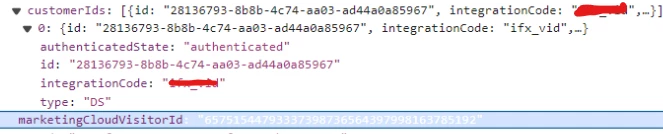
If in case you use setCutomerID then - you can able to see in Target payload like below - Please check and see if you're getting that way you can validate. 

OR through mbox3rdPartyID - you can also validate in network call.  Can you confirm please? 


1 reply

pradnya_balvir
Community Advisor
Community Advisor
July 11, 2024

Hi @eli-kirkley ,


Can you please refer below document for customer attributes implementation.


https://experienceleague.adobe.com/en/docs/target/using/audiences/visitor-profiles/working-with-customer-attributes


Eli-Kirkley
July 11, 2024

Thanks Prads, but I have already followed the steps in that documentation. I have created the audience in Target using the CA as the documentation below recommends, but it does not appear in the profile snapshot when testing. 

Use customer attributes in Target

You can use customer attributes in Target in the following ways:

Creating targeting audiences

In Target, you can select a customer attribute from the Visitor Profile section when creating an audience. All customer attributes have the prefix < data_source_name > in the list

Gokul_Agiwal
Community Advisor
Gokul_AgiwalCommunity AdvisorAccepted solution
Community Advisor
July 11, 2024

Hi @eli-kirkley 


I hope you've implemented all the steps from the documentation correctly and your primary ID set either using Send the ID as a `mbox3rdPartyID` in mbox call or using method called setCustomerID() of the ECID service 


If in case you use setCutomerID then - you can able to see in Target payload like below - Please check and see if you're getting that way you can validate. 

OR through mbox3rdPartyID - you can also validate in network call.  Can you confirm please?