Criteria set-up. Display products that matches an entity parameter on mbox | Community
Skip to main content
mikeetiuPH
Level 4
October 12, 2017
Solved

Criteria set-up. Display products that matches an entity parameter on mbox

  • October 12, 2017
  • 1 reply
  • 1979 views

Hi - I am trying to create a recs component that should provide product recommendations based on the entity parameter I am passing in mbox.

In the mbox call, I am passing an entity parameter which is 'entity.status'

In the data catalog, my products also have that attribute - entity.status.

What I want to happen is if the value I passed to the entity.status parameter is '1' in the mbox call, I want to see in recs all of the products in my data catalog that has a entity.status = 1.

I don't want to use the most viewed algorithm since my site is getting very low traffic.
This post is no longer active and is closed to new replies. Need help? Start a new post to ask your question.
Best answer by JonTehero

Hi Michael,

You are really close!

If you pass in an mbox parameter (a.k.a. targetPageParameter) called "status" -- not entity.status -- this use-case will work. So set status equal to 1 in the parameter an make sure that the items in the catalog have a corresponding entity.status value equal to 1. Also make sure you are passing both of them in the same way (either as a string or a value) so that the matching isn't trying to compare different types of data. Once you are passing in the parameter status=1, you can follow the setup below. Hope that helps!

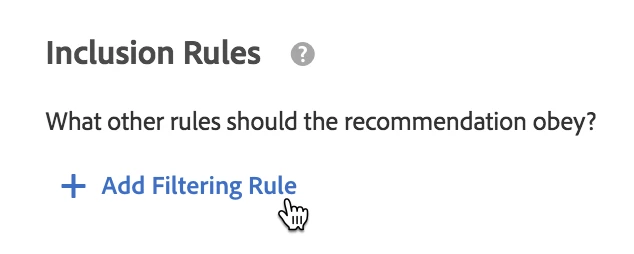
In your Criteria Card, click "Add Filtering Rule"

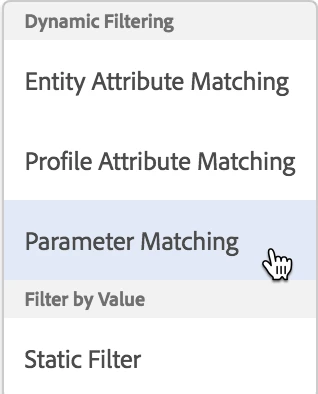
then select "Parameter Matching"

Then you create a rule that looks like this (you may need to change the name of the mbox):

1 reply

JonTeheroAdobe EmployeeAccepted solution
Adobe Employee
December 1, 2017

Hi Michael,

You are really close!

If you pass in an mbox parameter (a.k.a. targetPageParameter) called "status" -- not entity.status -- this use-case will work. So set status equal to 1 in the parameter an make sure that the items in the catalog have a corresponding entity.status value equal to 1. Also make sure you are passing both of them in the same way (either as a string or a value) so that the matching isn't trying to compare different types of data. Once you are passing in the parameter status=1, you can follow the setup below. Hope that helps!

In your Criteria Card, click "Add Filtering Rule"

then select "Parameter Matching"

Then you create a rule that looks like this (you may need to change the name of the mbox):