Build audience based on click event | Community
Skip to main content
Level 2
October 2, 2024
Solved

Build audience based on click event

  • October 2, 2024
  • 2 replies
  • 753 views

Hello Target Community, 

i want to track a click event of an Element on my Page, if the element is clicked the user should be in a specific audience. 


i tried this example 


https://experienceleague.adobe.com/en/docs/experience-cloud-kcs/kbarticles/ka-14550


but changed the code to:

adobe.target.trackEvent({mbox: 'target-global-mbox', params: {'person': 'private'}})


in my profile script i try to read it out like this:

if (mbox.name == 'target-global-mbox') { var x = mbox.param('person') return x; }


and try to add a audience based on that like this:
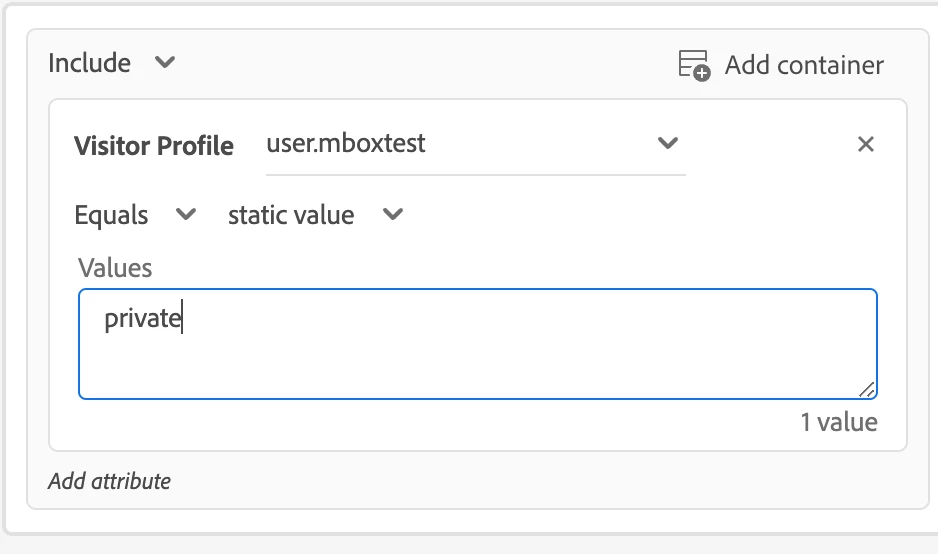
 

but the audience is not picking because the site is not changing. Am i missing something here? 


This post is no longer active and is closed to new replies. Need help? Start a new post to ask your question.
Best answer by kandersen-1

Hi @floriangr 

I wouldn't necessarily recommend that you use the global-target-mbox in the your trackevent function. When doing so the sdid is being reset, which is used for ensuring data between AA and AT is stitched together correctly.

If you're not using AA you can ignore the above. 


Besides that, nothing in your setup stands out to me. Remember that after the click, a page refresh will need to happen in order for the activity to be evaluated. The trackevent() does not request any Target activities.

Have you debugged using Target Trace to see whether you're in the audience or if the issue is somewhere else? https://experienceleague.adobe.com/en/docs/target-learn/tutorials/troubleshooting/troubleshoot-with-target-traces 

2 replies

kandersen-1
Community Advisor
kandersen-1Community AdvisorAccepted solution
Community Advisor
October 3, 2024

Hi @floriangr 

I wouldn't necessarily recommend that you use the global-target-mbox in the your trackevent function. When doing so the sdid is being reset, which is used for ensuring data between AA and AT is stitched together correctly.

If you're not using AA you can ignore the above. 


Besides that, nothing in your setup stands out to me. Remember that after the click, a page refresh will need to happen in order for the activity to be evaluated. The trackevent() does not request any Target activities.

Have you debugged using Target Trace to see whether you're in the audience or if the issue is somewhere else? https://experienceleague.adobe.com/en/docs/target-learn/tutorials/troubleshooting/troubleshoot-with-target-traces 

Test forum signature
bryan_w_bounteo
Level 2
October 5, 2024

The first thing I would do is enable the response token for `profile.mboxtest` in the Administration tab so you can see the value in the response of the delivery calls.

Also, if you want the result to be sticky you might need to surround the code with a check of whether the profile variable has already been set, otherwise it might get wiped out on the next call if `person` is empty or not set.

if (!user.get('mboxtest') && mbox.name === 'target-global-mbox') { return mbox.param('person'); }

or if it could later get set to something else, like `public` then

if (mbox.name === 'target-global-mbox') { var x = mbox.param('person') if (x) { return x; } }