Adobe Target to GA integration under Web SDK | Community
Skip to main content
Level 2
December 20, 2024
Solved

Adobe Target to GA integration under Web SDK

  • December 20, 2024
  • 0 replies
  • 1524 views

Hi all


We are currently running our Adobe Target via WebSDK, while the integration is done via Adobe Tags (Adobe Launch). 

We would like to leverage response token to pass the Adobe Target experience data to Google Analytics like it's suggested here: 

https://experienceleague.adobe.com/en/docs/target/using/administer/response-tokens


Our questions: 

  • From the example given in the above documentation, it looks to me it's hooking to a send event command, which we don't have it on our HTML but rather configured via Launch. Do we simply put the script into Launch by adding an addition action after the WebSDK call? 
  •  If the above is true, do we just need to copy this snippet of code to make it work? 
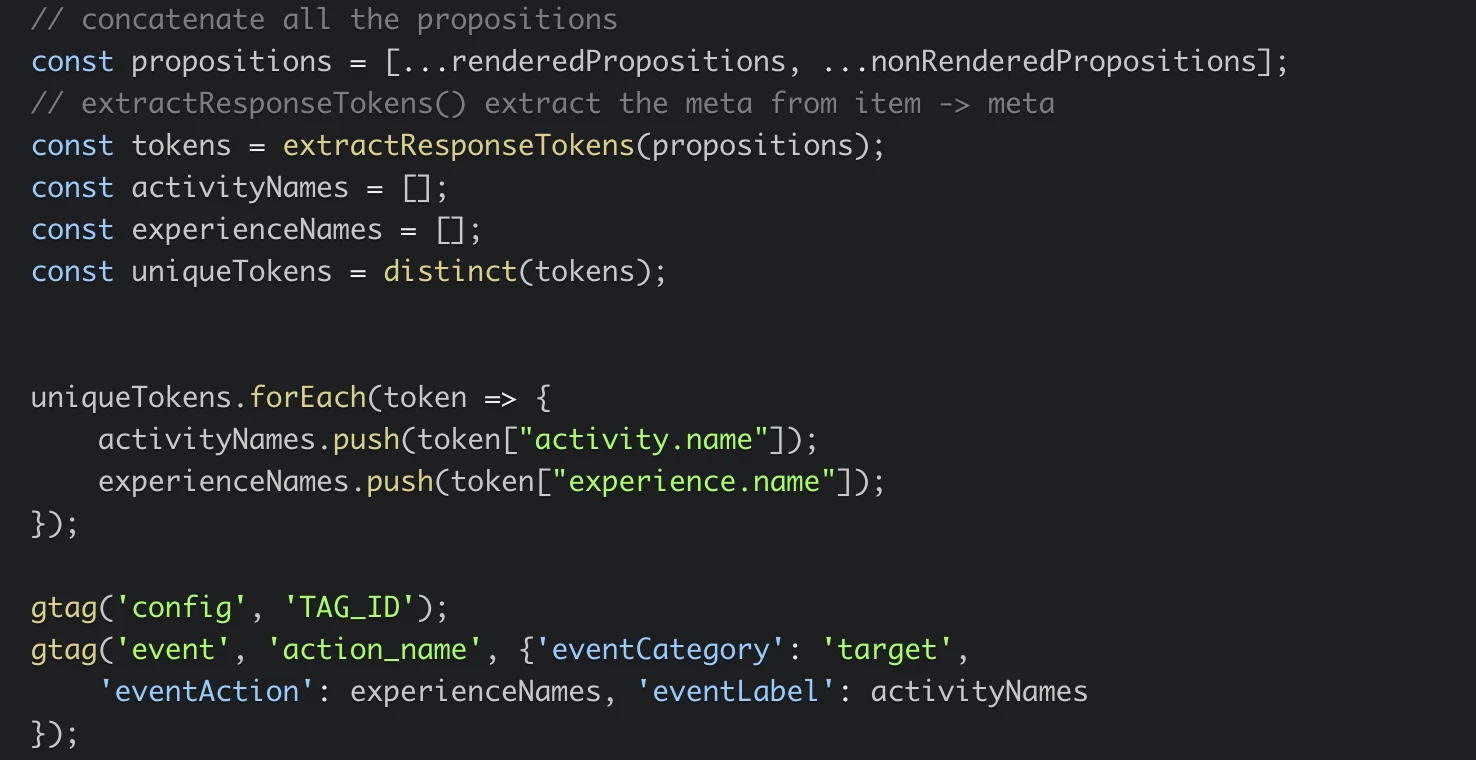
     

    Thanks!!!!
Best answer by RaymondCh4

@raymondch4 Sure, let us know how it goes. Feel free to post your observation. 


Hi @gokul_agiwal 


By just copy and pasting the code on Launch is not working; but when I follow the solution posted here it works:

https://www.youtube.com/watch?v=BG9J2-vcU0Q&ab_channel=DisaRastogi-DigitalAnalyticsontheGo


I think the code is pretty much the same as what you provided, but this example also highlight the Launch rule that we should configure to make this work. 


Thanks!

Gokul_Agiwal
Community Advisor
Community Advisor
December 24, 2024


Hey @raymondch4 

Yes, you can integrate the AT response tokens and pass the data to Google Analytics via Launch however simply copy the code from documentation might not help so below is the complete snippet.  See if this helps for you. 


Also you asked above - any alternative way to integrate code other than Launch, so the answer is yes however there are pros and cons and I'm sure for those way you've to dependent on with your other departments. Still let's discuss other alternatives.   


1) Direct script injection on the website - see if you have an access to codebase and I'm sure you need to be discuss this with your dev team. 

2) Server side solution. 


Recommended approach -

Use Adobe Launch ( Data Collection) as this gives better control and both your web sdk and Target configuration in Launch only. 

So I would suggest to align with your department who manage the changes for Adobe Launch and let them know about below so they will guide you. 


<script async src="https://www.googletagmanager.com/gtag/js?id=TAG_ID"></script> <script type="text/javascript"> // Initialize Google Analytics // Send Adobe WebSDK event alloy("sendEvent", { type: "web", renderDecisions: true }) .then(({ renderedPropositions, nonRenderedPropositions }) => { // Concatenate all propositions const propositions = [...renderedPropositions, ...nonRenderedPropositions]; // Extract response tokens from propositions const extractResponseTokens = (propositions) => { return propositions.flatMap(proposition => (proposition.items || []).map(item => item.meta || {}) ); }; const tokens = extractResponseTokens(propositions); // Ensure unique tokens const distinct = (tokens) => { const seen = new Set(); return tokens.filter(token => { const identifier = token["activity.name"] + token["experience.name"]; if (seen.has(identifier)) { return false; } seen.add(identifier); return true; }); }; const uniqueTokens = distinct(tokens); // Collect activity names and experience names const activityNames = []; const experienceNames = []; uniqueTokens.forEach(token => { if (token["activity.name"]) activityNames.push(token["activity.name"]); if (token["experience.name"]) experienceNames.push(token["experience.name"]); }); // Send the event to Google Analytics gtag('event', 'adobe_target_experience', { 'event_category': 'Adobe Target', 'event_action': experienceNames.join(', '), 'event_label': activityNames.join(', ') }); }) .catch(error => { console.error("Error sending event to Adobe Target:", error); }); </script>


Hope this helps.  Feel free to post question if not solve. 

Thanks


Level 2
January 2, 2025


Hey @raymondch4 

Yes, you can integrate the AT response tokens and pass the data to Google Analytics via Launch however simply copy the code from documentation might not help so below is the complete snippet.  See if this helps for you. 


Also you asked above - any alternative way to integrate code other than Launch, so the answer is yes however there are pros and cons and I'm sure for those way you've to dependent on with your other departments. Still let's discuss other alternatives.   


1) Direct script injection on the website - see if you have an access to codebase and I'm sure you need to be discuss this with your dev team. 

2) Server side solution. 


Recommended approach -

Use Adobe Launch ( Data Collection) as this gives better control and both your web sdk and Target configuration in Launch only. 

So I would suggest to align with your department who manage the changes for Adobe Launch and let them know about below so they will guide you. 


<script async src="https://www.googletagmanager.com/gtag/js?id=TAG_ID"></script> <script type="text/javascript"> // Initialize Google Analytics // Send Adobe WebSDK event alloy("sendEvent", { type: "web", renderDecisions: true }) .then(({ renderedPropositions, nonRenderedPropositions }) => { // Concatenate all propositions const propositions = [...renderedPropositions, ...nonRenderedPropositions]; // Extract response tokens from propositions const extractResponseTokens = (propositions) => { return propositions.flatMap(proposition => (proposition.items || []).map(item => item.meta || {}) ); }; const tokens = extractResponseTokens(propositions); // Ensure unique tokens const distinct = (tokens) => { const seen = new Set(); return tokens.filter(token => { const identifier = token["activity.name"] + token["experience.name"]; if (seen.has(identifier)) { return false; } seen.add(identifier); return true; }); }; const uniqueTokens = distinct(tokens); // Collect activity names and experience names const activityNames = []; const experienceNames = []; uniqueTokens.forEach(token => { if (token["activity.name"]) activityNames.push(token["activity.name"]); if (token["experience.name"]) experienceNames.push(token["experience.name"]); }); // Send the event to Google Analytics gtag('event', 'adobe_target_experience', { 'event_category': 'Adobe Target', 'event_action': experienceNames.join(', '), 'event_label': activityNames.join(', ') }); }) .catch(error => { console.error("Error sending event to Adobe Target:", error); }); </script>


Hope this helps.  Feel free to post question if not solve. 

Thanks


Thank you for the detailed answer, we will try it out and will post it here whether it works or not. Thanks again!!!

Gokul_Agiwal
Community Advisor
Community Advisor
January 2, 2025

Thank you for the detailed answer, we will try it out and will post it here whether it works or not. Thanks again!!!


@raymondch4 Sure, let us know how it goes. Feel free to post your observation. 

RaymondCh4AuthorAccepted solution
Level 2
February 26, 2025

@raymondch4 Sure, let us know how it goes. Feel free to post your observation. 


Hi @gokul_agiwal 


By just copy and pasting the code on Launch is not working; but when I follow the solution posted here it works:

https://www.youtube.com/watch?v=BG9J2-vcU0Q&ab_channel=DisaRastogi-DigitalAnalyticsontheGo


I think the code is pretty much the same as what you provided, but this example also highlight the Launch rule that we should configure to make this work. 


Thanks!

Michael_Soprano
Level 10
May 11, 2025


Hey @raymondch4 

Yes, you can integrate the AT response tokens and pass the data to Google Analytics via Launch however simply copy the code from documentation might not help so below is the complete snippet.  See if this helps for you. 


Also you asked above - any alternative way to integrate code other than Launch, so the answer is yes however there are pros and cons and I'm sure for those way you've to dependent on with your other departments. Still let's discuss other alternatives.   


1) Direct script injection on the website - see if you have an access to codebase and I'm sure you need to be discuss this with your dev team. 

2) Server side solution. 


Recommended approach -

Use Adobe Launch ( Data Collection) as this gives better control and both your web sdk and Target configuration in Launch only. 

So I would suggest to align with your department who manage the changes for Adobe Launch and let them know about below so they will guide you. 


<script async src="https://www.googletagmanager.com/gtag/js?id=TAG_ID"></script> <script type="text/javascript"> // Initialize Google Analytics // Send Adobe WebSDK event alloy("sendEvent", { type: "web", renderDecisions: true }) .then(({ renderedPropositions, nonRenderedPropositions }) => { // Concatenate all propositions const propositions = [...renderedPropositions, ...nonRenderedPropositions]; // Extract response tokens from propositions const extractResponseTokens = (propositions) => { return propositions.flatMap(proposition => (proposition.items || []).map(item => item.meta || {}) ); }; const tokens = extractResponseTokens(propositions); // Ensure unique tokens const distinct = (tokens) => { const seen = new Set(); return tokens.filter(token => { const identifier = token["activity.name"] + token["experience.name"]; if (seen.has(identifier)) { return false; } seen.add(identifier); return true; }); }; const uniqueTokens = distinct(tokens); // Collect activity names and experience names const activityNames = []; const experienceNames = []; uniqueTokens.forEach(token => { if (token["activity.name"]) activityNames.push(token["activity.name"]); if (token["experience.name"]) experienceNames.push(token["experience.name"]); }); // Send the event to Google Analytics gtag('event', 'adobe_target_experience', { 'event_category': 'Adobe Target', 'event_action': experienceNames.join(', '), 'event_label': activityNames.join(', ') }); }) .catch(error => { console.error("Error sending event to Adobe Target:", error); }); </script>


Hope this helps.  Feel free to post question if not solve. 

Thanks


I have find such a video:

https://www.youtube.com/watch?v=BG9J2-vcU0Q

Generally it advises to set up - Send event complete Rule and the send as Actions such a code:

However I have got doubts if that snippet applies to all activities returned to that only rendered?