A4T - viewed a page metric | Community
Skip to main content
Level 2
September 12, 2019
Solved

A4T - viewed a page metric

  • September 12, 2019
  • 10 replies
  • 7445 views

Hi all,

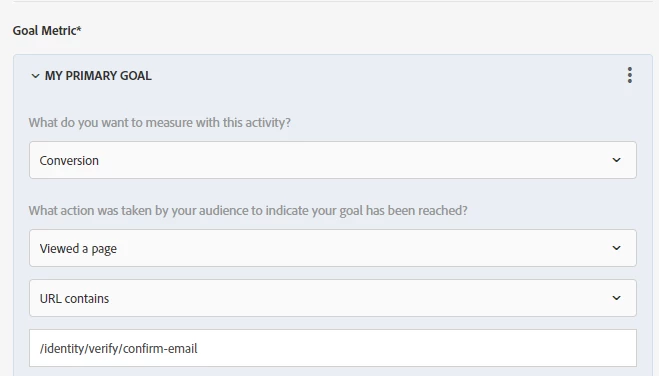
I am using A4T as the reporting source in one of my AB tests. In the 'My primary goal' section, I have used viewed a page --> URL contain -- '/pagex.html' as a metric
Target report
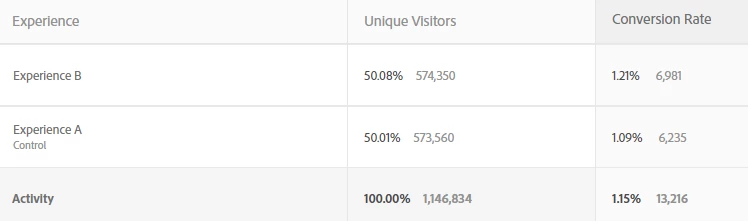
If I see analytics report for the page (pagex.html) that is way more than 6,981 visitors.

what is causing this discrepancy?

Vinodh

This post is no longer active and is closed to new replies. Need help? Start a new post to ask your question.
Best answer by vinodh_dinakar2

mikethewebguy​ any thoughts on the above comment?

Also, i came across this link :- https://helpx.adobe.com/target/kb/data-discrepancy-between-A4T-and-workspace-reports.html

10 replies

Level 2
September 13, 2019

Unable to edit my original post and hence the addendum

This is the report in analytics. It is showing 29k visitors as having viewed that page for experience B. while Target is showing 7k.

Andrey_Osadchuk
Level 10
September 13, 2019

I wonder what Activity Conversions metric returns?

Level 2
September 13, 2019

Thanks for the response Andrey. The activity conversions are the same as what you see in Target report section i.e around 7k

MihneaD
Adobe Employee
Adobe Employee
September 13, 2019

vinodh.dinakar1

That would indicate not all who have seen the conversion page have entered the activity. Surely the conversion page existed before the activity was live and there are some visitors you are pulling into your custom Analytics reporting that have seen that conversion prior to the activity existing. If you want to only look at the data for the activity in quesiton plese user the special report created just for that. It can be accessed from: "Analytics > Reports > Adobe Target > Analytics for Target > Target Activities > Click on the Activity in question"

If this satisfies your query please like, mark as helpful and mark as answer. Otherwise lets keep the conversation going. Hope you have a wonderful day.

Mihnea Docea | Technical Support Consultant | Customer Experience | Adobe | (:: 1 (800) 497-0335

Andrey_Osadchuk
Level 10
September 14, 2019

Hi mikewebguy,

Could you please explain the meaning of the number 57,294 in the freeform table (intersection of the activity dimension and Unique Visitors filtered by the goal page)?

Presumably, it should represent those who entered the activity and then visited the goal page. Am I missing something?

Level 2
September 16, 2019

Your understanding is correct, Andrey.

Those are people who qualified for the activity and then visited the goal page

Andrey_Osadchuk
Level 10
September 16, 2019

If so, I do not understand the cause of the discrepancy. I hope Mihnea can provide a further clarification.

Level 2
September 16, 2019

Are you saying that visitors viewed the conversion page first and then qualified for the activity, so this report is showing such visitors? This should not be possible based on how evars work (How eVars work in Adobe Analytics ). A4T variables act like an evar. So, the report should show whatever metrics/success events happened after the visitor qualified for the activity. Please correct me if my understanding is wrong.

vinodh_dinakar2AuthorAccepted solution
Level 2
September 17, 2019

mikethewebguy​ any thoughts on the above comment?

Also, i came across this link :- https://helpx.adobe.com/target/kb/data-discrepancy-between-A4T-and-workspace-reports.html

Amelia_Waliany
Adobe Employee
Adobe Employee
October 21, 2019

Hi Vinodh! Reaching out to see if you were able to resolve the issue? Thanks for posting and we look forward to hearing from you!