A4T Reporting Error | Community
Skip to main content
Level 3
August 27, 2024
Question

A4T Reporting Error

  • August 27, 2024
  • 1 reply
  • 1805 views

Hi Team,


I created one activity in our workspace and used adobe analytics as a reporting source but I am facing below issue: 
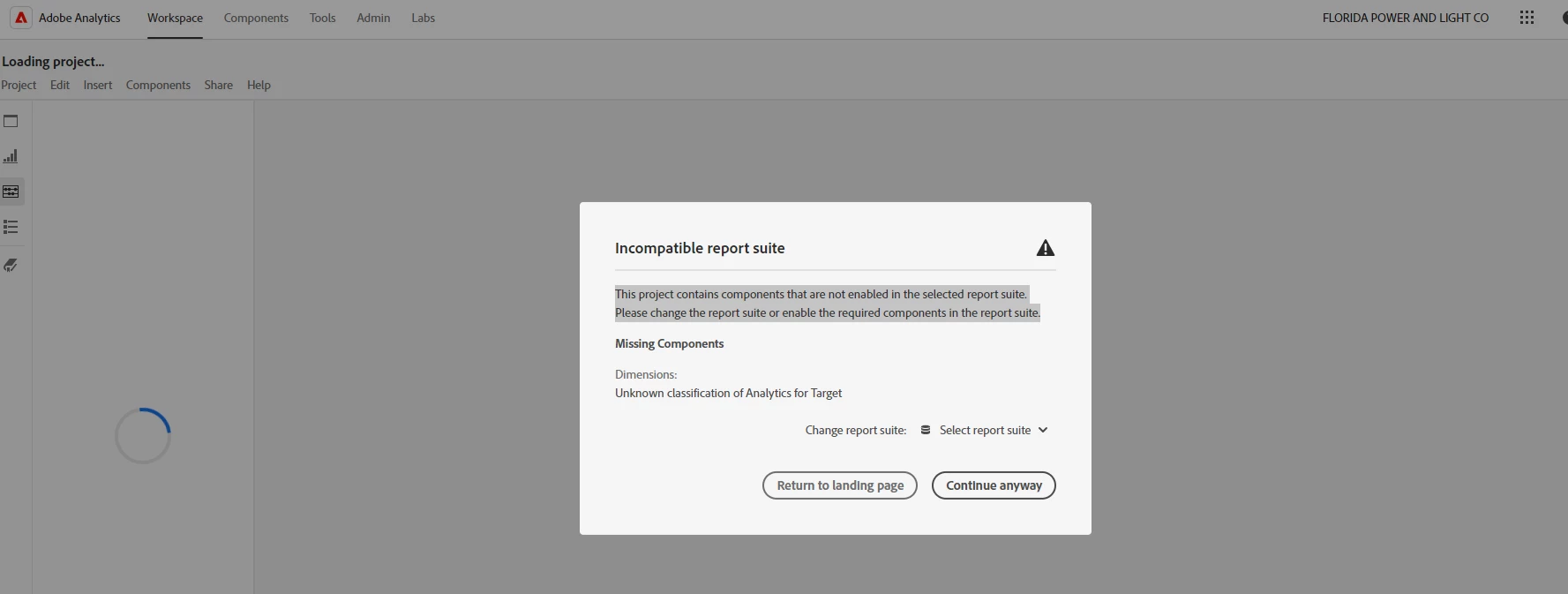
Please let me know the reason for this.


Also, I am using Websdk extension v.25 for target integration with website and it is using decision proposition event type.

1 reply

pradnya_balvir
Community Advisor
Community Advisor
August 27, 2024

Hi @bindukumari90 ,


Can you please share the target Goal and setting screenshot. Need to check which report suite you have used?


Thanks.

Pradnya


Level 3
August 27, 2024

Hi


Level 2
March 11, 2025

Hi @shaunzie83,


In Adobe Analytics, an "incompatible report suite" error usually means the current report suite doesn't have the same variables enabled as those used in your project, or you lack permissions to access certain report suites. 

Here's a breakdown of common causes and solutions:

Causes:

  • Missing or Disabled Variables:

You're trying to use metrics, dimensions, or segments that aren't enabled in the current report suite. 

  • Incorrect Permissions:

You might not have the necessary access to view or use specific report suites. 

  • Report Suite Change:

You've switched to a report suite that doesn't have the same variables or configurations as the original. 

  • API Integration Issues:

If using an API integration, the integration might not have the correct permissions to access the report suite. 

  • Report Suite Not Visible:

You might not have permissions to see a report suite, even if it exists. 

Troubleshooting and Solutions:

  • Check Enabled Variables:
    • Go to the Admin section in Adobe Analytics. 
    • Select your report suite. 
    • Verify that the required metrics, dimensions, and segments are enabled. 
  • Verify Permissions:
    • If you're a non-admin user, ask your administrator to grant you access to the necessary report suites and variables. 
    • Ensure your user profile has the correct permissions to access Adobe Analytics and the specific report suites.

One user case:

This message generally occurs when you are change the report suite and current report suite does not have same set of variables enabled which are being used in the project.

For example, In the workspace project for RS "A" you have looking at evar1 report. Now you decided to change the report suite to RS "B" in the same project but evar1 is not enabled for RS "B" so you might see that warning.

This warning may also occur for non-admin users. If a non-admin user is trying to select a report suite for which evar1 access is not given to that user. 


Please check and confirm.


Thanks @pradnya_balvir for the response.  Closing the loop here.


I received a response from Adobe support and it looks like the issue was a known issue on the Adobe end.  The "glitch" was fixed on their end and now I am able to see Adobe Target reporting in Analytics.  Thank you for the insights to possible other causes.