
A4T - Don't See Target Activity | Community
Skip to main content
bkmills
Level 2
December 14, 2021
Solved

A4T - Don't See Target Activity

  • December 14, 2021
  • 2 replies
  • 3621 views

Hello community,


I'm struggling with something, and hope you can provide some clarity.


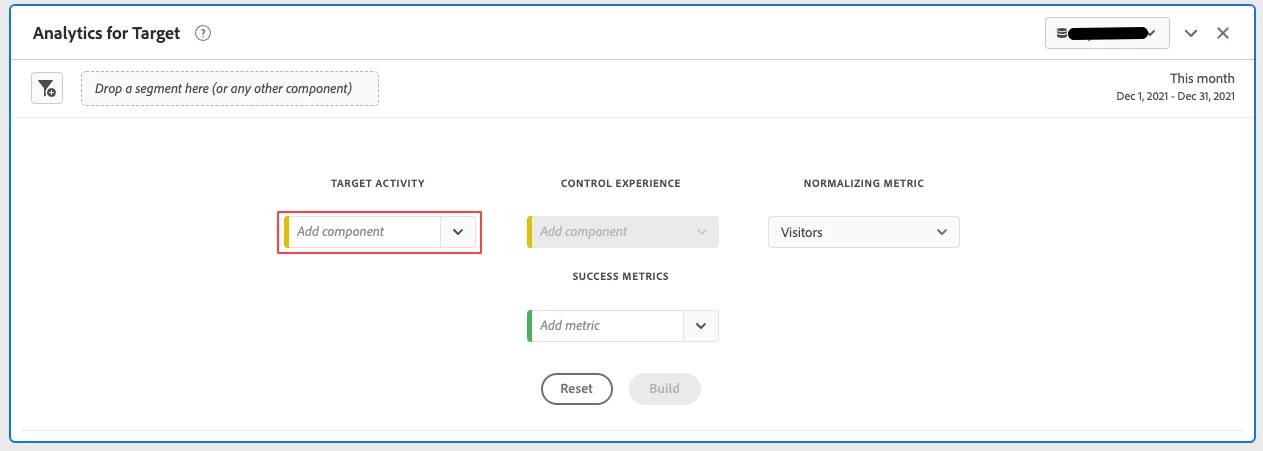
I've created an A/B activity using Analytics as the reporting source. We have a premium account with A4T integrated. However, after activating my test in our staging environment I don't see the activity in the TARGET ACTIVITY dropdown in the A4T Panel in Analytics.


Is the activity only accessible once data has been collected? I can understand if there's no data, but why can't I build the panel in advance of receiving data?
 

This post is no longer active and is closed to new replies. Need help? Start a new post to ask your question.
Best answer by ryanr7

Hi @bkmills,

When you first create an A4T activity in Target, a back-end process has to run in order to list the new activity and experiences in the Target related dimensions in Analytics Workspace. This usually only takes a few hours after the activity is first saved, but could take a day in some cases. Keep in mind the activity data collection and reporting work immediately, it's just the friendly names of the activities that are going to take a little bit to show up at first.

Could this be your issue? Hope that helps. 

2 replies

ryanr7Adobe EmployeeAccepted solution
Adobe Employee
December 15, 2021

Hi @bkmills,

When you first create an A4T activity in Target, a back-end process has to run in order to list the new activity and experiences in the Target related dimensions in Analytics Workspace. This usually only takes a few hours after the activity is first saved, but could take a day in some cases. Keep in mind the activity data collection and reporting work immediately, it's just the friendly names of the activities that are going to take a little bit to show up at first.

Could this be your issue? Hope that helps. 

bkmills
bkmillsAuthor
Level 2
December 16, 2021

Hi @ryanr7,


This makes sense. We were having trouble with setting the report suite to Analytics when this activity was created. This resulted in changing the default reporting source to Analytics in the account settings, and why I thought it may have something to do with the Target Activity not appearing in the A4T panel.


Thanks for your help!

bkmills
bkmillsAuthor
Level 2
December 22, 2021

@ryanr7 - Turns out, unbeknownst to me, our dev environment is not configured for A4T reporting. Because we were QAing an activity in our staging environment, there was no data being captured.


Switching to production, and using activity qa links, addressed the issue. Shortly after that, I was able to access the Target Activity in AA and build out the A4T panel.


Thanks for the explanation you provided. It was definitely useful!

Kishore_Reddy
Community Advisor
Community Advisor
December 30, 2021

The synchronization time is usually a few hours after an activity is created in Target and provided A4T integration was done atleast 24 hours ago. 


Hope this helps!