A/B test : Clinet side AT.JS implementation not working | Community
Skip to main content
June 28, 2024
Solved

A/B test : Clinet side AT.JS implementation not working

  • June 28, 2024
  • 1 reply
  • 573 views

Hello 

I wanted to jump in and check how A/B test via Target works. I've created a basic A/B test in Adobe Target (just a text change) using client-side implementation (without a tag manager).
Can I Implement Target without a Tag Manager? | Adobe Target

However, when I request the Experience B URL (preview link), I don't see the expected results. In the network tab, I can see a response from Target (PFA screenshot), but it doesn't contain any experiment information ( I believe it should )

What could be causing this issue, why experiment doesn't work , and how can I troubleshoot it?



Thanks

This post is no longer active and is closed to new replies. Need help? Start a new post to ask your question.
Best answer by Gokul_Agiwal

Hi @chirayukumarbr 

There are few options you can try  - 

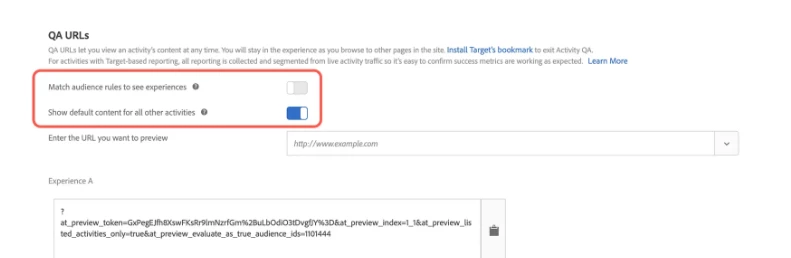
1. In Adobe Target UI, "Match Audience rules to see experiences" should be disabled 


2. Check console logs and see if any error related to rendering issues . Sometimes content may get failed to render.  

3. Try using Activity QA bookmarklet :  https://experienceleague.adobe.com/docs/target/using/activities/activity-qa/activity-qa-bookmark.htm...  

4. Use mboxTrace or mboxDebug to troubleshoot the Target request. 

https://experienceleague.adobe.com/en/docs/target/using/activities/troubleshoot-activities/content-trouble#mboxdebug 


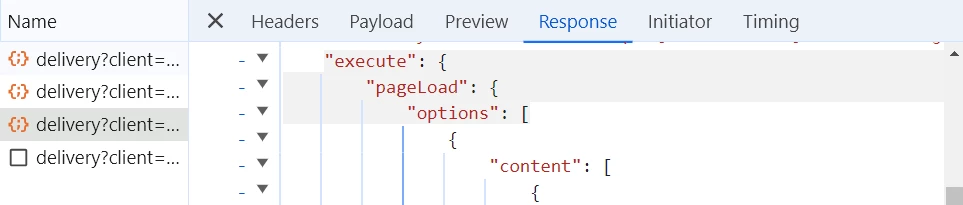
Open the preview or response tab of the request to see if anything shows up in the execute.pageLoad portion of the object like below. 

Hope this helps. If any more question please post it here.  Thanks

1 reply

Gokul_Agiwal
Community Advisor
Gokul_AgiwalCommunity AdvisorAccepted solution
Community Advisor
June 30, 2024

Hi @chirayukumarbr 

There are few options you can try  - 

1. In Adobe Target UI, "Match Audience rules to see experiences" should be disabled 


2. Check console logs and see if any error related to rendering issues . Sometimes content may get failed to render.  

3. Try using Activity QA bookmarklet :  https://experienceleague.adobe.com/docs/target/using/activities/activity-qa/activity-qa-bookmark.htm...  

4. Use mboxTrace or mboxDebug to troubleshoot the Target request. 

https://experienceleague.adobe.com/en/docs/target/using/activities/troubleshoot-activities/content-trouble#mboxdebug 


Open the preview or response tab of the request to see if anything shows up in the execute.pageLoad portion of the object like below. 

Hope this helps. If any more question please post it here.  Thanks