
Trouble Targeting IE11 | Community
Skip to main content
bkmills1
Level 3
August 17, 2018

Trouble Targeting IE11

  • August 17, 2018
  • 2 replies
  • 11491 views

Hi all,

I've got an A/B test activity in which I'm targeting Chrome, FF, Safari, Edge, and IE11. All browsers work with the exception of IE11.

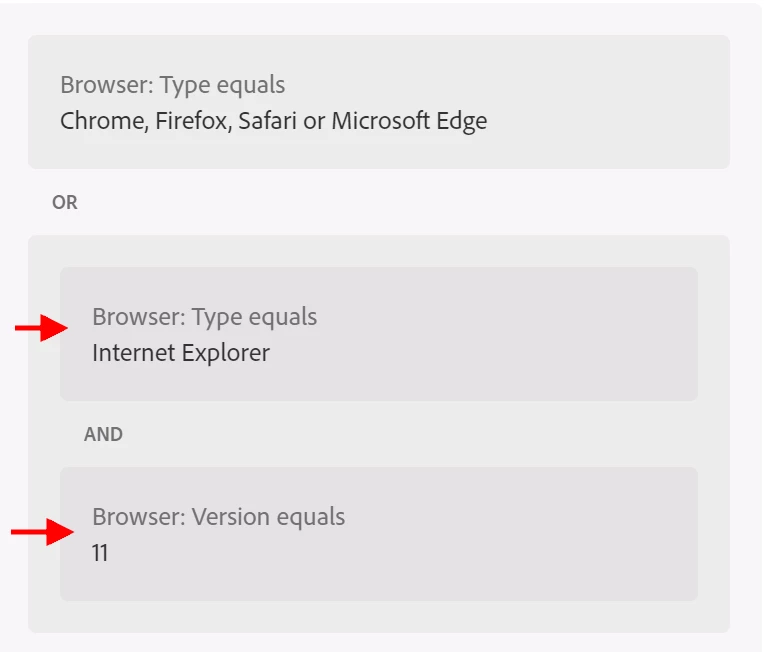
I can't determine what is wrong with my audience configuration. See attached.

I've included an additional OR to include Browser Type equals IE and Browser Version equals 11. Is there any reason, with this config, that I would not enter the test using IE11?

Thanks in advance for your help/guidance!

- Brion
This post is no longer active and is closed to new replies. Need help? Start a new post to ask your question.

2 replies

Adobe Employee
August 21, 2018

bkmills1​ I cannot see any problem with the Audience.

Did you check for any errors on the console window of Developer Tools?

bkmills1
bkmills1Author
Level 3
August 21, 2018

Hi Karan,

Yes, in dev tools, the Network tab in particular, I can see a reference to the my test/experience in the Response Body. However, I'm also getting "ttMETA object does not exist" in console.

The errors I'm seeing are related to:

  • SEC7120: Origin now found in Access-Control-Allow-Origin header.
  • SCRIPT7002: XMLHttpRequest: Network Error 0x80700013, Could not complete the operation due to error 80700013.

Any idea if these could be related?

- Brion

Adobe Employee
August 22, 2018

bkmills1​ Can you please confirm if Target has been implemented using Ensighten tag manager OR any other 3rd party?

Could you also please send us the screenshot for the errors you are getting on the console?

Regards,

Karan

bkmills1
bkmills1Author
Level 3
February 4, 2019

delta.shayan​ -

While the cause wasn't immediately obvious, the template string was being used within the test code. It was not associated with AT.js or our Bootstrap.js.

ShayanSa
February 4, 2019

Thanks bkmills1!

That definitely resolved the issue we were seeing. Appreciate the insight.