hi Philip,
There are several things to consider when selecting elements:
- You can browse to a different page to track clicks on a page where you might not be changing content. This different page must be included in the activity using the multipage feature and at.js or mbox.js must be implemented on it.
- If you select more than one element, if an entrant clicks on any one of the chosen elements, the click is counted. To count each item separately, set up individual success metrics for each element.
- Make sure you select the level of element you want to track. For example, when specifying a button, make sure you select the link and not the button text.
- Click events are sent to Target on the same page as the click.
- If the click-tracking metric is the Goal metric of an A4T activity, the visitor must click this element within 60 seconds of the page loading in order for the metric to track.
- Click tracking does not work on elements that include escaped characters in their selectors, including the following:
| Character | Description |
|---|
| # | Number sign or Hash |
| : | Colon |
| . | Period |
| $ | Dollar sign |
| # | Square brackets |
You can check whether your click is getting tracked or no in developer's tool by following below steps,
1. Go to your page and press ctrl + shift + i (on the page where you have added the links)
2. Go to Network Tab
3. Filter your mbox file and click on it
4. Go to preview section
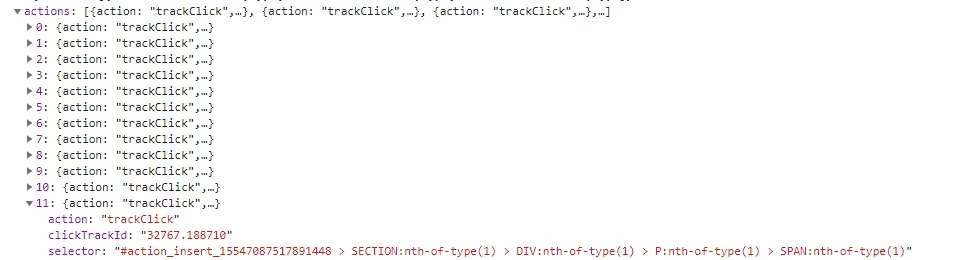
5. There you can see numbers of offers getting fired on your page, click on the last offer > actions > where you can see all the elements which are getting tracked.
If you find your links(i.e. element selector for your links) in that list that means it is getting tracked properly, otherwise you need to check whether your goal and metric selection is properly defined .
Thanks,
Gauresh.