How to access all activities via Javascript | Community
Skip to main content
Level 2
June 20, 2019

How to access all activities via Javascript

  • June 20, 2019
  • 4 replies
  • 18721 views

Hi,

Is anyone know how to access all activities that are running on the same page via javascript on a  offer.

This post is no longer active and is closed to new replies. Need help? Start a new post to ask your question.

4 replies

Gaureshk_Kodag
Adobe Employee
Adobe Employee
June 21, 2019

Hi Jennifer Huynh​,

Can you clarify more about your question? What do you mean by "accessing all activities"?

Thanks,

Gauresh Kodag

Level 2
June 21, 2019

I have 3 activities running on home page.  In my activity #3 I want to be able to check if any activity running on the same page.  If there is, I would like to access the other activity name and store in a cookie

Gaureshk_Kodag
Adobe Employee
Adobe Employee
June 21, 2019

Jennifer Huynh

You can try creating a rule in Adobe launch on library loaded (Page top) event and fire it on Activity URL where you want to run the test (Activity 3)

Add the following custom code for a rule:

document.addEventListener(adobe.target.event.REQUEST_SUCCEEDED, function(e) {

    var tokens = e.detail.responseTokens;

    if (isEmpty(tokens)) {

      return;

    }

    var activityNames = [];

    var experienceNames = [];

    var uniqueTokens = distinct(tokens);

    uniqueTokens.forEach(function(token) {

      activityNames.push(token["activity.name"]);

      experienceNames.push(token["experience.name"]);

    });

    document.cookie="activityName="+activityNames;

  });

  function isEmpty(val) {

    return (val === undefined || val == null || val.length <= 0) ? true : false;

  }

  function key(obj) {

     return Object.keys(obj)

    .map(function(k) { return k + "" + obj[k]; })

    .join("");

  }

  function distinct(arr) {

    var result = arr.reduce(function(acc, e) {

      acc[key(e)] = e;

      return acc;

    }, {});


    return Object.keys(result)

    .map(function(k) { return result[k]; });

  }

This will store activity names in a cookie

Let me know if this helps

Thanks,

Gauresh Kodag.

Gaureshk_Kodag
Adobe Employee
Adobe Employee
June 21, 2019

I think we can get a list of all activities getting fired on a page in mbox response token and we can use them to create an audience (profile parameter) which you can use for your activity and store list of activities in a cookie with help of javascript custom code.

Okay, @Jennifer Huynh​ let me check on this.

Thanks,

Gauresh Kodag

Level 2
June 28, 2019

Do you think adobe.target.event.CONTENT_RENDERING_SUCCEEDED can be used to here?

I tried it and it get call but event.detail.responseTokens turns undefined.  There is not property call responseTokens.  Is there a way to work around?

Gaureshk_Kodag
Adobe Employee
Adobe Employee
June 29, 2019

Hi Jennifer,

I would say it would be tougher for me to discuss it over messages without involving into code level changes in your system environment as your business requirements. Maybe your developer could help much better than me in this. This code must work with few changes as you need.

Or you can reach out to Adobe's client care.

Thanks,

Gauresh kodag.

Level 2
July 1, 2019

Here the issue

The adobe.target.event.REQUEST_SUCCEEDED event is sent out as soon as the response is received from Target, but before the offers are actually applied. The customer included the script that sets up the event listener in a Target offer, thus it's perfectly normal that the event is not intercepted, as the listener is set up after REQUEST_SUCCEEDED event has been already broadcast.

I'd have to put that's scripts on tagging management.

Adobe Employee
August 30, 2019

Hi Jennifer,

You can find more information about the response tokens and java script code required to fetch all the Target activities on the page @ Response tokens  (you can refer the video available on the page also)

I would recommend you to implement this using Launch because there you get a option to place this code exactly between the events of 'Load Target on the Page' & 'Fire Target on the Page'.

If the code if fired after or before these events then it does not work.

Regards

Skand Gupt

September 28, 2023

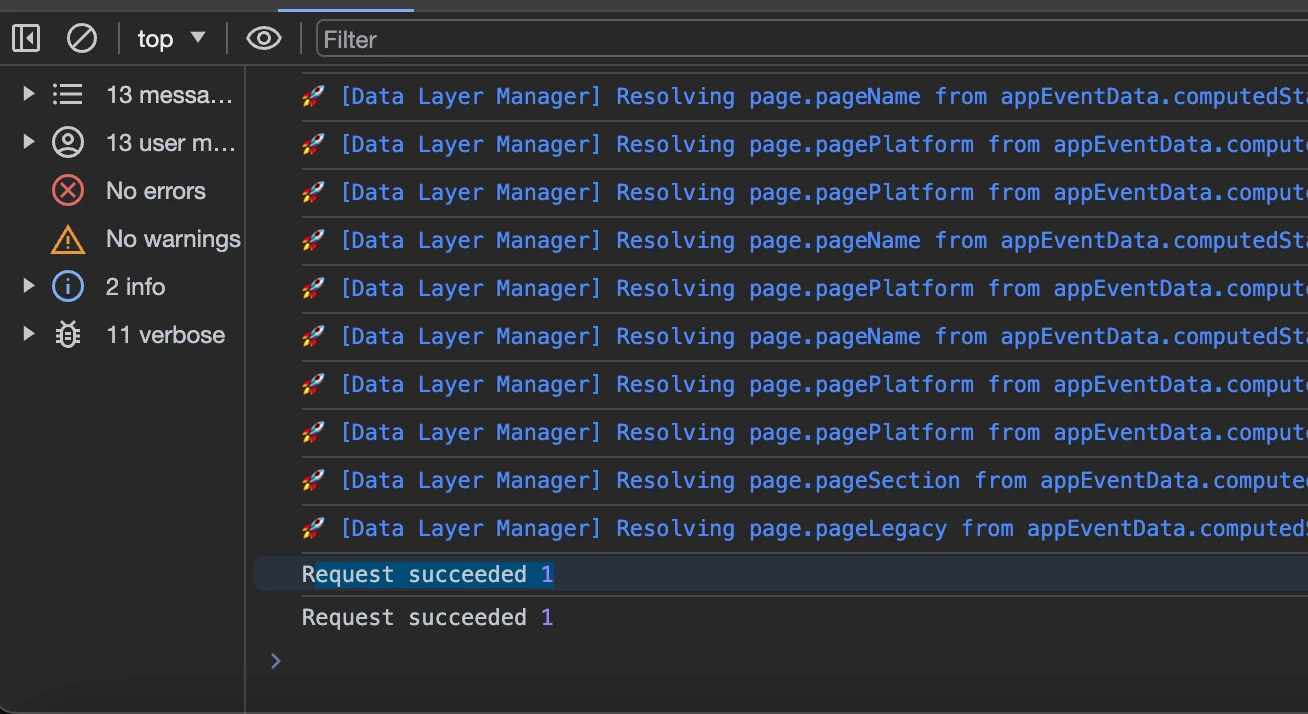
I'm trying to do the same, and when adding:

document.addEventListener('click', function(e) { console.log("Request succeeded", e.detail); });

The only response I get is: Request succeeded 1

I can see the response tokens in the Network call, but I'm unable to access them via the adobe.target object.