What is the MODEL error in Data Distiller? - SQL UPDATE method | Community
Skip to main content
October 2, 2024
Solved

What is the MODEL error in Data Distiller? - SQL UPDATE method

  • October 2, 2024
  • 1 reply
  • 1133 views

Hi, 

I'm trying to push an UPDATE value to a specific field in my dataset using Data distiller. Something like 


update my_dataset
set _tenant.customfield.occupation = 'updated_occupation'
where id = 'VADER00000000000000000000000000004200'
;

This returns me this: ErrorCode: 42601 queryId: <error_id> Syntax error encountered. Reason: [line 1:8: missing 'MODEL' at 'my_dataset']. 


I search the community for answer and found this https://experienceleaguecommunities.adobe.com/t5/adobe-experience-platform-data/update-query-in-aep-query-service/m-p/689876#M7154

The only thing I understand from this is that the UPDATE method doesn't work in data distiller and we should use INSERT INTO as a "fix" instead. Is that right?


Can someone explain to me what the error missing 'MODEL'  means? Is there documentation around this?


Thanks

This post is no longer active and is closed to new replies. Need help? Start a new post to ask your question.
Best answer by Parvesh_Parmar

Hello @filouterrible , 


As I understand, the "UPDATE" syntax is not supported by Adobe Query Service.


The data stored in datasets is kept in Azure Data Lake, which is not a relational database. Therefore, SQL queries cannot directly interact with it in the same way they would with a typical SQL database. Instead, the queries are passed through the Adobe Query Service, which translates your SQL query into a form that the data lake layer can understand.


If the Query Service is not designed to convert an UPDATE query into a compatible format for the downstream service, it will not work, and that's the case here.


If you need to update records, I suggest using the Data Lifecycle functionality. This would involve deleting the existing records and then ingesting the updated records into the dataset again.


Hope this helps!


Kind regards,
Parvesh


1 reply

Parvesh_Parmar
Community Advisor
Community Advisor
October 2, 2024

Hello @filouterrible , 


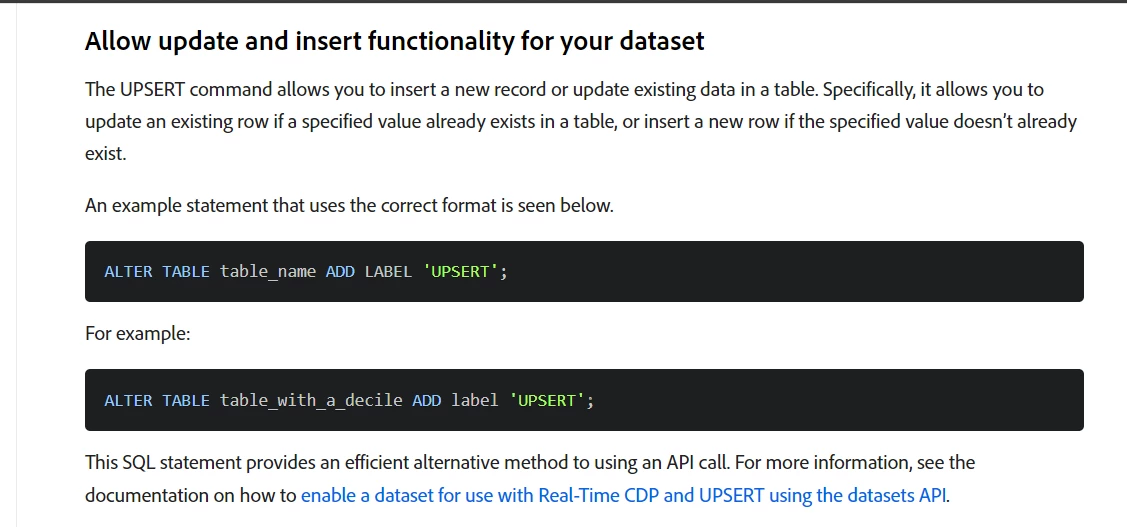
Did you try to enable the "UPSERT" on your datasets?


Create Derived Datasets with SQL | Adobe Experience Platform


Kr,

Parveh

Parvesh Parmar – Adobe Community Advisor https://www.linkedin.com/in/parvesh-parmar/
October 2, 2024

Hi @parvesh_parmar ,

I tried activating UPSERT for the dataset. 

Same error unfortunately. 

Parvesh_Parmar
Community Advisor
Parvesh_ParmarCommunity AdvisorAccepted solution
Community Advisor
October 3, 2024

Hello @filouterrible , 


As I understand, the "UPDATE" syntax is not supported by Adobe Query Service.


The data stored in datasets is kept in Azure Data Lake, which is not a relational database. Therefore, SQL queries cannot directly interact with it in the same way they would with a typical SQL database. Instead, the queries are passed through the Adobe Query Service, which translates your SQL query into a form that the data lake layer can understand.


If the Query Service is not designed to convert an UPDATE query into a compatible format for the downstream service, it will not work, and that's the case here.


If you need to update records, I suggest using the Data Lifecycle functionality. This would involve deleting the existing records and then ingesting the updated records into the dataset again.


Hope this helps!


Kind regards,
Parvesh


Parvesh Parmar – Adobe Community Advisor https://www.linkedin.com/in/parvesh-parmar/