
I would like to use value from Point 1 into Point 3 in order to set up event in AJO with email value. How to move value between different nodes from 1 to 3?
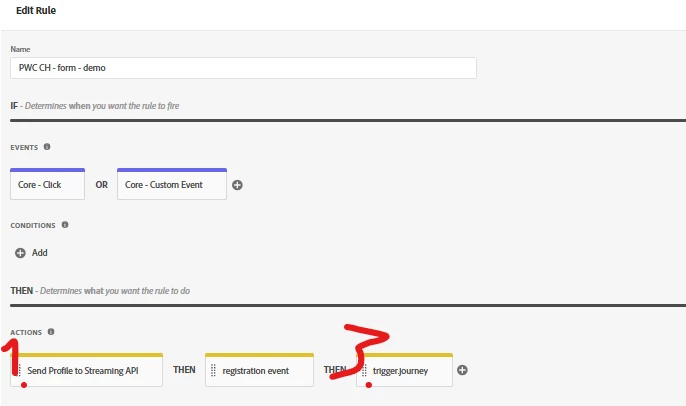
I tried that way:
1. Set up Data Element type of constant.
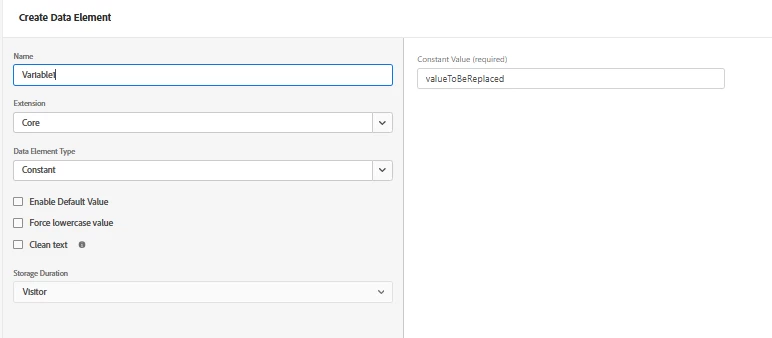
2. Update that Data Element Variable 1 in Point 1 like that:
const email = document.querySelector('input[name="email"]').value;
_satellite.setVar('Variable1', email)
3. Use the value from Point 1 in Point 3
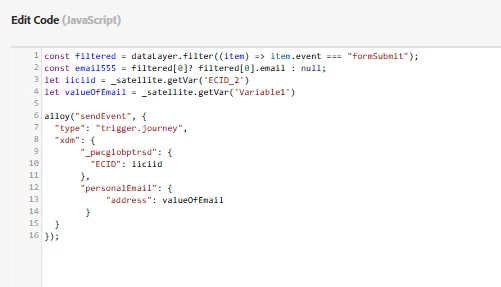
I think I might miss something and it does not work. Any help?
Solved! Go to Solution.
Topics help categorize Community content and increase your ability to discover relevant content.
Views
Replies
Total Likes
constant data elements cannot be changed (hence they are constant).
In fact, you cannot modify any Data Element's value that you have defined in the UX through calling _satellite.setVar
Try getting rid of the constant data element and only use your code _satellite.setVar("Variable1", "someValue");
and _satellite.getVar("Variable1") in your custom code, (respectively, you can use the percent syntax %myDummyVar% in the Launch UX)
constant data elements cannot be changed (hence they are constant).
In fact, you cannot modify any Data Element's value that you have defined in the UX through calling _satellite.setVar
Try getting rid of the constant data element and only use your code _satellite.setVar("Variable1", "someValue");
and _satellite.getVar("Variable1") in your custom code, (respectively, you can use the percent syntax %myDummyVar% in the Launch UX)