no all fields fields from schema visible in dataset | Community
Skip to main content
Michael_Soprano
Level 10
December 6, 2023
Solved

no all fields fields from schema visible in dataset

  • December 6, 2023
  • 3 replies
  • 1432 views

Hi, 

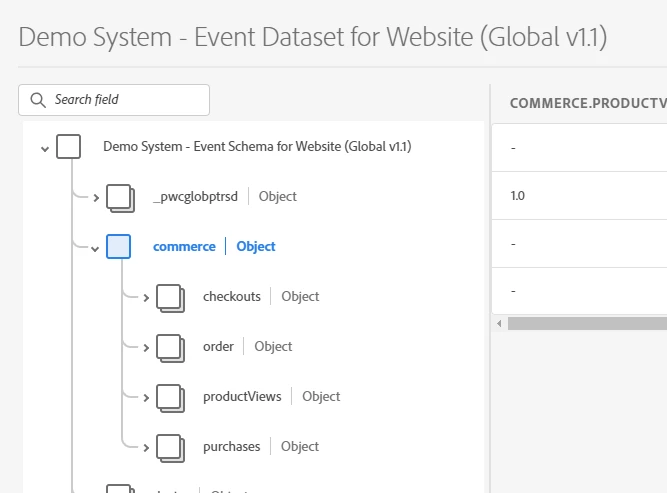
I have got a question. Why not all fields are visible in dataset preview even though they are in the Schema which was used to build that dataset? Is it because some particular columns are not yet populated with data? 

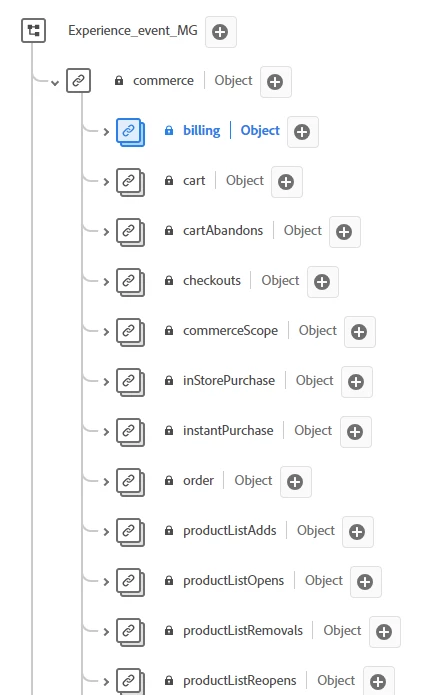
I have attached default Commerce field group which has a lot properties but these properties are not populated in the dataset. 
 

Regards 

Mike 


This post is no longer active and is closed to new replies. Need help? Start a new post to ask your question.
Best answer by dwright-adobe

I think it also just uses a sample of recent data to populate that preview. So, if the data in the sample didn't contain the fields you are interested in seeing, it might not display. Preview dataset is handy for a quick sanity check, but a more thorough way to validate would be to use query service to confirm fields are being populated. Or if you are validating for your own activity and things are enabled for profile, confirm that your profile has the expected events and fields in it.

3 replies

abhinavbalooni
Community Advisor
Community Advisor
December 6, 2023

Hey @michael_soprano 


Lot of these columns you are looking at are either object types or arrays or maps which don't show up in the UI. I am not sure about the exact reason. 


You can try querying the dataset using query service if you believe there should be data in those columns and they should show up.


Let me know if you face any issues.


Cheers,

Abhinav

dwright-adobeAdobe EmployeeAccepted solution
Adobe Employee
December 13, 2023

I think it also just uses a sample of recent data to populate that preview. So, if the data in the sample didn't contain the fields you are interested in seeing, it might not display. Preview dataset is handy for a quick sanity check, but a more thorough way to validate would be to use query service to confirm fields are being populated. Or if you are validating for your own activity and things are enabled for profile, confirm that your profile has the expected events and fields in it.

NimashaJain
Adobe Employee
Adobe Employee
January 8, 2024

Did you find the suggestion solution helpful? It would be great if you can  mark the answer as correct for posterity. If you have found out solution yourself, share it with wider audience in the community.