How to verify the segment size before sharing segments with email marketing tool? | Community
Skip to main content
Luca_Lattarini
Level 9
September 18, 2022
Solved

How to verify the segment size before sharing segments with email marketing tool?

  • September 18, 2022
  • 4 replies
  • 2121 views

Hi All,

What is the best approach to verify the segment size before sharing segments with email marketing tool? 

Thanks


This post is no longer active and is closed to new replies. Need help? Start a new post to ask your question.
Best answer by Luca_Lattarini

@ thanks for your useful information. Yes, I agree to use segment dashboard with A udience Size widget to determinate the segment volumes. 

I have a question, you mentioned that this dashaboard is refreshed daily. What if, we need to find the segment volumes in short notice of few hours. Is the Segment Job through API for the segment created or use the profiles values that we have in the Segment builder?


4 replies

ChetanyaJain-1
Community Advisor
Community Advisor
September 18, 2022

@luca_lattarini,


You can use the Segments UI or API - I can think of these 3 ways:

  1. Edit Segment -> Refresh the estimates
  2. Browse Segment -> Select the segment -> see "Total audience in segment" card
  3. API Segmentation Service API -> https://developer.adobe.com/experience-platform-apis/references/segmentation/#tag/Estimates 

Regards,

Chetanya 

Adobe Employee
September 18, 2022

hi @luca_lattarini, most users can make use of the Segment Dashboards: https://experienceleague.adobe.com/docs/experience-platform/dashboards/guides/segments.html?lang=en

These dashboards currently refresh daily. 


1. First understand the identities supported by the Destination. The most obvious here would be email address but it could be another cross-device ID.

2. Use the Segment Dashboard to understand the identity composition of the Segment. This will provide the maximum addressable audience according to the AEP data.

Luca_Lattarini
Luca_LattariniAuthorAccepted solution
Level 9
September 21, 2022

@ thanks for your useful information. Yes, I agree to use segment dashboard with A udience Size widget to determinate the segment volumes. 

I have a question, you mentioned that this dashaboard is refreshed daily. What if, we need to find the segment volumes in short notice of few hours. Is the Segment Job through API for the segment created or use the profiles values that we have in the Segment builder?


Adobe Employee
October 13, 2022

It would not have at the accuracy. You could use the Segment estimates and apply the ratio of identities to get a rough number. Obviously, it will depend on the Segment definition i.e if you want to send emails based on web events which have a low authentication rate then the Profile count might be high but low in emails, etc

adobechat
Level 5
September 27, 2022

The UI result is only approximate and also the segment qualification happens sequentially. There is no way in AEP that you can get an exact number at any given time - not even via API. So, there will always be that discrepancy ~ a few percentage points.

Anuhya-Y
Community Advisor
Community Advisor
October 14, 2022

@luca_lattarini 

Adding few more ways to know the segment count.


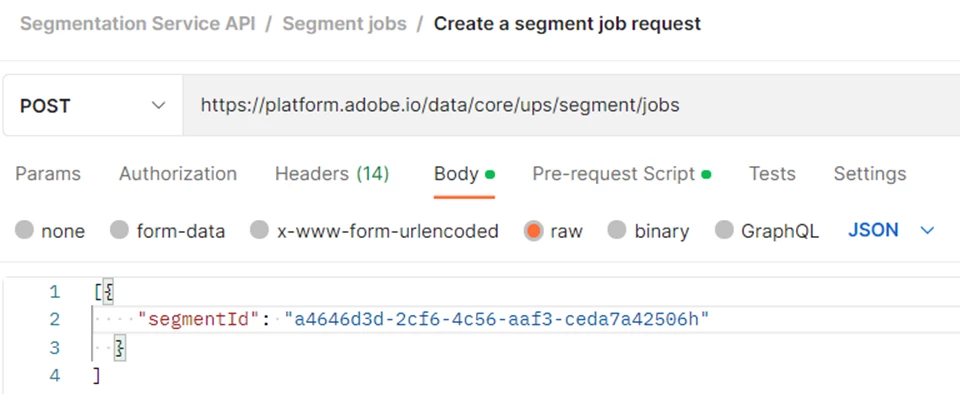
  • Option 1 : Run segment job API. This will force segment evaluation of the particular segment, will update exact counts on UI (as per my observation this would happen in 30 min) for the particular segment

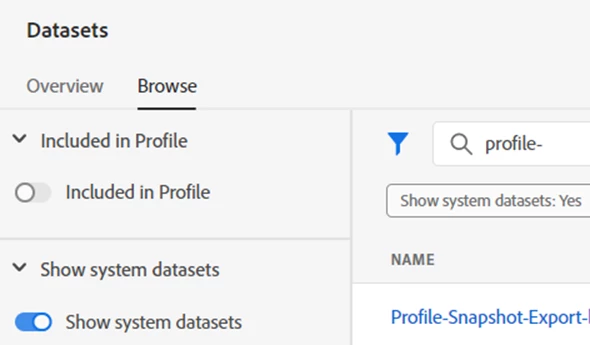
  • Option 2: query the count of profilesnapshot export table by passing segment id. Check out a sample query.  (This may not work for edge segmentation ; reason could be edge segments are evaluated at edge server)

select count(*) from profile_snapshot_export_e1f3148a_5007_45cb_96cf_d34e1472a7e6  where 

segmentmembership['ups'][' a4646d3d-2cf6-4c56-aaf3-ceda7a42506h].status IN ('realized', 'existing')