How to Remove a Schema Once it is set for Profile | Adobe Higher Education
Skip to main content
Level 2
May 1, 2025
Resuelto

How to Remove a Schema Once it is set for Profile

  • May 1, 2025
  • 1 respuesta
  • 867 visualizaciones

During our initial attempt at go live we imported several schemas from our Dev environment and enabled them for profile.  During final validation a major issue was discovered, and we had to do a significant re-architecture.  I am now attempting to migrate in the updated schemas but running into issues as we're overwriting schemas that already exist, so the import is throwing errors.  What is the best way to either remove the existing schemas so I can pull in the new ones, or align the data so they overwrite properly and update to the new structure?
Mejor respuesta de bjoern__koth

Hi @danspigs1 

that's not possible, at least not through the UI. But this blog may be helpful. Seems like the API can perform this task.

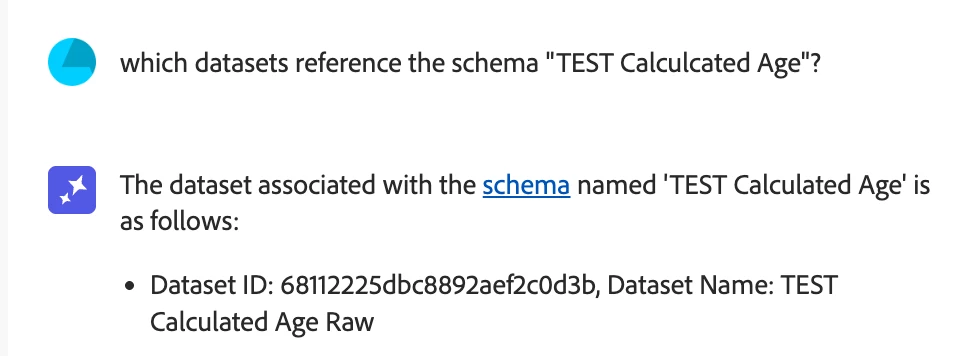
But you must make sure beforehand that there are no datasets referencing this schema.

https://www.bounteous.com/insights/2020/06/25/building-schemas-adobe-experience-platform/#:~:text=As%20of%20today%2C%20a%20schema,by%20any%20of%20your%20datasets.


This is actually a task the AI Assistant can help you with


1 respuesta

bjoern__koth
Community Advisor and Adobe Champion
bjoern__kothCommunity Advisor and Adobe ChampionRespuesta
Community Advisor and Adobe Champion
May 1, 2025

Hi @danspigs1 

that's not possible, at least not through the UI. But this blog may be helpful. Seems like the API can perform this task.

But you must make sure beforehand that there are no datasets referencing this schema.

https://www.bounteous.com/insights/2020/06/25/building-schemas-adobe-experience-platform/#:~:text=As%20of%20today%2C%20a%20schema,by%20any%20of%20your%20datasets.


This is actually a task the AI Assistant can help you with


Cheers from Switzerland!
Level 2
May 1, 2025

Thank you, that seemed like the case but was hoping I had missed something.  Seems an odd feature to not have in the UI.  Appreciate the feedback.